組織を選択
活動の数式項目で「関連先」または「名前」項目から関連レコードの情報を参照できない
公開日: Sep 25, 2025
説明
解決策
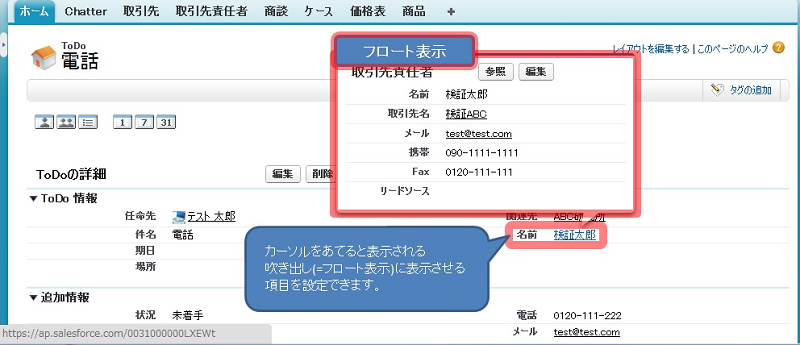
活動の「関連先」または「名前」項目にカーソルを合わせた際に表示されるフロート表示の内容は、各オブジェクトのコンパクトレイアウト(Lightning Experience)またはミニページレイアウト(Salesforce Classic)で設定します。
以下に、[名前] 項目で参照する取引先責任者のフロート表示に項目を追加する手順を例として示します。
Lightning Experience の場合
コンパクトレイアウトを編集して、フロート表示に表示する項目を設定します。
-
[設定] から [オブジェクトマネージャ] に移動し、[取引先責任者] をクリックします。
-
左側のメニューから [コンパクトレイアウト] を選択します。
-
[新規] をクリックするか、既存のレイアウトをコピーします。
-
[表示ラベル] と [名前] を入力します。
-
[選択可能な項目] からフロート表示させたい項目を [選択済みの項目] へ追加し、[保存] をクリックします。
-
[コンパクトレイアウトの割り当て] をクリックし、続けて [割り当ての編集] をクリックします。
-
[主コンパクトレイアウト] として、手順 4 で作成したレイアウトを選択し、[保存] をクリックします。
Salesforce Classic の場合
ミニページレイアウトを編集して、フロート表示に表示する項目を設定します。
-
[設定] から、[クイック検索] ボックスに「取引先責任者」と入力し、[カスタマイズ] > [取引先責任者] > [ページレイアウト] を選択します。
-
編集したいページレイアウトの横にある [編集] をクリックします。
-
ページ上部のパレットで [ミニページレイアウト] をクリックします。
-
[選択可能な項目] からフロート表示させたい項目を [選択済みの項目] へ追加し、[保存] をクリックします。
注: 「関連先」項目では取引先や商談など、さまざまなオブジェクトが関連付けられる可能性があります。フロート表示をカスタマイズしたい各オブジェクト(例: 取引先、商談)に対しても、同様にコンパクトレイアウトまたはミニページレイアウトの設定が必要です。
※Classic での利用イメージ
関連情報:
Lightning Experience でのケースのフロート表示のカスタマイズ
ナレッジ記事番号
000387499
この記事で問題は解決されましたか?
ご意見をお待ちしております。
