Select An Org
Salesforce Knowledge Data Categories Best Practices
Publish Date: Apr 1, 2025
Description
What are Data Categories?
Data Categories are hierarchical classification of articles that are controlled by the system administrator. Articles are tagged to Data Categories in a way that is similar to tagging a blog post with keywords. For example, if a tech blog were to use Salesforce for publishing their content, they could create Data Categories such as: Mobile, Web, Venture Funding, Big Data, etc. to categorize their articles. An article can be tagged to more than one category.
Data categories are used for two purposes:
1. Organizing the knowledge-base content
2. Providing a way to secure access to the knowledge-base content
2. Providing a way to secure access to the knowledge-base content
With Data Categories you can:
- Create up to three category groups
- A maximum of five hierarchy levels in each group
- Each category group can contain a total of 100 categories
- Classify articles in the knowledge base according to multiple categories
- Assigned to up to eight categories to an article from a single category group – but an article does not need to have a category.
- Set visibility of data categories with roles, permission sets, or profiles - visibility can be set to All, None, or Custom (where selected categories are visible)
For more details, see Work with Data Categories.
Resolution
Data Category Best Practices
1. Organize your Data Categories
Modeling your organizations data categories correctly is very important. Getting it done right the first time starts with answering questions like:
- How will the user filter the results using data categories?
- Who is using the knowledge base, and in which context?
- Do I need to have the article distributed to specific groups of users?
As a starting point, we recommend that you consider using the following data category types:
- Products
- Geographical Areas
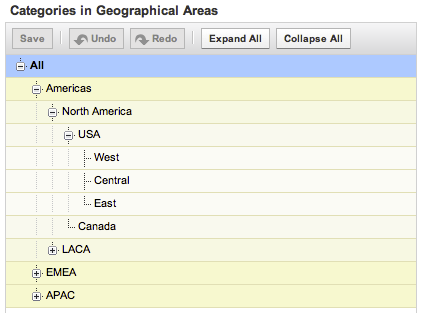
- Customer Types
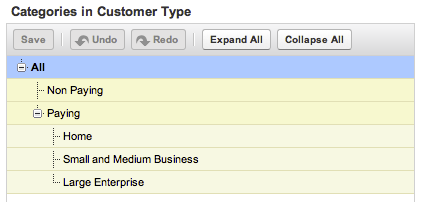
When organizing your data categories, consider how they will be used with your articles: articles can be associated to none, one or multiple categories in each group, at any level of the hierarchy.
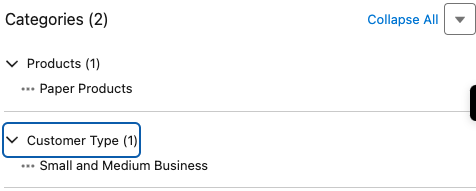
If an article is not associated to a category in a data category group, that means it is not related to the category topic. For example, if you consider the group named "Products," you may not want to relate the article "Support Contact Details" to one product. This article will appear in searches with the filter "Products" not set, but will not appear in search results when the filter is set to a category from the Product group. On the contrary, an article titled "Standard Return Policy" and categorized to All Products will appear both when no filter is set and when the filter is set to All Products.
2. Secure Access to Articles with your Data Categories
Data categories are also used to secure access to the knowledge base through Data Category Visibility Settings, which you can set at the role level (you can also set some default ones). These settings allow you to restrict the access to a sub-tree of a data category group or even to forbid access to an entire data category group.
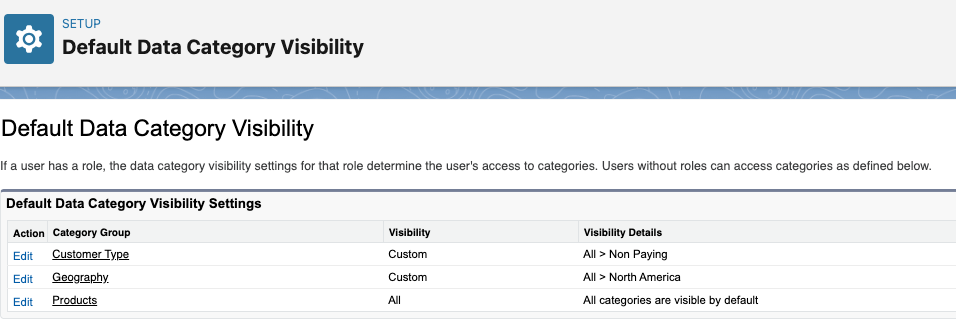
For example, when you are making your knowledge base available to your customers through a customer portal, you may want to have some articles available only to paying customers. In that case, those articles are categorized on the category Paying Customers. With regard to access rights, paying customers have access to the data category group Customer Types, whereas non-paying customers are restricted to the relevant sub-branch. This will ensure those non-paying customers cannot read the articles that they don't have permission to access.
Once Data Categories are setup and activated, edit the knowledge article to add or adjust the data categories.
Additional Resources
Knowledge Article visibility
Set up and Configure Lightning Knowledge Category Group Article Visibility Settings Examples
Category Group Article Visibility Settings Examples
Knowledge Article Number
000387727
Did this article solve your issue?
Let us know so we can improve!
