Seleziona un'organizzazione
Salesforce Knowledge Data Categories Best Practices
Data pubblicazione: Jul 2, 2026
Descrizione
What are Data Categories?
Data Categories are hierarchical classifications of Knowledge articles controlled by the system administrator. Articles are tagged to Data Categories in a way similar to tagging a blog post with keywords.
For example, in a tech blog using Salesforce for publishing, you could create Data Categories such as: Mobile, Web, Venture Funding, and Big Data. An article can be tagged to more than one category.
Data categories are used for two purposes:
- Organizing the knowledge base content
- Providing a way to secure access to the knowledge base content
With Data Categories you can:
- Create up to three category groups (maximum of five hierarchy levels per group; each group can contain up to 100 categories)
- Classify articles according to multiple categories
- Assign up to eight categories to an article from a single category group (an article does not need to have a category)
- Set visibility of data categories with roles, permission sets, or profiles — visibility can be set to All, None, or Custom
For more details, see Work with Data Categories.
Risoluzione
Data Category Best Practices Overview
The following best practices guide you through organizing and securing your Salesforce Knowledge data categories for optimal article discoverability.
1. Organize your Data Categories
Modeling your organization's data categories correctly is very important. Getting it done right the first time starts with answering questions like:
- How will the user filter the results using data categories?
- Who is using the knowledge base, and in which context?
- Do I need to have the article distributed to specific groups of users?
As a starting point, consider using the following data category types:
- Products — Classify articles by Salesforce product (e.g., Sales Cloud, Service Cloud)
- Geographical Areas — Classify articles by region
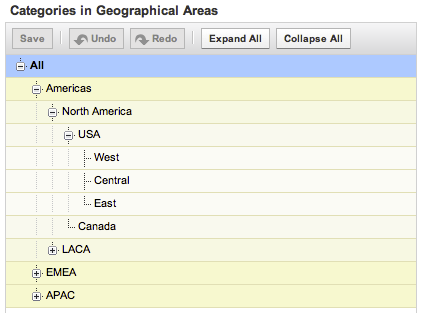
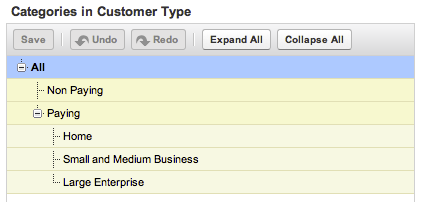
- Customer Types — Classify articles by customer segment (e.g., paying vs. non-paying)
When organizing your data categories, consider how they will be used with your articles: articles can be associated with none, one, or multiple categories in each group, at any level of the hierarchy.
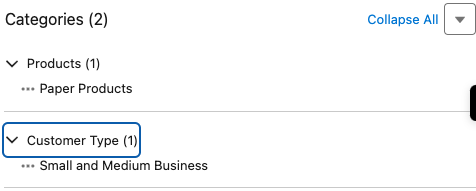
Example: If an article is not associated to a category in a data category group, it is not considered related to that category topic. For instance, an article titled "Support Contact Details" may not need to be related to any product category. It will appear in searches when the Products filter is not set, but not when the filter is set to a specific product. Conversely, an article titled "Standard Return Policy" categorized to All Products will appear both when no filter is set and when the filter is set to All Products.
2. Secure Access to Articles with your Data Categories
Data categories are also used to secure access to the knowledge base through Data Category Visibility Settings, which you can set at the role level (you can also set some default ones). These settings allow you to restrict the access to a sub-tree of a data category group or even to forbid access to an entire data category group.
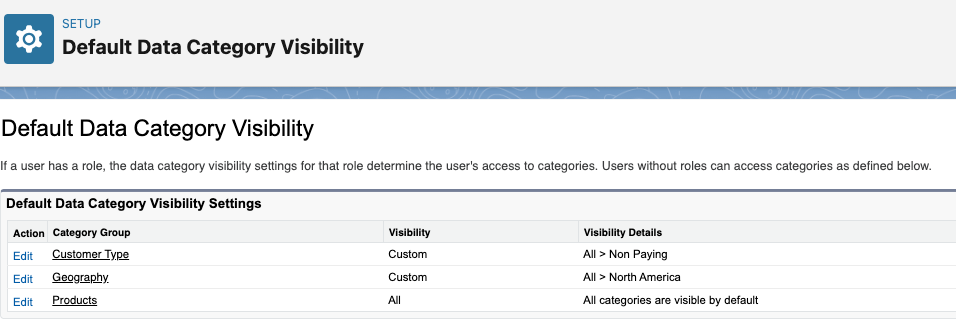
For example, when you are making your knowledge base available to your customers through a customer portal, you may want to have some articles available only to paying customers. In that case, those articles are categorized on the category Paying Customers. With regard to access rights, paying customers have access to the data category group Customer Types, whereas non-paying customers are restricted to the relevant sub-branch. This will ensure those non-paying customers cannot read the articles that they don't have permission to access.
Once Data Categories are setup and activated, edit the knowledge article to add or adjust the data categories.
Risorse aggiuntive
Knowledge Article visibility
Set up and Configure Lightning Knowledge Category Group Article Visibility Settings Examples
Category Group Article Visibility Settings Examples
Numero articolo Knowledge
000387727
Questo articolo ha risolto il problema?
Facci sapere, così possiamo migliorare!
