Valitse organisaatio
Grand Total in Reports doesn't match Custom Summary Formula Totals
Julkaisupäivä: Jul 1, 2026
Kuvaus
When a Custom Summary Formula is added to a Salesforce report, the value in the Grand Total row may not match the sum of the formula values shown for each grouping. This is expected behavior: the Grand Total is not the sum of the formula values shown in each group — it is recalculated independently at runtime against the overall total. Additionally, Smart Totaling may cause differences when currency conversion is involved.
Ratkaisu
This is because the sum of the Formula Fields is not the sum of the values that are calculated in each report row: the Grand Total is calculated on its own at run time.
Another reason for the mismatch could be the Smart totaling. Learn more in our article Report total doesn't match the total in Excel or in a Dashboard table component.
Example
Example custom summary formula field added to an Opportunity report: IF(AMOUNT.CONVERT:SUM<0, 0,AMOUNT.CONVERT:SUM)
The formula appears as a column and on all grouping levels. The report is in summary report format and has (2) groupings:
- Grouping 1: Account Name
- Grouping 2: Opportunity Owner
Only (3) Opportunities appear in the report:
- One (1) for UserA with a converted amount of -365.25
- Two (2) for UserB with a total of converted amount of 401
The report shows a difference of amounts between the sum of the field amount converted (visible by adding the field as a column of the report, then opening the drop down menu of the column and selecting "summarize this field..." and flagging the checkbox "sum" and clicking on apply) and the formula above.
Since -365 for UserA is a negative value, the formula displays 0.
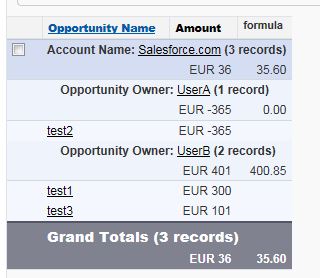
For UserB, the value is positive, so the formula displays the summarized value of the two Opportunity amounts.
When the formula evaluates the values for the grand total, it checks if the total value is above or below zero. If the total value is above zero, it calculates the sum of all the Opportunity amounts in the report (300 + 101 - 365) and not the sum of the values above zero (400.85 + 0).
Knowledge-artikkelin numero
000387985
Ratkaisiko tämä artikkeli ongelmasi?
Anna palautetta, jotta voimme kehittyä!
