조직 선택
'Gmail Integration' shows repeated Session Expired or Allow Deny warnings
게시 일자: Mar 25, 2024
상세 설명
솔루션
This can be related to cookies and can be resolved by clearing the error and reauthenticating Gmail Integration with Salesforce and Gmail.
To do this:
1. Clear all Cookies in Chrome since the beginning of time
- Click the three vertically aligned dots in the upper right corner of your Chrome browser
- Click Settings
- Click Privacy and security in the left side of your browser
- Click Clear browsing data
- Choose All time in the Time Range
- Click Clear data
For more information, see 'Clear cache & cookies' n the Google Help Site.
2. Follow the steps in Clear the Cache of Gmail Integration Chrome Extension to clear the Gmail Integration cache
Orgs with My Domain Enabled
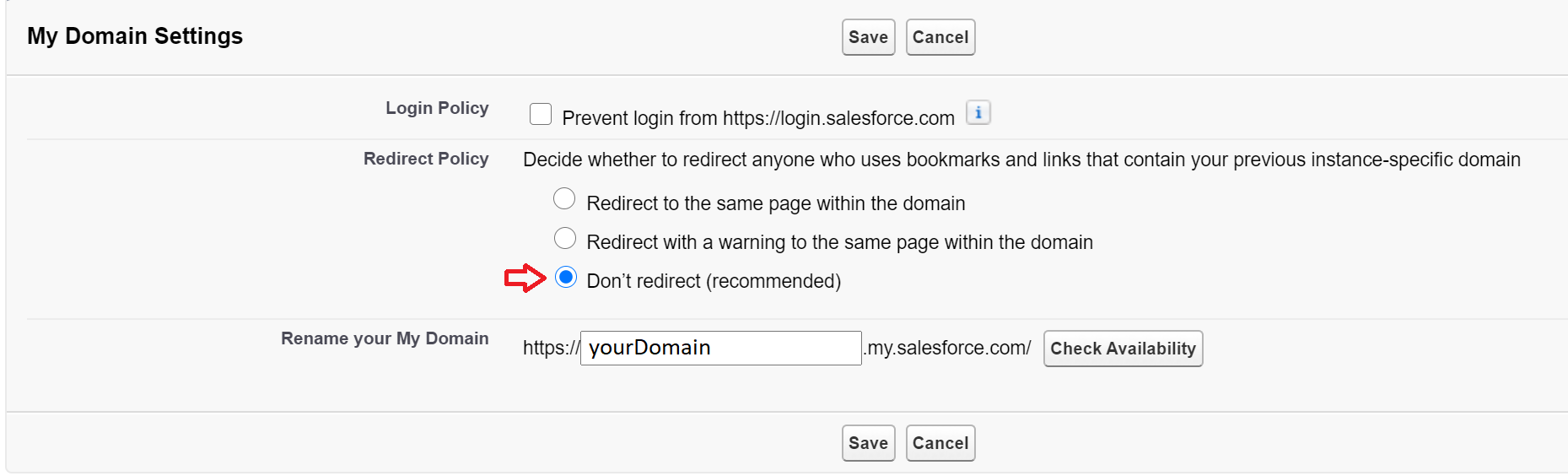
If your org has My Domain enabled and configured make sure in the Setup | My Domain section you have selected the recommended settings for redirection
After completing reauthentication Gmail Integration should load with no errors.
Knowledge 기사 번호
000388790
이 기사를 통해 문제를 해결했습니까?
개선을 위한 의견을 보내주세요.
