Välj en organisation
Live Paste in Quip
Publiceringsdatum: Dec 20, 2024
Beskrivning
Lösning
Live Paste provides the ability for populated content or content with anchor links to be referenced in more than one document.
When updates are made to the source document, referenced sections will automatically update.
This article covers the following:
- How to Live Paste
- Disable Live Paste Automatic Updates
- Live Paste Use Cases & Examples
- Live Paste FAQ
- Live Paste Video
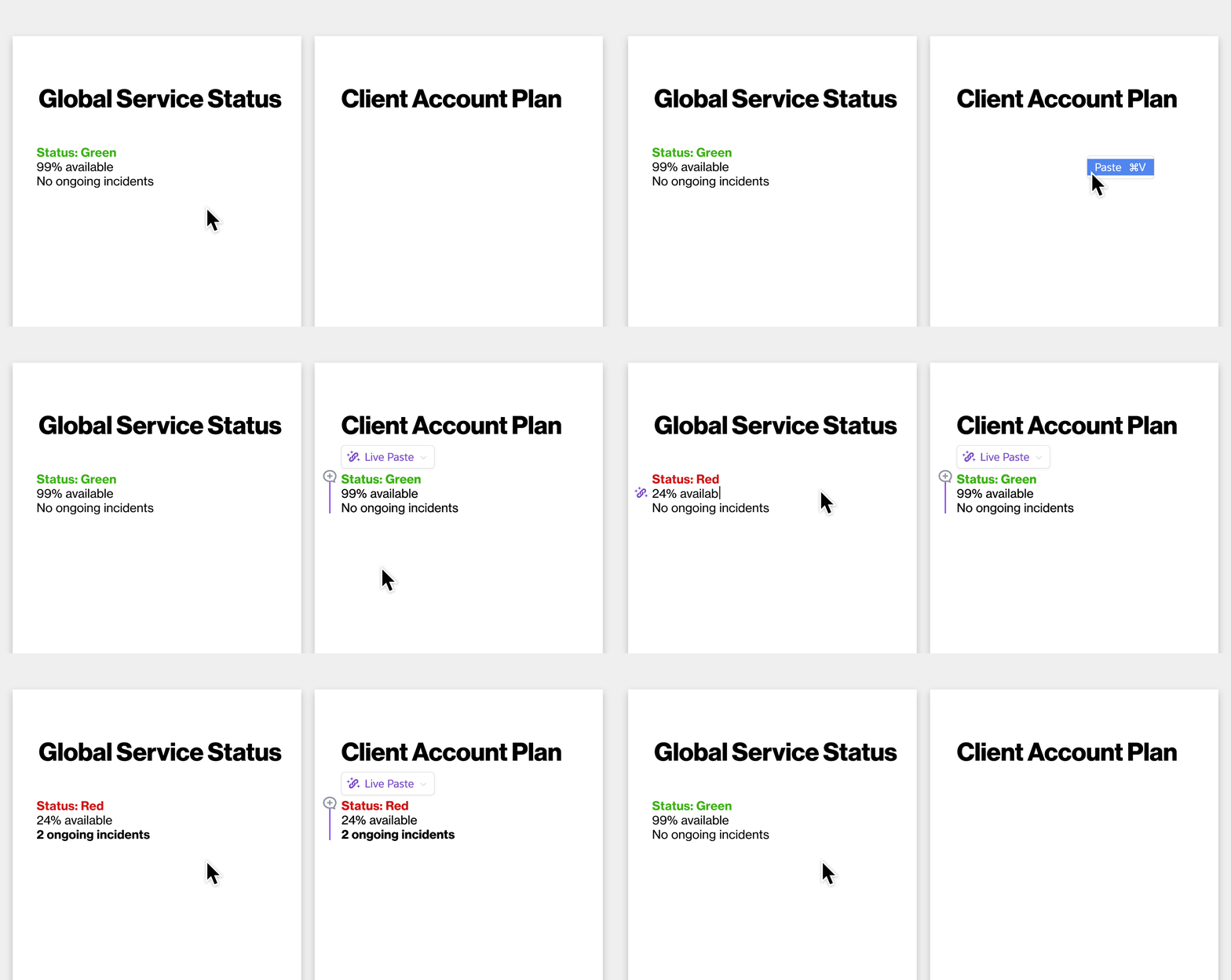
How to Live Paste
- Copy content in a document that is populated or has anchor links
- Paste the content into a new document
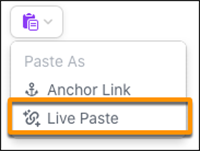
- Open the clipboard paste menu and select Live Paste
Note: The clipboard paste menu will only appear if the content is Live-Paste-able. Texts/data from the spreadsheets are not Live-Paste-able.
Once a document has a section with Live Paste content, a light purple line will appear vertically to the left-hand side of the pasted content. The line also indicates the section is live-synced to the source.
To unlink Live Paste select the section with Live Paste and click the Live Paste icon that appears. Select Unlink. The content will unlink, but not be deleted.
Disable Live Paste Automatic Updates
Quip admins can disable their org from Live Paste automatically updating. With this option disabled, only document members shared on the source material would be able to update Live Pasted content. Recommended if there are security concerns.
To disable or enable automatic updates with Live Paste:
- Go to the Admin Console, select Site Settings > Allow Automatic Updates for Live Pasted Content
- Toggle to Enable or Disable
Live Paste Use Cases & Examples
- Distributive: Duplicating information from one source document to many destination documents.
- Examples: Content management for internal documentation, templates.
- Aggregative: Gathering distributed content from various source documents into a single “dashboard” document.
- Examples: Rolling up executive briefings, group task lists, and team status trackers
- Flat: Duplicating pertinent information across related documents
- Examples: Organizing accounts, projects, and launches that sprawl across many documents. Handing off account information from sales to deployment to executives.
Account Planning Example
Varun is on the Sales team and uses Live Paste to reference the account summary content from his Account Plan onto the five other account documents that need a summary. When key content in the account summary is updated on the Account Plan he knows his Live Paste content will always be up to date, without having to copy and paste again.
Product Manager Example
Maria is a Product Manager and wants to have one master document with all of the upcoming product release summaries in one place. She uses Live Paste to add all the summaries to one document, knowing if anything is updated on the source product release documents it will automatically be reflected on her master document.
Secure Content Sharing Example
If you have people who only need to see a certain part of a document, you can reference that information on a separate document using Live Paste. Maria is the VP of Engineering and wants to share select content out to the engineering team without including all the details on this secret project. Maria uses Live Paste to share select content with the right people.
Live Paste FAQ
- If the data source is updated, how long will it take for the data to be reflected where the content has been Live Pasted?
- Changes will update automatically, and will take no longer than a few minutes to be reflected.
- There is an option for the Live Paste not to be updated automatically. Click the content in the source article, open the Live Paste Menu, and select Update Now.
- How can I tell where the content has been Live Pasted?
- Click on the section from the Live Paste menu and select References. A list of documents will appear where the content has been Live Pasted.
- Can I view the document(s) that reference the Live Paste content?
- Only if the document has been shared with you.
- If the referenced content is deleted, will the source content be deleted as well?
- No. The only way to delete original source content is to delete it directly from the source document
- Is there a limit to Live Paste?
- No.
- If @mentions are referenced in the Live Paste, will the person who was @mentioned receive double notifications?
- The person @mentioned will receive one notification related to the source document.
- Does formatting carry over in Live Paste?
- Yes.
- Can Live Paste be used for automation?
- Yes. Read more here.
- When someone who inserted Live Paste leaves the company or loses access to the source document, what happens?
- An error will be shown and updates will stop syncing. Those who still have access to the source document can re-link the Live Paste
- Will Comments be included with Live Paste?
- Comments made to the parent content before the Live Paste has taken place can be included with the pasted content. However, these Comments will only appear in the Comment Pane and will not be attached to the Live Pasted content.
- Comments made to the parent content after the Live Paste has taken place will not render in the Document containing the Live Pasted content.
- Comments made on the pasted text or part of pasted text by one user will only appear in the Comment Pane for another user and will not show linked to the text.
Live Paste Video
Click here to watch a short video (1 minute, 45 seconds) about live paste.
Questions/Feedback?
Reach out to our support team and log a case. Learn how to do that here.
Knowledge-artikelnummer
000388833
Löste denna artikel ditt problem?
Berätta för oss vad vi kan förbättra!
