Выбрать организацию
Understand and Troubleshoot Unit Assignment in Salesforce Maps Territory Planning
Дата публикации: May 12, 2026
Описание
The purpose of Unit Assignment is to assign units to the correct territory upon alignment creation, meaning if you already know that there should be 3 accounts in the Charlotte territory, then you want the software to assign those accounts for you. This automatic unit assignment process works only on alignment creation and is not recalculated after editing an existing alignment.
If you fail to configure this correctly, then you will end up with a blank map and the following error message appears: There are no units in this focus, you may need to select additional areas.
Решение
To illustrate how this should work conceptually, consider the following data:
| ID | Name | Billing Latitude | Billing Longitude | Owner Name | Owner Id | Territory |
|---|---|---|---|---|---|---|
| 0015w000028JXh7AAG | ACME | 35.219 | -80.8556 | Hank Scurry | 0055w00000CL6ghAAD | Charlotte 1 |
| 0015w000028JYsYAAW | Cloud Kicks | 35.10355 | -81.215 | Hank Scurry | 0055w00000CL6ghAAD | Charlotte 1 |
| 0015w000028JXrMAAW | Salesforce Maps | 34.886 | -81.0235 | Hank Scurry | 0055w00000CL6ghAAD | Charlotte 1 |
| 0015w000028JXrMAAD | Cloudy | 34.04252 | -81.10936 | Derek Jamieson | 0055w00000CL6ghAAF | Columbia 2 |
In this example, you could have three options for Unit Assignment: Owner Name, Owner Id, or Territory. However, most users typically have either Account Ownership, or Territory values, not both. If you have both values, we suggest using the Territory value since it is often more unique than the Account Owner (e.g., one owner could have multiple territories).
Let’s say we want to visualize these 4 accounts on a map, grouped by Territory:
| Territory | Territory Owner | Number of Accounts |
|---|---|---|
| Charlotte 1 | Hank Scurry | 3 |
| Columbia 2 | Derek Jamieson | 1 |
For this example, you should configure the Unit Assignment in the Data Set using the Territory field:
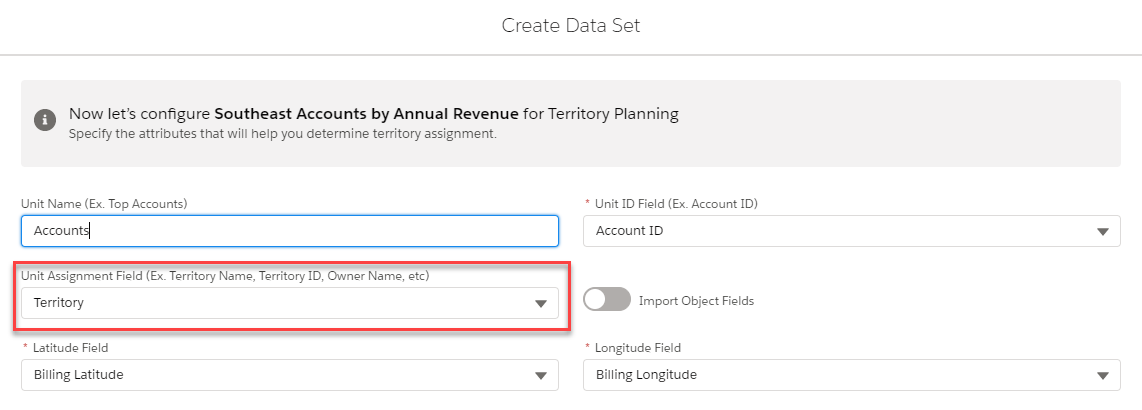
Since you selected Territory as your Unit Assignment Field during data set configuration, you should use the Auto-Fill with Territory Name option during alignment configuration:
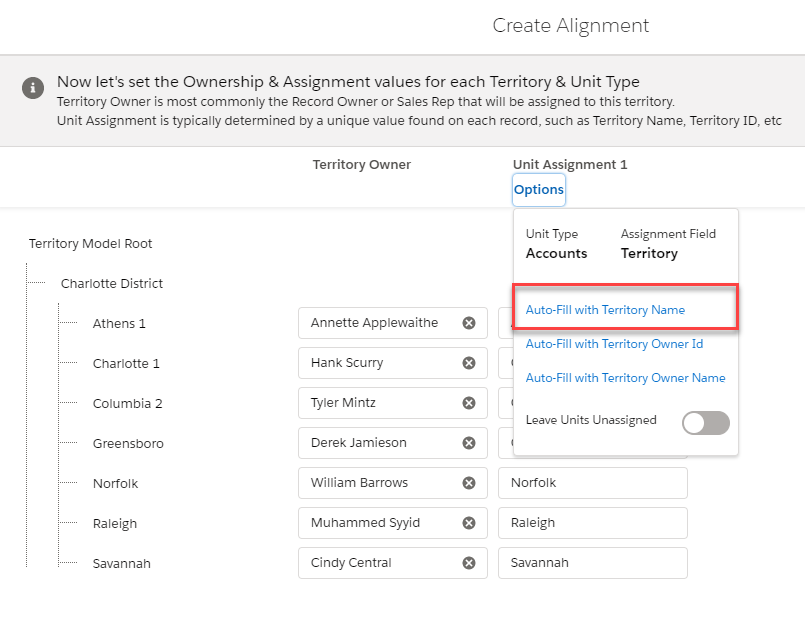
In this example, we are telling the software to assign any unit that has Charlotte 1in the Territory field to the Charlotte 1 territory.
If you used Owner Name as the assignment value, then you should use Auto-Fill with Owner Name, which would tell the software to assign any units with Hank Scurry in the Owner Name field to the Charlotte 1 territory.
If you used Owner Id as the assignment value, then you should use Auto-Fill with Owner Id, which would tell the software to assign any units with 0055w00000CL6ghAAD in the Owner Id field to the Charlotte 1 territory.
In short, you need to use the same value through the process.
Other Causes
- Your territory model does not match your data set data (e.g., I tried to use the United Kingdom Territory Model with United States Account Data).
- You select Auto-Fill with Owner Name/Id but do not have Territory Owners defined.
Troubleshooting Issues
If you encounter the There are no units in this focus, you may need to select additional areas warning message, diving into your source data is the best place to start investigating where the mismatch occurred. To do so:- Open the alignment with Include Unassigned Units selected.
- Add Unit Assignment field to the legend at the unit level.
- Note: If you do not know what field was selected, you can check it by selecting Options in the Ownership & Assignment values step of alignment configuration.
- Check to see if your Unit Assignment value matches either the Territory Name, Territory Owner Name, or Territory Owner Id.
- Re-create the Alignment using the correct Auto-Fill option
Номер статьи базы знаний
000389070
Эта статья решила вашу проблему?
Оставьте свой отзыв, чтобы мы могли стать лучше!
