組織を選択
Edge DevTool か IEChooser で Outlook のコンソールとネットワークのログを記録する
公開日: Oct 13, 2022
説明
コンソールとネットワークのログを記録するためです。Salesforce Outlook インテグレーションをインストールしている場合や、アドインからエラーメッセージがスローされている場合に、Outlook インテグレーションでサイドパネルがフリーズする、接続できない、Outlook がフリーズするなどの問題のトラブルシューティングに使用します。
これらのログを記録するには、インストールされている Microsoft Outlook が 32 ビットか 64 ビットかを把握する必要があります。次に、IEChooser か Microsoft Edge DevTool Preview で Outlook かサイドパネルプロセスを選択します (Windows 10 と Edge をインストールしており、Internet Explorer がない場合)。
以下のステップではこのプロセスを紹介します。
Microsoft Outlook のビット数を確認する
Outlook インストールをチェックし、Microsoft Outlook メインウィンドウで [ファイル]、[Office アカウント]、[Outlook について] をクリックして、32 ビット版と 64 ビット版のどちらがインストールされているかを確認します。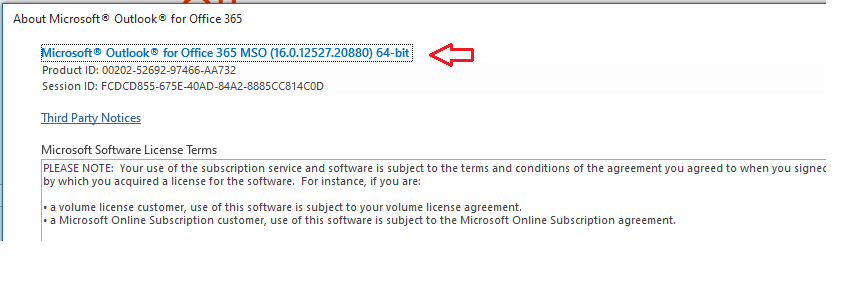
Internet Exploer - IEChooser - F12
1- Microsoft Outlook を開き、[表示] をクリックしてサイドパネルを読み込みます。または、[新しい電子メールの作成] ウィンドウで読み込みますが、問題は再現されます。2- 次のうち、ご使用の Outlook ビット数に一致するいずれかのパスに移動し、管理者として IEChooser.exe を実行します (右クリックして [管理者として実行] をクリックします)。
Outlook の 32 ビット版の場合
C:\Windows\System32\F12\IEChooser.exe を使用します。
Outlook の 64 ビット版の場合
C:\Windows\SysWOW64\F12\IEChooser.exe を使用します。
C:\Windows\System32\F12\IEChooser.exe を使用します。
Outlook の 64 ビット版の場合
C:\Windows\SysWOW64\F12\IEChooser.exe を使用します。
3- F12 [デバッグするターゲットの選択] ウィンドウから [Outlook] ボックスを選択します (Outlook ターゲットまたは必要なターゲットがない場合は更新してみてください。ウィンドウが表示されない場合は、以下の「Microsoft Edge DevTool Preview」にスキップします)。
5- 次に、Outlook とサイドパネルで問題を再現します (このケースではアクティブなプロセスウィンドウがサイドパネルに当たります)。
6- IEChooser の [ネットワーク] タブでネットワークリクエストを保存できます。
7- 同様に、[コンソール] タブではコンテンツを保存できます。
8- コンテンツで右クリックしてすべて選択し、名前を付けて保存したり、コピーしてメモ帳に貼り付けたりすることができます。
Microsoft Edge DevTool Preview
これは、Windows 10 のバージョン 1903 以降を使用するユーザーに適用されます。
ツールをインストールする:
1- こちら からツールをインストールする必要があります (Microsoft Windows Store に移動して検索することもできます)。
2- インストールしたら、その隣にある [...] をクリックし、[スタート] かタスクバーにピン留めして、後から簡単に見つけられるようにします。
デバッグを有効化する
1- すべてのプログラムを閉じます。
2- [スタート] をクリックして「PowerShell」と入力し、リストから [Windows Powershell] をクリックします。
3- Windows PowerShell のブルースクリーンに以下のコマンドを入力するか、コピーして貼り付けます。
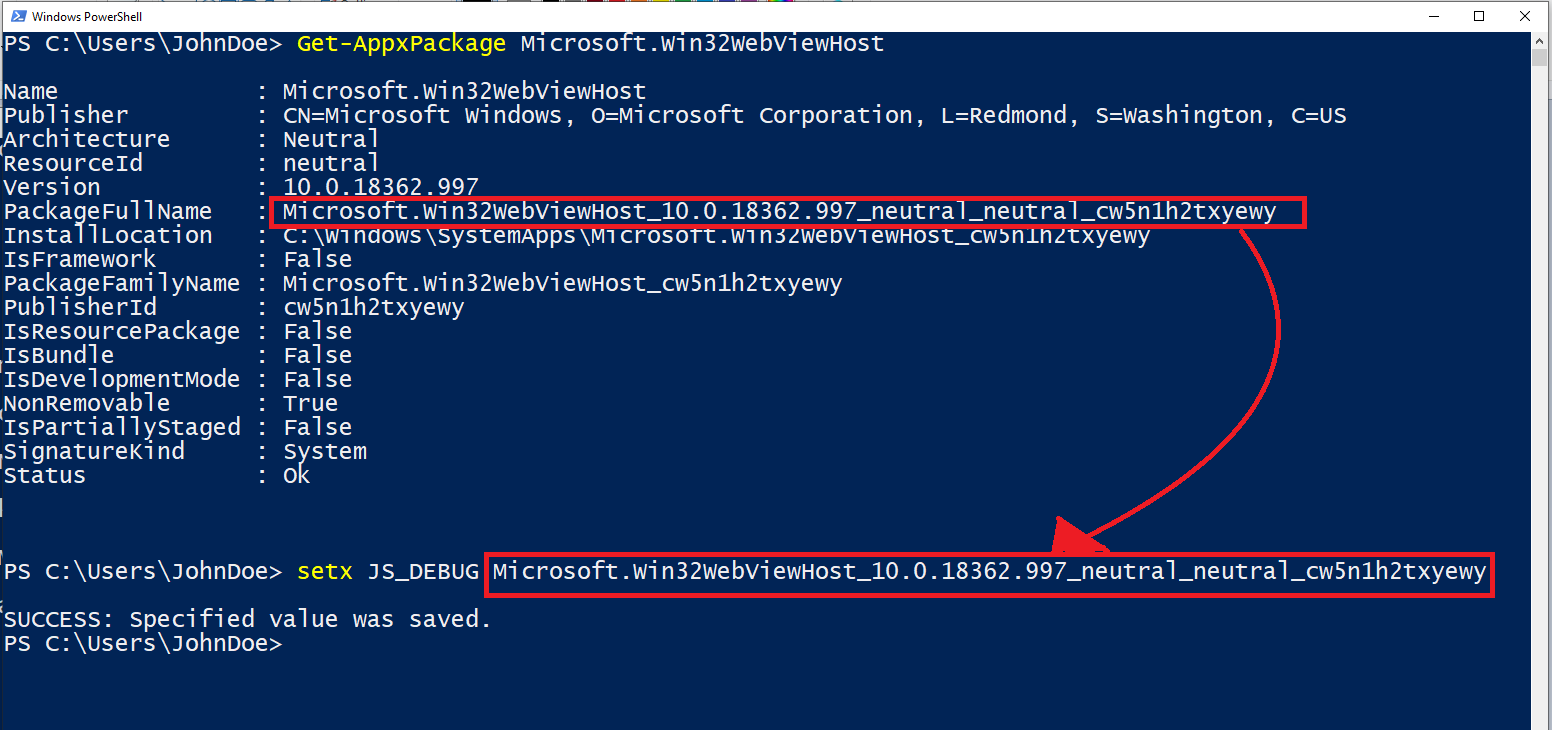
Get-AppxPackage Microsoft.Win32WebViewHost
4- [PackageFullName] の値をコピーします。
5- setx JS_DEBUG <PackageFullName> の <PackageFullName> の部分を先ほどコピーした値に置き換えて入力します。詳しいヘルプについては、以下の画像を参照してください。
6- Microsoft Outlook を実行します。閉じていない場合は、Office を再起動します。
ツールを実行してログを記録する
1- 上記のインストールセクションで [スタート] メニューかタスクバーに追加したショートカットを使用して、Microsoft Edge DevTool を実行します。
2- 次に、Outlook を開いてサイドパネルを読み込みます。
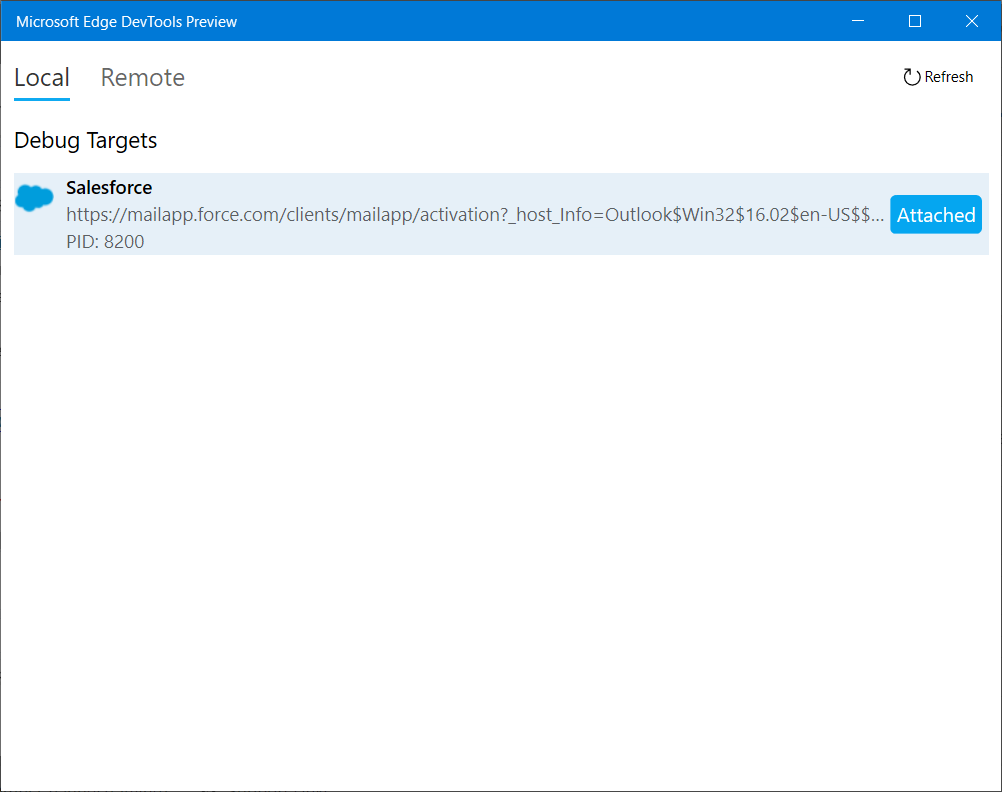
3- [Microsoft Edge DevTools Preview] の [ローカル] ウィンドウを確認します。
4- メールアプリのOutlook に関連するプロセスを選択して開きます。
5- 問題を再現し、[コンソール] と [ネットワーク] のタブから個別にログを取得します。
参照ドキュメント:
https://docs.microsoft.com/en-us/office/dev/add-ins/testing/debug-add-ins-using-f12-developer-tools-on-windows-10
ナレッジ記事番号
000389242
この記事で問題は解決されましたか?
ご意見をお待ちしております。
