将电子表格和表格插入到 Quip 文档中,并通过 2 种不同的布局中查看文档。
电子表格和表格可以嵌入到文档中,并且可以从“文档”和“电子表格”两种不同的布局中查看。要查看这两种布局选项,请单击左上角的文档 > 高级。
要在文档中插入表格,键入 @table。插入表格(非电子表格)可以减少工作表 UI 的信息量,从而不包括行标题和列标题。表格和电子表格具有相同的功能。 在 Quip 中,表格和电子表格几乎相同,除了在插入表格时会有一个标题。创建/插入表格后,即无法将其转换为电子表格,反之亦然。
注意:
可以手动将 Excel 电子表格复制粘贴到 Quip 中,但字体大小、颜色等部分 Excel 属性在 Quip 电子表格中无法继承。
要在现有电子表格中添加一个列,在 Quip 中右击电子表格的字段或标题,然后选择“在左侧插入列”、“在右侧插入列”等。
如果在添加内容前手动调整单元格大小,则文本换行设置将被覆盖。此规则同时适用于手动创建和通过模板创建的电子表格。要启用换行,先选中单元格,然后选择编辑 > 调整行/列大小(根据单元格最初的大小进行调整)> 适应数据 > 应用。
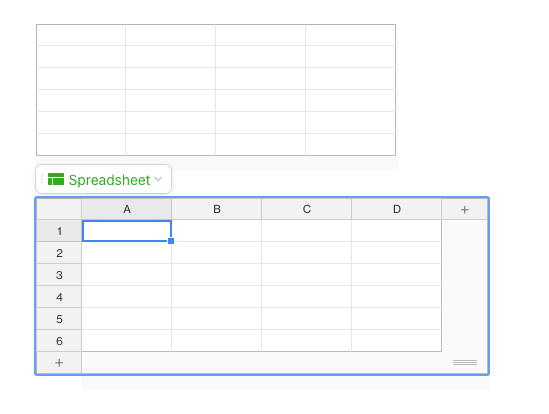
您可以使用 @table 插入表格,也可以使用 @spreadsheet 插入电子表格。下方为在 Quip 文档中插入表格和电子表格的示例。
000389279

We use three kinds of cookies on our websites: required, functional, and advertising. You can choose whether functional and advertising cookies apply. Click on the different cookie categories to find out more about each category and to change the default settings.
Privacy Statement
Required cookies are necessary for basic website functionality. Some examples include: session cookies needed to transmit the website, authentication cookies, and security cookies.
Functional cookies enhance functions, performance, and services on the website. Some examples include: cookies used to analyze site traffic, cookies used for market research, and cookies used to display advertising that is not directed to a particular individual.
Advertising cookies track activity across websites in order to understand a viewer’s interests, and direct them specific marketing. Some examples include: cookies used for remarketing, or interest-based advertising.