Loading

Formulas and Functions in Quip

Publiceringsdatum: Feb 13, 2024
Beskrivning

Learn what functions and formulas are supported in Quip.

Lösning

Quip supports formulas and over 400 common functions. Within a cell, start with an equals sign and functions will autocomplete as you type. [example: =COUNTIF(B2:B10,"64")].
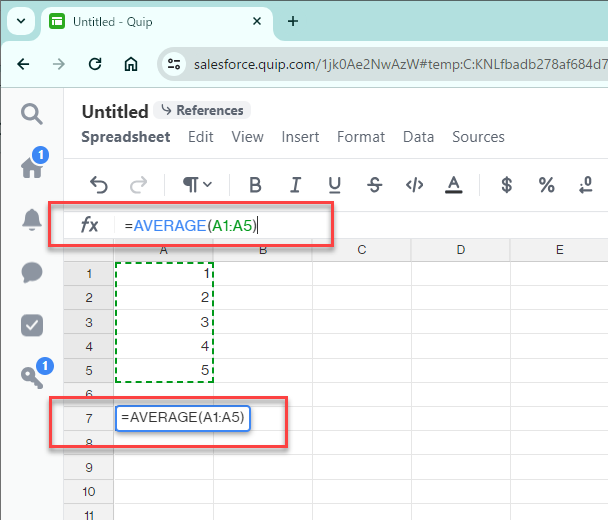
formula-quip.png 
Here's a few things that are unique about our spreadsheet functionality:

  • Comment directly on a cell with an in-line comment.
  • Add a checkbox to a cell showing when things get done. When it's checked off, the whole row is checked off.
  • Bring any spreadsheet formula into the body of your document to bubble up the most important info. Simply type @forumula [=counta(parameters we want)].
  • Bring in Live Salesforce Reports to populate your spreadsheets (available for Quip Enterprise only after setup completion).
  • View Spreadsheet tabs in the context of a document canvas or just as a spreadsheet view by going to the top left Document or Spreadsheet button > Advanced > Layout.
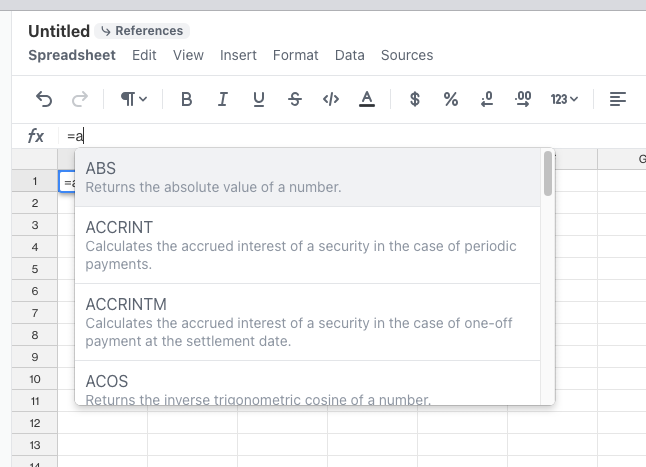
formula.jpg

For more information on Formula, refer to the Online Help: 
Add Formulas and Functions to a Spreadsheet


FormulaFormula Description
ABSReturns the absolute value of a number.
ACCRINTCalculates the accrued interest of a security in the case of periodic payments.
ACCRINTMCalculates the accrued interest of a security in the case of one-off payment at the settlement date.
ACOSReturns the inverse trigonometric cosine of a number.
ACOSHReturns the inverse hyperbolic cosine of a number.
ACOTReturns the inverse cotangent (the arccotangent) of the given number.
ACOTHReturns the inverse hyperbolic cotangent of the given number.
ADDReturns the sum of two numbers.
ANDReturns TRUE if all arguments are TRUE.
ARABICCalculates the value of a Roman number. The value range must be between 0 and 3999.
ASINReturns the inverse trigonometric sine of a number.
ASINHReturns the inverse hyperbolic sine of a number.
ATANReturns the inverse trigonometric tangent of a number.
ATAN2Returns the inverse trigonometric tangent of the specified x and y coordinates.
ATANHReturns the inverse hyperbolic tangent of a number.
AVEDEVReturns the average of the absolute deviations of data points from their mean.
AVERAGEReturns the average of the arguments.
AVERAGEAReturns the average of the arguments. The value of a text is 0.
AVERAGEIFAverages the arguments that meet the conditions.
AVERAGEIFSAverages the value of the cells that meet multiple criteria in multiple ranges.
BASEConverts a positive integer to a specified base into a text from the numbering system.
BESSELIReturns the modified Bessel function In(x)
BESSELJReturns the Bessel function Jn(x)
BESSELKReturns the Bessel function Kn(x)
BESSELYReturns the Bessel function Yn(x)
BETA.DISTValues of the beta distribution.
BETA.INVValues of the inverse beta distribution.
BETADISTReturns the beta function.
BETAINVReturns the inverse of the cumulative beta probability density function.
BIN2DECThe result is the decimal number for the binary number entered.
BIN2HEXThe result is the hexadecimal number for the binary number entered.
BIN2OCTThe result is the octal number for the binary number entered.
BINOM.DISTValues of the binomial distribution.
BINOM.DIST.RANGEReturns the probability of a trial result using binomial distribution.
BINOM.INVReturns the smallest value for which the cumulative binomial distribution is greater than or equal to a criterion value.
BINOMDISTReturns the individual term binomial distribution probability.
BITANDReturns a bitwise logical "and" of the parameters.
BITLSHIFTShifts a number left by n bits.
BITORReturns a bitwise logical "or" of the parameters.
BITRSHIFTShifts a number right by n bits.
BITXORReturns a bitwise logical "exclusive or" of the parameters.
CEILINGRounds a number up to the nearest multiple of Significance.
CEILING.MATHRounds a number up to the nearest multiple of significance.
CEILING.PRECISERounds a number up to the nearest multiple of significance, regardless of sign of significance.
CHARConverts a number into a character according to the current code table.
CHIDISTReturns the probability value from the indicated Chi square that a hypothesis is confirmed.
CHIINVReturns the inverse of the one-tailed probability of the chi-squared distribution.
CHISQ.DISTReturns left-tail probability of the cumulative distribution function or values of the probability density function of the chi-square distribution.
CHISQ.DIST.RTReturns the right-tail probability of the chi-square distribution.
CHISQ.INVValues of the inverse of CHISQ.DIST(x;DegreesOfFreedom;TRUE()).
CHISQ.INV.RTValues of the inverse of CHIDIST(x; DegreesOfFreedom).
CHISQ.TESTReturns the chi square independence test.
CHITESTReturns the probability of a deviance from a random distribution of two test series based on the chi-squared test for independence.
CHOOSEUses an index to return a value from a list of up to 30 values.
CLEANAll non-printing characters are removed from the string.
CODEReturns a numeric code for the first character in a text string.
COLReturns the column number of a specified cell.
COLUMNSReturns the number of columns in the given reference.
COMBINReturns the number of combinations for elements without repetition.
COMBINAReturns the number of combinations of a subset of items including repetitions.
COMPLEXThe result is a complex number which is returned from a real coefficient and an imaginary coefficient.
CONCATCombines two strings into one string.
CONCATENATECombines several text strings into one string.
CONFIDENCEReturns the (1-alpha) confidence interval for a normal distribution.
CONFIDENCE.NORMReturns a (1 alpha) confidence interval for a normal distribution.
CONFIDENCE.TReturns a (1 alpha) confidence interval for a Student's t distribution.
CONVERTConverts a numeric value to a different unit of measure.
CORRELReturns the correlation coefficient between two data sets.
COSReturns the cosine of the given angle (in radians).
COSHReturns the hyperbolic cosine of a number.
COTReturns the cotangent of the given angle (in radians).
COTHReturns the hyperbolic cotangent of a given number (angle).
COUNTCounts how many numbers are in the list of arguments.
COUNTACounts how many values are in the list of arguments.
COUNTBLANKReturns the number of empty cells.
COUNTIFReturns the number of cells that meet with certain criteria within a cell range.
COUNTIFSCounts the cells that meet multiple criteria in multiple ranges.
COUNTUNIQUECounts the unique values in a list of specified values and ranges.
COUPDAYBSReturns the number of days from the first day of interest payment on a security until the settlement date.
COUPDAYSReturns the number of days in the current interest period in which the settlement date falls.
COUPDAYSNCReturns the number of days from the settlement date until the next interest date.
COUPNCDReturns the date of the first interest date after the settlement date. Format the result as a date.
COUPNUMReturns the number of coupons (interest payments) between the settlement date and the maturity date.
COUPPCDReturns the date of the interest date prior to the settlement date. Format the result as a date.
COVARReturns the covariance of the product of paired deviations.
COVARIANCE.PCalculates the population covariance.
COVARIANCE.SCalculates the sample covariance.
CRITBINOMReturns the smallest value for which the cumulative binomial distribution is greater than or equal to a criterion value.
CSCReturns the cosecant of the given angle (in radians). The cosecant of an angle is equivalent to 1 divided by the sine of that angle
CSCHReturns the hyperbolic cosecant of a number.
CUMIPMTCalculates the cumulative interest payments, that is, the total interest, for an investment based on a constant interest rate.
CUMPRINCReturns the cumulative interest paid for an investment period with a constant interest rate.
DATEProvides an internal number for the date given.
DATEDIFCalculates the number of days, months, or years between two dates.
DATEVALUEReturns an internal number for a text having a possible date format.
DAYReturns the sequential date of the month as an integer (1-31) in relation to the date value.
DAYSCalculates the number of days between two dates.
DAYS360Calculates the number of days between two dates based on a 360-day year.
DBReturns the depreciation of an asset for a specified period using the fixed-declining balance method.
DDBReturns the depreciation of an asset for a specified period using the arithmetic-declining method.
DEC2BINThe result is the binary number for the decimal number entered between -512 and 511.
DEC2HEXThe result is the hexadecimal number for the decimal number entered.
DEC2OCTThe result is the octal number for the decimal number entered.
DECIMALConverts text with characters from a number system to a positive integer in the base radix given.
DEGREESConverts radians into degrees.
DELTAThe result is TRUE (1) if both numbers, which are delivered as an argument, are equal, otherwise it is FALSE (0).
DEVSQReturns the sum of squares of deviations based on a sample mean.
DISCCalculates the allowance (discount) of a security as a percentage.
DIVIDEReturns the division of two numbers.
DOLLARConverts a number to an amount in the currency format, rounded to a specified decimal place.
DOLLARDEConverts a quotation that has been given as a decimal fraction into a decimal number.
DOLLARFRConverts a quotation that has been given as a decimal number into a mixed decimal fraction.
DURATIONCalculates the number of periods required by an investment to attain the desired value.
EDATEReturns the serial number of the date that is a specified number of months before or after the start date
EFFECTReturns the effective annual interest rate
EOMONTHReturns the serial number of the last day of the month that comes a certain number of months before or after the start date
EQReturns TRUE if two values are equal and FALSE otherwise.
ERFReturns values of the Gaussian error integral.
ERF.PRECISEReturns the error function.
ERFCReturns complementary values of the Gaussian error integral between x and infinity.
ERFC.PRECISEReturns the complementary error function.
ERROR.TYPEReturns a number corresponding to an error type
EVENRounds a positive number up to the next even integer and a negative number down to the next even integer.
EXACTCompares two text strings and returns TRUE if they are identical.
EXPReturns e raised to the power of a number.
EXPON.DISTValues of the exponential distribution.
EXPONDISTReturns the exponential distribution.
F.DISTValues of the left tail F probability distribution.
F.DIST.RTValues of the right tail F probability distribution.
F.INVValues of the inverse left tail F distribution.
F.INV.RTValues of the inverse right tail F distribution.
F.TESTCalculates the F test.
FACTReturns the factorial of a number.
FACTDOUBLEReturns the double factorial of a number.
FALSEReturns the logical value FALSE.
FDISTCalculates the values of an F distribution.
FILTERFilters a range of data based on specified criteria.
FINDLooks for a string of text within another string.
FINVReturns the inverse of the F probability distribution.
FISHERReturns the Fisher transformation for x and creates a function close to a normal distribution.
FISHERINVReturns the inverse of the Fisher transformation for x and creates a function close to a normal distribution.
FIXEDReturns a number as text with a specified number of decimal places and optional thousands separators.
FLOORRounds a number down to the nearest multiple of Significance.
FLOOR.MATHRounds number down to the nearest multiple of significance.
FLOOR.PRECISERounds number down to the nearest multiple of significance, regardless of sign of significance.
FORECASTExtrapolates future values based on existing x and y values.
FORMULATEXTReturns the formula as a string.
FTESTReturns the result of an F test.
FVReturns the future value of an investment based on periodic, constant payments and a constant interest rate (Future Value).
FVSCHEDULECalculates the accumulated value of the starting capital for a series of periodically varying interest rates.
GAMMAReturns the Gamma function value.
GAMMA.DISTReturns the value of the probability density function or the cumulative distribution function for the Gamma distribution.
GAMMA.INVValues of the inverse gamma distribution.
GAMMADISTReturns the values of a Gamma distribution.
GAMMAINVReturns the inverse of the Gamma cumulative distribution GAMMADIST.
GAMMALNReturns the natural logarithm of the Gamma function: G(x).
GAMMALN.PRECISEReturns the natural logarithm of the gamma function.
GAUSSReturns the standard normal cumulative distribution.
GCDReturns the greatest common divisor of two or more integers.
GEOMEANReturns the geometric mean of a sample.
GESTEPThe result is 1 if Number is greater than or equal to Step.
GTReturns TRUE if the first value is strictly greater than the second value, and FALSE otherwise.
GTEReturns TRUE if the first value is greater than or equal to the second value, and FALSE otherwise.
HARMEANReturns the harmonic mean of a data set.
HEX2BINThe result is the binary number for the hexadecimal number entered.
HEX2DECThe result is the decimal number for the hexadecimal number entered.
HEX2OCTThe result is the octal number for the hexadecimal number entered.
HLOOKUPSearches for a value and reference to the cells below the selected area.
HOURDetermines the sequential number of the hour of the day (0-23) for the time value.
HYPGEOM.DISTValues of the hypergeometric distribution.
HYPGEOMDISTReturns the hypergeometric distribution.
IFSpecifies a logical test to be performed.
IFERRORReturns value if not an error value, else alternative.
IFNAReturns value if not a #N/A error, else alternative.
IMABSThe result is the absolute value of a complex number.
IMAGINARYThe result is the imaginary coefficient of a complex number.
IMARGUMENTThe result is the argument (the phi angle) of a complex number.
IMCONJUGATEThe result is the conjugated complex complement to a complex number.
IMCOSThe result is the cosine of a complex number.
IMCOSHReturns the hyperbolic cosine of a complex number
IMCOTReturns the cotangent of a complex number
IMCSCReturns the cosecant of a complex number
IMCSCHReturns the hyperbolic cosecant of a complex number
IMDIVThe result is the division of two complex numbers.
IMEXPThe result is the power of e and the complex number.
IMLNThe result is the natural logarithm (to the base e) of a complex number.
IMLOG10The result is the common logarithm (to the base 10) of a complex number.
IMLOG2The result is the binary logarithm of a complex number.
IMPOWERThe result is the ComplexNumber raised to the power of Number.
IMPRODUCTThe result is the product of up to 29 complex numbers.
IMREALThe result is the real coefficient of a complex number.
IMSECReturns the secant of a complex number
IMSECHReturns the hyperbolic secant of a complex number
IMSINThe result is the sine of a complex number.
IMSINHReturns the hyperbolic sine of a complex number
IMSQRTThe result is the square root of a complex number.
IMSUBThe result is the subtraction of two complex numbers.
IMSUMThe result is the sum of up to 29 complex numbers.
IMTANReturns the tangent of a complex number
INDEXINDEX returns a sub range, specified by row and column number, or an optional range index. Depending on context, INDEX returns a reference or content.
INTRounds a number down to the nearest integer.
INTERCEPTCalculates the point at which a line will intersect the y-values by using known x-values and y-values.
IPMTCalculates the periodic amortizement for an investment with regular payments and a constant interest rate.
IRRCalculates the internal rate of return for an investment.
ISBLANKReturns TRUE if the reference to a cell is blank.
ISERRORTests for error conditions, including the #N/A error value, and returns TRUE or FALSE.
ISEVENReturns TRUE if the value is an even integer, or FALSE if the value is odd.
ISNAReturns TRUE if a cell contains the #N/A (value not available) error value.
ISNONTEXTTests if the cell contents are text or numbers, and returns FALSE if the contents are text.
ISNUMBERReturns TRUE if the value refers to a number.
ISTEXTReturns TRUE if the cell contents refer to text.
ISO.CEILINGRounds a number up to the nearest multiple of significance, regardless of sign of significance.
ISODDReturns TRUE if the value is odd, or FALSE if the number is even.
ISOWEEKNUMReturns the ISO week number of the year for the date specified.
ISPMTCalculates the level of interest for unchanged amortization installments.
JOINCombines values from one or more one-dimensional arrays using a specified separator.
KURTReturns the kurtosis of a data set (at least 4 values required).
LARGEReturns the Rank_c-th largest value in a data set.
LCMReturns the least common multiple of one or more integers.
LEFTReturns the first character or characters of a text.
LENReturns the length of a string including spaces.
LNReturns the natural logarithm based on the constant e of a number.
LOGReturns the logarithm of a number to the specified base.
LOG10Returns the base-10 logarithm of a number.
LOGINVReturns the inverse of the lognormal distribution.
LOGNORM.DISTValues of the log normal distribution.
LOGNORM.INVValues of the inverse of the lognormal distribution.
LOGNORMDISTReturns the values of a lognormal distribution.
LOOKUPReturns the contents of a cell either from a one-row or one-column range.
LOWERConverts all uppercase letters in a text string to lowercase.
LTReturns TRUE if the first value is strictly less than the second value, and FALSE otherwise.
LTEReturns TRUE if the first value is less than or equal to the second value, and FALSE otherwise.
MATCHReturns the relative position of an item in an array that matches a specified value.
MAXReturns the maximum value in a list of arguments.
MAXAReturns the maximum value in a list of arguments. In opposite to MAX, here you can enter text. The value of the text is 0.
MAXIFSReturns the maximum value from a range of cells specified by a set of criteria.
MDETERMReturns the array determinant of an array.
MEDIANReturns the median of a set of numbers. In a set containing an uneven number of values, the median will be the number in the middle of the set and in a set containing an even number of values, it will be the mean of the two values in the middle of the set.
MIDReturns a text string of a text. The parameters specify the starting position and the number of characters.
MINReturns the minimum value in a list of arguments.
MINAReturns the minimum value in a list of arguments. Here you can also enter text. The value of the text is 0.
MINIFSReturns the minimum value from a range of cells specified by a set of criteria.
MINUSReturns the difference of two numbers.
MINUTEDetermines the sequential number for the minute of the hour (0-59) for the time value.
MIRRCalculates the modified internal rate of return of a series of investments.
MODReturns the remainder when one integer is divided by another.
MODEReturns the most common value in a data set.
MODE.SNGLReturns the most common value in a sample.
MONTHDetermines the sequential number of a month of the year (1-12) for the date value.
MROUNDReturns a number rounded to the nearest multiple of another number.
MULTINOMIALReturns the factorial of the sum of the arguments divided by the product of the factorials of the arguments.
MULTIPLYReturns the product of two numbers.
NReturns the numeric value of the given parameter. Returns 0 if parameter is text or FALSE.
NAReturns the error value #N/A.
NEReturns TRUE if two values are not equal and FALSE otherwise.
NEGBINOM.DISTValues of the negative binomial distribution.
NEGBINOMDISTReturns the negative binomial distribution.
NETWORKDAYSReturns the number of workdays between two dates
NETWORKDAYS.INTLReturns the number of workdays between two dates using arguments to indicate weekend days and holidays.
NOMINALCalculates the yearly nominal interest rate, given the effective rate and the number of compounding periods per year.
NORM.DISTValues of the normal distribution.
NORM.INVValues of the inverse normal distribution.
NORM.S.DISTThe values of the standard normal distribution.
NORM.S.INVValues of the inverse standard normal distribution.
NORMDISTReturns the density function or the normal cumulative distribution.
NORMINVReturns the inverse of the normal cumulative distribution.
NORMSDISTReturns the standard normal cumulative distribution function. The distribution has a mean of zero and a standard deviation of one.
NORMSINVReturns the inverse of the standard normal cumulative distribution.
NOTComplements (inverts) a logical value.
NOWDetermines the current time of the computer.
NPERReturns the number of periods for an investment based on periodic, constant payments and a constant interest rate.
NPVReturns the present value of an investment based on a series of periodic cash flows and a discount rate. To get the net present value, subtract the cost of itial cash flow at time zero) from the returned value.
NUMBERVALUEConverts text to a number, in a locale-independent way.
OCT2BINThe result is the binary number for the octal number entered.
OCT2DECThe result is the decimal number for the octal number entered.
OCT2HEXThe result is the hexadecimal number for the octal number entered.
ODDRounds a positive number up to the nearest odd integer and a negative number down to the nearest odd integer.
ORReturns TRUE if at least one argument is TRUE.
PDURATIONDuration. Calculates the number of periods required by an investment to attain the desired value.
PEARSONReturns the Pearson product moment correlation coefficient r.
PERCENTILEReturns the alpha-percentile of data values in an array.
PERCENTILE.EXCReturns the alpha percentile of a sample.
PERCENTILE.INCReturns the alpha percentile of a sample.
PERCENTRANKReturns the percentage rank of a value in a sample.
PERCENTRANK.EXCReturns the percentage rank (0..1, exclusive) of a value in a sample.
PERCENTRANK.INCReturns the percentage rank (0..1, inclusive) of a value in a sample.
PERMUTReturns the number of permutations for a given number of objects.
PERMUTATIONAReturns the number of permutations for a given number of objects (repetition allowed).
PHIReturns the values of the distribution function for a standard normal distribution.
PIReturns 3.14159265358979, the value of the mathematical constant PI to 14 decimal places.
PMTReturns the periodic payment for an annuity with constant interest rates.
POISSONReturns the Poisson distribution.
POISSON.DISTReturns the Poisson distribution.
POWReturns a number raised to another number.
POWERReturns a number raised to another number.
PPMTReturns for a given period the payment on the principal for an investment that is based on periodic and constant payments and a constant interest rate.
PRICECalculates the market value of a fixed interest security with a par value of 100 currency units as a function of the forecast yield.
PRICEDISCCalculates the price per 100 currency units of par value of a non-interest- bearing security.
PRICEMATCalculates the price per 100 currency units of par value of a security, that pays interest on the maturity date.
PROBReturns the probability that values in a range are between two limits.
PRODUCTMultiplies all the numbers given as arguments and returns the product.
PROPERCapitalizes the first letter in all words of a text string.
PVReturns the present value of an investment resulting from a series of regular payments.
QUARTILEReturns the quartile of a data set.
QUARTILE.EXCReturns the quartile of a sample.
QUARTILE.INCReturns the quartile of a sample.
QUOTIENTReturns the integer part of a division operation.
RADIANSConverts degrees to radians.
RANDReturns a random number between 0 and 1.
RANDBETWEENReturns an integer random number in a specified range.
RANKReturns the rank of a number in a sample.
RANK.AVGReturns the ranking of a value in a sample; if more than one value has the same rank, the average rank is returned.
RANK.EQReturns the ranking of a value in a sample; if more than one value has the same rank, the top rank of that set of values is returned.
RATEReturns the constant interest rate per period of an annuity.
RECEIVEDCalculates the amount received that is paid for a fixed-interest security at a given point in time.
REFERENCERANGEUses data referencing to reference/insert a specific cell or range of cells from a different spreadsheet
REFERENCESHEETUses data referencing to reference/insert an entire spreadsheet
REGEXEXTRACTExtracts matching substrings according to a regular expression.
REGEXMATCHReturns TRUE if specified text matches the regular expression and FALSE otherwise.
REGEXREPLACEReplaces part of a text string with a different text string specified using a regular expression.
REPLACEReplaces part of a text string with a different text string.
REPTRepeats a character string by the given number of copies.
RIGHTReturns the last character or characters of a text.
ROMANConverts a number into a Roman numeral. The value range must be between 0 and 3999, the modes can be integers from 0 to 4.
ROUNDRounds a number to a certain number of decimal places.
ROUNDDOWNRounds a number down, toward zero, to a certain precision.
ROUNDUPRounds a number up, away from zero, to a certain precision.
ROWReturns the row number of a specified cell.
ROWSReturns the number of rows in a reference or array.
RRICalculates the interest rate resulting from the profit (return) of an investment.
RSQReturns the square of the Pearson correlation coefficient based on the given values.
SEARCHReturns the position of a text segment within a character string.
SECReturns the secant of the given angle (in radians). The secant of an angle is equivalent to 1 divided by the cosine of that angle
SECHReturns the hyperbolic secant of a number.
SECONDDetermines the sequential number of the second of a minute (0-59) for the time value.
SERIESSUMSums the first terms of a power series.
SIGNReturns the sign of a number. Returns 1 if the number is positive, -1 if negative and 0 if zero.
SINReturns the sine of the given angle (in radians).
SINHReturns the hyperbolic sine of a number.
SKEWReturns the skewness of a distribution.
SKEW.PReturns the skewness of a distribution using the population of a random variable.
SLNReturns the straight-line depreciation of an asset for one period.
SLOPEReturns the slope of the linear regression line.
SMALLReturns the Rank_c-th smallest value in a data set.
SORTSorts data from a range or array.
SQRTReturns the positive square root of a number.
SQRTPIReturns the square root of (PI times a number).
STANDARDIZEConverts a random variable to a normalized value.
STDEVEstimates the standard deviation based on a sample.
STDEV.PCalculates the standard deviation based on the entire population.
STDEV.SCalculates the standard deviation based on a sample.
STDEVACalculates the standard deviation of an estimation based on a sample.
STDEVPCalculates the standard deviation based on the entire population.
STDEVPACalculates the standard deviation based on the entire population.
STEYXReturns the standard error of the predicted y value for each x in the regression.
SUBSTITUTESubstitutes new text for old text in a string.
SUMAdds all the numbers in a range of cells.
SUMIFAdds the cells specified by a given criteria.
SUMIFSTotals the values of cells in a range that meet multiple criteria in multiple ranges.
SUMPRODUCTMultiplies corresponding elements in the given arrays, and returns the sum of those products.
SUMSQIf you want to calculate the sum of the squares of numbers (totaling up of the squares of the arguments), enter these into the text fields.
SUMX2MY2Returns the sum of the difference of squares of corresponding values in two arrays.
SUMX2PY2Returns the sum of the sum of squares of corresponding values in two arrays.
SUMXMY2Adds the squares of the variance between corresponding values in two arrays.
SYDReturns the arithmetic-declining depreciation rate.
TThis function returns the target text, or a blank text string if the target is not text.
T.DISTReturns the t-distribution.
T.DIST.2TReturns the two-tailed t-distribution.
T.DIST.RTReturns the right-tailed t-distribution.
T.INVValues of the left-tailed inverse t-distribution.
T.INV.2TValues of the two-tailed inverse t-distribution.
T.TESTCalculates the T test.
TANReturns the tangent of the given angle (in radians).
TANHReturns the hyperbolic tangent of a number.
TBILLEQCalculates the annual return on a treasury bill.
TBILLPRICECalculates the price of a treasury bill per 100 currency units.
TBILLYIELDCalculates the yield of a treasury bill.
TDISTReturns the t-distribution.
TEXTConverts a number into text according to a specified format.*
TIMEDetermines a time value from the details for hour, minute and second.
TIMEVALUEReturns a sequential number for a text shown in a possible time entry format.
TINVReturns the inverse of the t-distribution.
TODAYDetermines the current date of the computer.
TRANSPOSEReturns a horizontal range of cells as a vertical range, or vice versa.
TRIMRemoves spaces from a string, leaving only a single space character between words.
TRIMMEANReturns the mean of a data set without the Alpha percent of data at the margins.
TRUEThe logical value is set to TRUE.
TRUNCTruncates a number by removing decimal places.
TTESTReturns the probability associated with a Student's t-Test.
TYPEReturns the type of value.
UMINUSReturns the specified number with its sign reversed.
UNARY_PERCENTReturns a number as a percentage.
UNICHARConverts a code number into a Unicode character or letter.
UNICODEReturns the numeric code for the first Unicode character in a text string.
UNIQUEReturns unique values from a range of data.
UPLUSReturns the specified number, unchanged.
UPPERConverts the string specified in the text field to uppercase.
VALUEConverts a text string into a number.
VAREstimates the variance based on a sample.
VAR.PCalculates variance based on the entire population.
VAR.SCalculates the variance based on a sample.
VARAEstimates a variance based on a sample. The value of text is 0.
VARPCalculates a variance based on the entire population.
VARPACalculates the variance based on the entire population. The value of text is 0.
VLOOKUPVertical search with reference to adjacent cells to the right.
WEEKDAYReturns the day of the week for the date value as an integer (1-7).
WEEKNUMReturns the number of the calendar week in which the specified date occurs.
WEIBULLReturns the values of the Weibull distribution.
WEIBULL.DISTReturns the values of the Weibull distribution.
WORKDAYReturns the serial number of the date before or after a specified number of workdays
WORKDAY.INTLReturns the serial number of the date before or after a number of workdays using arguments to indicate weekend days and holidays.
XIRRCalculates the internal rate of return for a list of payments which take place on different dates.
XNPVCalculates the capital value (net present value)for a list of payments which take place on different dates.
XORReturns true if an odd number of arguments evaluates to TRUE.
YEARReturns the year of a date value as an integer.
YEARFRACReturns the number of years (including fractional part) between two dates
YIELDCalculates the yield of a security.
ZOIDBERGWhy not Zoidberg?
Z.TESTCalculates the probability of observing a z-statistic greater than the one computed based on a sample.
ZTESTCalculates the probability of observing a z-statistic greater than the one computed based on a sample.


Considerations

  • TEXT() formula only supports leading 0’s, thousand separator, numbers, currency, dates, times, and percentages. The TEXT() formula does not support: fractions, custom formats, “?”, phone numbers, latitude and longitude and accounting patterns.


Questions/Feedback?
Reach out to our support team and log a case. Learn how to do that here.
 

Knowledge-artikelnummer

000389291

 
Laddar
Salesforce Help | Article
