Velg en organisasjon
Workarounds for duplicate records created in the Field Service app
Publiseringsdato: Sep 12, 2025
Beskrivelse
Duplicate record creation is a known issue currently. This can occur periodically due to network condition changes such as poor network coverage, mobile connection changes (WiFi to LTE to Edge), WiFi signal strength, etc. When a new record is created on the mobile app and the network request successfully reaches the server but the response is unable to be delivered to the app for whatever reason, a duplicate record will be created when the app attempts to re-submit the object creation at a later time.
Until we can implement a more permanent solution, this knowledge article gives a few potential workarounds using either a BEFORE INSERT or an AFTER INSERT trigger. Each workaround has drawbacks which are outlined below.
Considerations:
- Removing a record create operation from the pending upload queue can cause issues if subsequent updates in the pending queue depend on the removed create operation.
- Users will need to know to perform a data sync (Profile→Settings→Data Sync) to re-synchronize data between app and server.
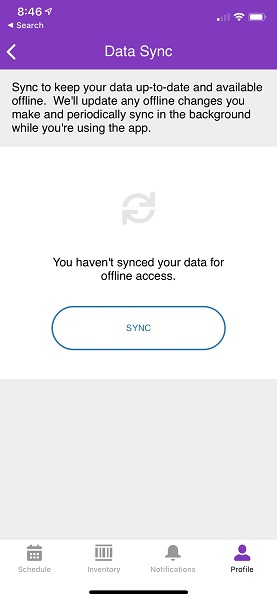
- The query to determine duplicates in the trigger should take into account the window where duplicates are occurring. For example, sometimes it may happen over a 24 hour period. This will help limit the possibility of a false-duplicate detection.
- In some cases, a trigger can process multiple inserts. In the examples below, it is assumed only a single row is inserted.
Løsning
BEFORE INSERT Trigger
Rejecting an insert in the BEFORE INSERT trigger will cause the error message to bubble to the app where the user will need to take corrective action to unblock the pending queue, typically this involves removing the record creation from the pending queue and performing a pull-to-refresh or data sync to retrieve the out-of-sync server data. In addition, any updates based on the newly created record will fail as well because the temporary mobile-side record will have been removed by the user. After removing the record from the mobile device’s pending update queue, the app and server will be out of sync and will require a pull-to-refresh or data sync operation to get things back in sync.Here is an example BEFORE INSERT trigger that detects duplicate records and rejects the insert if a duplicate is detected:
trigger DetectJellyBeanDuplicates_BeforeInsert on JellyBean__c (before insert) {
    // Obtain the record that was just inserted. We will search for similar records below.
    JellyBean__c newlyCreatedJellyBean = trigger.new[0];

    // Most duplicate records tend to occur within 24 hours.
    DateTime oneDayAgo = System.now().addHours(-24);

    // See if a similar record was created for the same user. Use as much criteria as possible.
    JellyBean__c[] existingJellyBeans = [
            SELECT Id
            FROM JellyBean__c
            WHERE Color__c = :newlyCreatedJellyBean.Color__c
                AND CreatedById = :System.UserInfo.getUserId()
                AND CreatedDate > :oneDayAgo
            LIMIT 1
            ];

    if (existingJellyBeans.size() > 0) {
      // Duplicate was detected. Throw an error.
      newlyCreatedJellyBean.addError('Duplicate detected! Please fix on mobile!');
    }
}
See the BEFORE INSERT Trigger behavior in the app in the Videos for Workarounds for duplicate records created in the Field Service app article .
AFTER INSERT Trigger
Rejecting an insert in the AFTER INSERT trigger can be more useful to keep the app in sync with the server and to relieve pressure from the user to know how to resolve duplicate issues. By using an AFTER INSERT trigger, the app's insert will succeed and therefore the new record will be in sync with the server state. However, the old record will also exist on the app (but not on the server) until a pull-to-refresh or data sync operation is performed again. Any attempted updates to the old record will result in an error on the app so the user will be aware that the deleted record no longer exists.Here is an example AFTER INSERT trigger that detects a single duplicate record and deletes it. The app will receive a success message and will have the new record, so subsequent updates in the user’s pending upload queue will succeed.
trigger DetectJellyBeanDuplicates_AfterInsert on JellyBean__c (after insert) {

    // Obtain the record that was just inserted. We will search for similar records below.
    JellyBean__c newlyCreatedJellyBean = Trigger.New[0];

    // Most duplicate records tend to occur within 24 hours.
    DateTime oneDayAgo = System.now().addHours(-24);

    // See if a similar record was created for the same user. Use as much criteria as possible.
    JellyBean__c[] existingJellyBeans = [
            SELECT Id
            FROM JellyBean__c
            WHERE Color__c = :newlyCreatedJellyBean.Color__c
                AND CreatedById = :System.UserInfo.getUserId()
                AND CreatedDate > :oneDayAgo
                AND Id != :newlyCreatedJellyBean.Id
            LIMIT 1
            ];


    if (existingJellyBeans.size() > 0) {
      // Duplicate was detected. Chances are, mobile doesn't even yet know about the duplicate
      // and the record that was just inserted prior to calling this trigger will be successful.
      // Therefore, do something with the detected duplicate -- delete it, mark it as inactive,
      // send to a review queue, etc.
      delete existingJellyBeans;
    }  else {
      newlyCreatedJellyBean.addError('Did not work: ' + newlyCreatedJellyBean.Id);

    }
}
See the AFTER INSERT Trigger video in the Videos for Workarounds for duplicate records created in the Field Service app article.
Flows
Flows have more control over generating a unique id, perhaps using a custom field and appending various values to a field to be used as a unique identifier. Using a generated value from a flow can help detect duplicates easier. In this example, we obtain the date/time stamp when the record is created on the device and using it as a unique ID to use in the before/after insert triggers on the server. The JellyBean custom object has a UniqueId__c field now, so the Create Records step will pass this date/time value to the server so it can be used in the trigger.Here is how we create the UniqueID value in the flow:
- Variable: {!UniqueID}
- Operator: Equals
- Value: {!$FlowcCurrentDateTime}
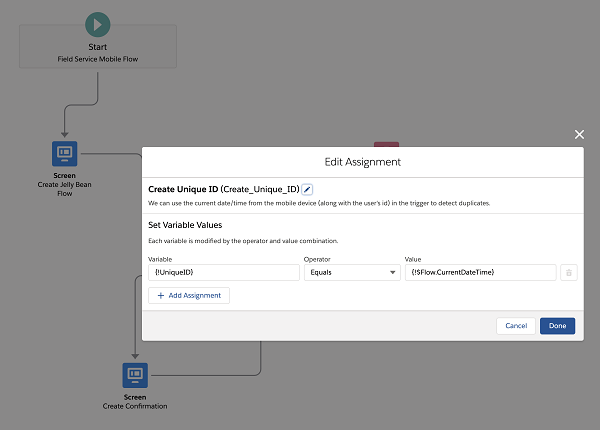
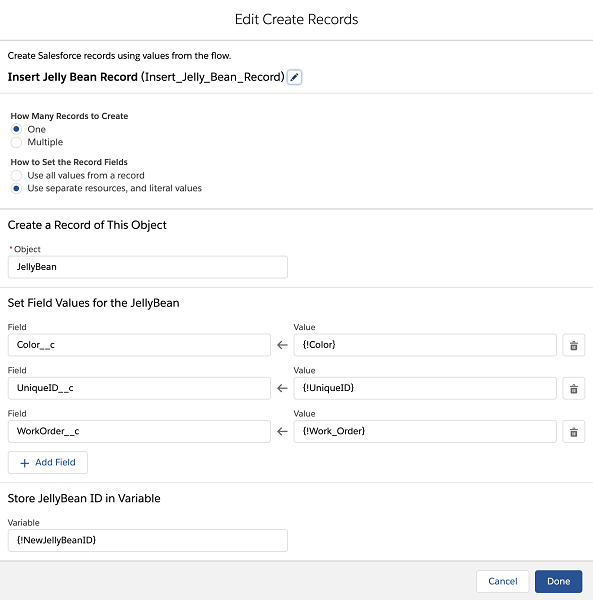
The JellyBean custom object has a UniqueId__c field now, so the Create Records step will pass this date/time value to the server so it can be used in the trigger:
- Settings for the Create Record flow:
- How Many Records to Create: One
- How to Set the Record Fields: Use separate resources, and literal values
- Object: JellyBean (the object for our example)
- Set Field Values
- Color__C <-- {!Color}
- UniqueID__c <-- {!UniqueID}
- WorkOrder__c <-- {!Work_Oder}
- Store JellyBean ID in Variable: {!NewJellyBeanID}
The trigger can use the unique id to more easily detect duplicates now:
trigger DetectJellyBeanDuplicates_BeforeInsert on JellyBean__c (before insert) {
    // Obtain the record that was just inserted. We will search for similar records below.
    JellyBean__c newlyCreatedJellyBean = trigger.new[0];

    // See if a similar record was created for the same unique id (and user id)
    JellyBean__c[] existingJellyBeans = [
            SELECT Id
            FROM JellyBean__c
            WHERE UniqueId__c = :newlyCreatedJellyBean.UniqueId__c
                AND CreatedById = :System.UserInfo.getUserId()
            LIMIT 1
            ];

    if (existingJellyBeans.size() > 0) {
      // Duplicate was detected. Throw an error.
      newlyCreatedJellyBean.addError('Duplicate detected! Please fix on mobile!');
    }
}
Knowledge-artikkelnummer
000389435
Hjalp denne artikkelen med å løse problemet ditt?
La oss få vite det slik at vi kan forbedre!
