选择组织
Quip 电子表格 - 锁定的单元格
发布日期: Jan 29, 2021
描述
如何锁定/解锁单元格
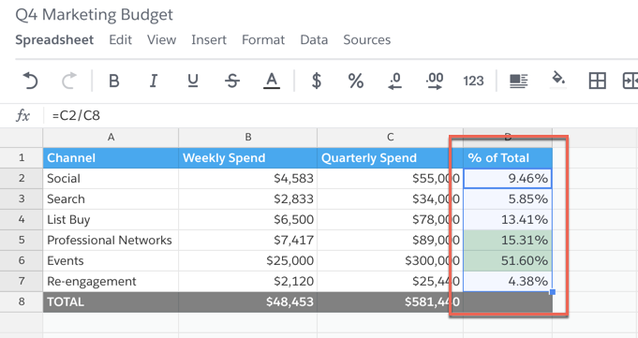
1) 要锁定电子表格中的一个或多个单元格,高亮显示要锁定的一个或多个单元格。
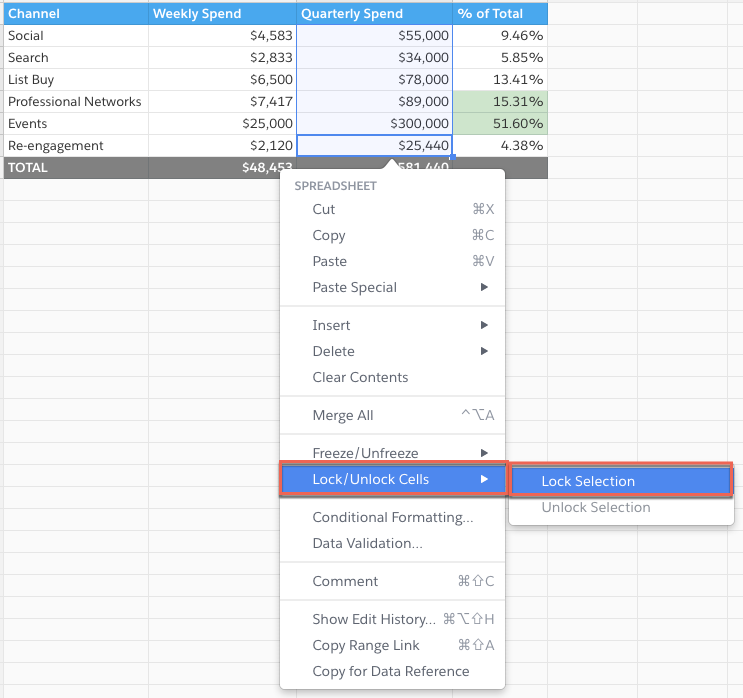
2) 然后,右键单击打开电子表格菜单 > 锁定/解锁单元格 > 锁定选择。
如果要解锁已锁定的单元格,请先高亮显示要解锁的一个或多个单元。然后,右键单击打开电子表格菜单 > 锁定/解锁单元格 > 锁定选择。从格式栏的数据菜单中,您也可以访问锁定/解锁单元格。
在单击锁定单元格时,将显示蓝线,这表示单元格已锁定并无法编辑。
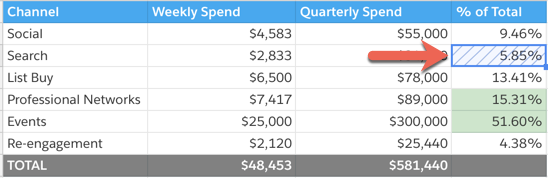
单元格“锁定”究竟表示什么?问得好!
如果单元格锁定,用户无法:
- 将格式化应用于锁定单元格
- 您仍可以调整列宽和行高。此外,单元格边框可以应用于锁定单元格
- 删除锁定单元格
- 隐藏/取消隐藏/冻结/取消冻结包含锁定单元格的行/列
- 移动包含锁定单元格的行/列
- 如果筛选器范围包含锁定单元格 - 用户无法使用筛选器,并应在尝试应用筛选器时看到错误
- 筛选器视图将正常工作,如同所有单元格已解锁
- 对包含锁定单元格的范围排序
1) 要锁定整个电子表格(包含具有多个选项卡的电子表格的所有选项卡),转到电子表格 > 高级 > 锁定编辑。
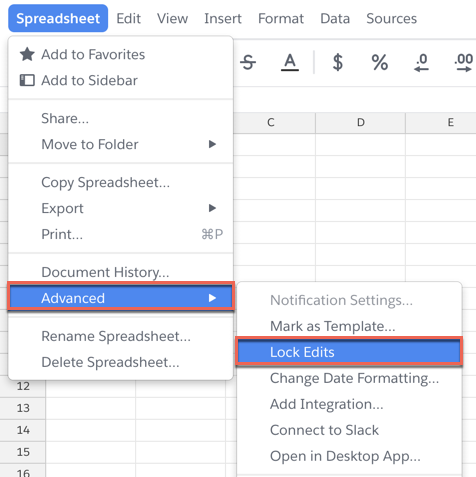
如果您要解锁电子表格,单击左上角的蓝色编辑已禁用和解锁编辑。
如果电子表格锁定,用户无法:
- 实施任何类型的编辑(即格式化、公式、筛选器)
- 添加/移除行或列
- 添加/移除选项卡
如何锁定/解锁电子表格的选项卡
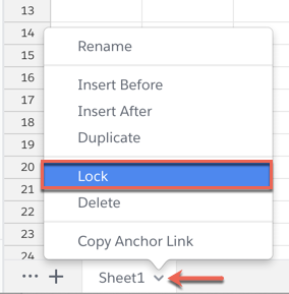
1) 要锁定电子表格中的选项卡,单击工作表名称旁边的箭头,然后单击锁定。
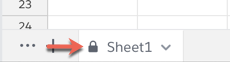
在单个工作表锁定时,您将在工作表名称旁边看到一个锁定符号。
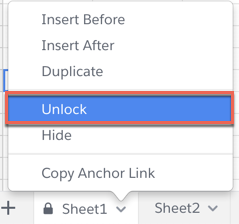
要解锁锁定的选项卡,单击箭头,然后解锁。
如果选项卡锁定,用户无法:
- 对锁定的选项卡实施任何类型的编辑(即格式化、公式、筛选器)
- 在锁定的选项卡中添加/移除行或列
谁可以锁定/解锁单元格
对于拥有电子表格/文档的完全访问权限或编辑权限的任何人,他们可以锁定或解锁单元格,不论电子表格的创建者如何。要防止对电子表格实施任何更改,您可以将共享设置调整为可评论或可查看。有关共享和粒度权限的更多信息,单击此处。
知识文章编号
000389437
本文章是否解决您的问题?
请与我们共享您的想法,以便我们进行改进!
