組織を選択
Inbox を備えた Outlook Integration を初めて使う場合はどうすればよいですか?
公開日: Oct 26, 2022
説明
A. Inbox ライセンスが付与されていることの確認
B. Inbox 権限セットの割当
C. Inbox と Outlook インテグレーションの有効化
D. Office 365 の設定
解決策
1. [右上の歯車] | [設定] | [会社の設定] | [組織情報] の順にクリックします。
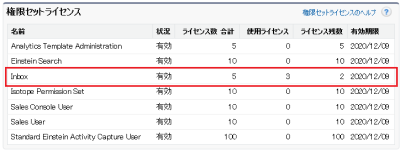
2. [権限セットライセンス] 関連リストに Inbox ライセンスが購入分存在していることを確認します。無い場合は担当営業へご連絡ください。
※ “Sales Cloud Einstein” ライセンスを購入されている場合は、 “Sales Cloud Einstein” ライセンスがあることをご確認ください。
※ “High Velocity Sales” ライセンスを購入されている場合は、 “High Velocity Sales” ライセンスがあることをご確認ください。
B. Inbox 権限セットの割当
※本作業は"システム管理者"プロファイルに属しているユーザで行ってください。
1. [右上の歯車] | [設定] | [ユーザ] | [権限セット] の順にクリックします。
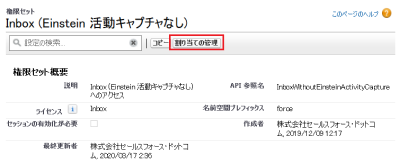
2. Inbox 用の下記権限セットのいずれかを選択し、[割り当ての管理] より利用ユーザへ割り当てます(両方割り当てないよう注意してください。両方割り当てた場合、「Inbox (Einstein 活動キャプチャあり)」が採用されます。)
※ “Sales Cloud Einstein” や “High Velocity Sales” ライセンスを購入されている場合は、それぞれに対応した権限セットを割り当てます。
- Inbox (Einstein 活動キャプチャあり)
- Inbox (Einstein 活動キャプチャなし)
C. Inbox と Outlook インテグレーションの有効化
※本作業は「システム管理者」プロファイルに属しているユーザで行ってください。
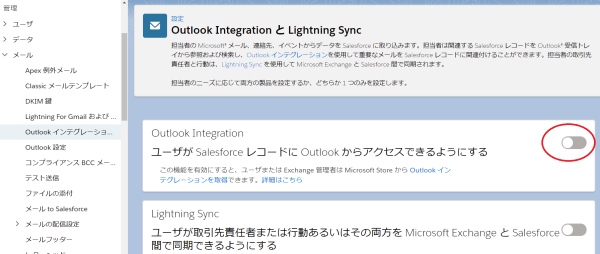
1. [設定] | [メール] | [Outlook インテグレーションおよび同期] の順にクリックします。
2. [ユーザが Salesforce レコードに Outlook からアクセスできるようにする] をクリックし、トグルボタンが青色に変わることを確認します。
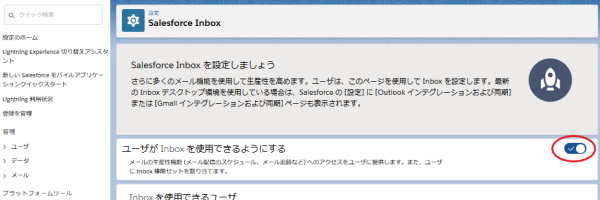
3. [設定] | [Einstein] | [Einstein セールス] | [Inbox] | [設定アシスタント] の順にクリックします。
4. [ユーザが Inbox を使用できるようにする] をクリックし、トグルボタンが青色に変わることを確認します。
D. Office 365 の設定
1. Office 365 Exchange 管理センターへアクセスします。
2. [設定] | [統合アプリ] | [アプリを入手する] をクリックします。
3. Salesforce で検索し、 [Salesforce] を探します。
4. [今すぐ入手する] をクリックします。
5. [続行] をクリックします。
6. 画面の指示に従い、アプリを展開します。
※ [ユーザーを追加] では、 Outlook Integrationを展開するユーザーを指定することが可能です。
なお、Inbox の利用方法については次のヘルプや動画を参照してください。
Outlook および Gmail での Inbox 機能の使用
Connecting to Salesforce in Outlook (Outlook での Salesforce への接続) (日本語字幕あり)
ナレッジ記事番号
000389600
この記事で問題は解決されましたか?
ご意見をお待ちしております。
