組織を選択
Configure Priority Scheduling in Salesforce Maps
公開日: Aug 22, 2023
説明
Salesforce Maps can Schedule events based on a priority field. Below are instructions on how to configure priority settings to use with the Maps Schedule feature.
解決策
Configuring Priority Scheduling
Configure Priority Scheduling in order to utilize this feature in Schedule. Only numeric fields may be used for Priority Scheduling.
Steps
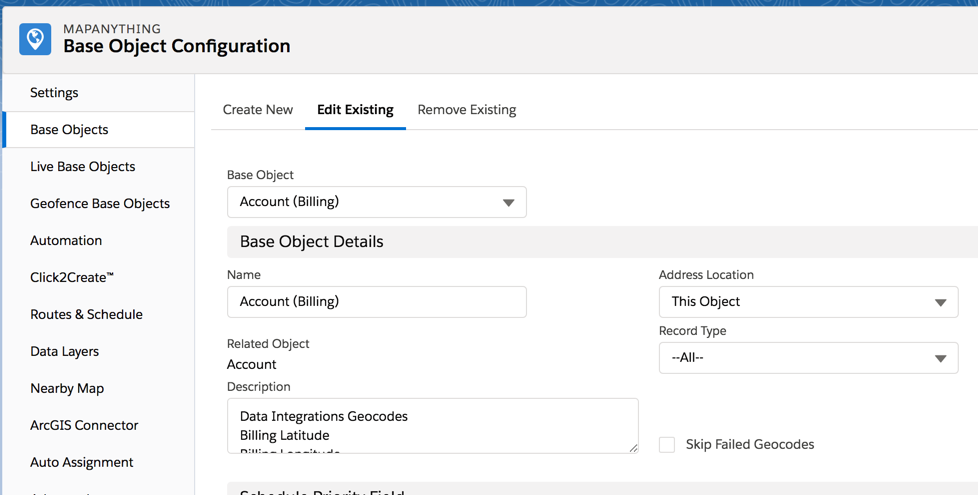
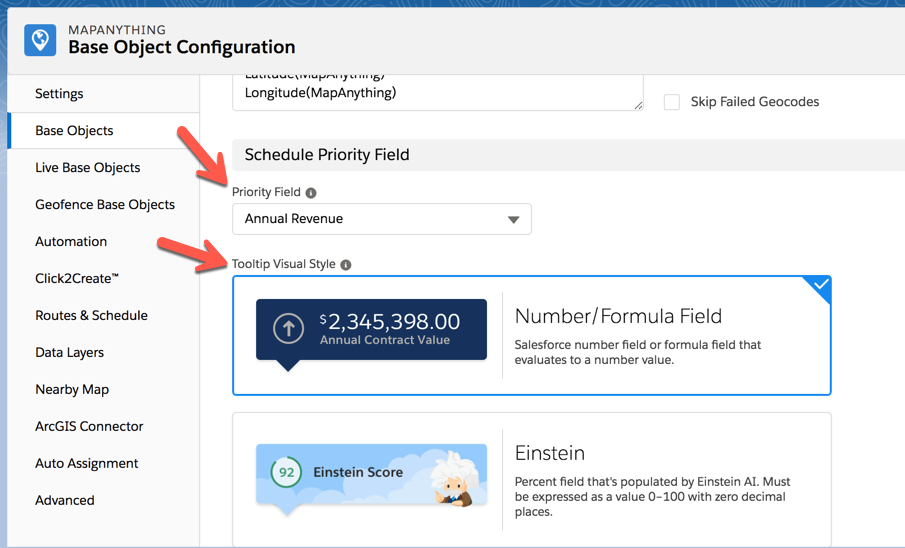
Suppose you want your users to schedule events according to Annual Revenue. You would configure Salesforce Maps to use this field when calculating the order in which to visit Accounts. On the Account base object, you would specify which field to use for priority then select a visual style for the tooltip hover.
- Navigate to the Account base object in Salesforce Maps.
- In the Schedule Priority Field section, select "Annual Revenue" in the Priority Field picklist. Then, select the Number/Formula Field tooltip style.
- Click Save. Now the Account base object is set up to use the Annual Revenue field to calculate priority when using the Schedule feature.
See Also:
Use Mass Actions to add markers to Maps ScheduleCreate new Events with Maps Schedule
ナレッジ記事番号
000389855
この記事で問題は解決されましたか?
ご意見をお待ちしております。
