組織を選択
Quip - Live App
公開日: Aug 18, 2026
説明
解決策
この記事では、次の内容について説明します。
- Live App の基本 (使用方法)
- 考慮事項
- デフォルト Live Apps (Quip)
- デフォルト Live Apps (Salesforce + Quip)
- その他の Live Apps (サードパーティ)
Live App の基本 (使用方法)
Live App をドキュメントに挿入するには、「@」を入力してからアプリ名を入力します。スクロールして使用可能な Live App を見つけることもできます。たとえば、「@ project tracker」と入力し、[挿入] を選択すると、カレンダー Live App がドキュメントに自動的に挿入されます。
デフォルト Live Apps (Quip)
次の Live App は Salesforce データに関連付けることはできません。
カレンダー、カウントダウン、カンバンボード、アンケート、プロセスバー、プロジェクトトラッカー
カレンダー
ドキュメントにカレンダーを挿入するには、「@calendar」と入力して [挿入] を選択します。
カレンダーのヒント:
- カレンダーのイベント内のユーザー、日付、その他のドキュメントを @メンションできます。プロジェクトの調整に便利な方法です。注意: Live App のテキスト項目でのユーザーの @メンションはサポートされていません。@メンションした場合、ユーザー名は表示されますが、ユーザーにはメンションが通知されません。
- イベントの日付を変更するには、作成したイベントをクリックしてドラッグアンドドロップします。
- イベントの長さを変更するには、イベントの右下をクリックしてドラッグします。
- カレンダー Live App には、Google や iCal などのサードパーティのカレンダーと同期する機能が組み込まれていません。 Quip の API を使用して独自のインテグレーションを構築してください。
カウントダウン
ドキュメントにカウントダウンを挿入するには、「@countdown」と入力して [挿入] を選択します。
カンバンボード
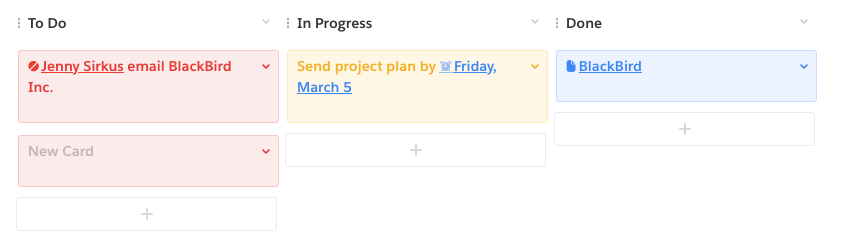
ドキュメントにカンバンボードを挿入するには、「@kanban board」と入力して [挿入] を選択します。
カンバンボードのヒント:
- カンバンボードは、カードと列から成る直感的なシステムです。タスクごとにカードを作成し、各タスクの進行状況に合わせて列間でドラッグします。
- カードを追加するには、各列の下にあるプラス記号をクリックします。
- 列を追加するには、カンバンボードのどこかをクリックし、左上の [列を追加] を選択します。列の名前も変更できます。
アンケート
ドキュメントにアンケートを挿入するには、「@poll」と入力して [挿入] を選択します。
アンケートのヒント:
- アンケートはすばやく簡単に投票できるシステムで、単一投票と複数投票を設定できます。
- アンケートのオプションについてコメントするには、オプション内でスクロールし、+ 記号の付いたチャットバブルを選択します。
ドキュメントにプロセスバーを挿入するには、「@process bar」と入力して [挿入] を選択します。
プロセスバーのヒント:
- 段階的なプロセスを定義し、そのプロセスを追跡します。
- 説明されたプロセスについてコメントするには、プロセス内でスクロールし、+ 記号の付いたチャットバブルを選択します。
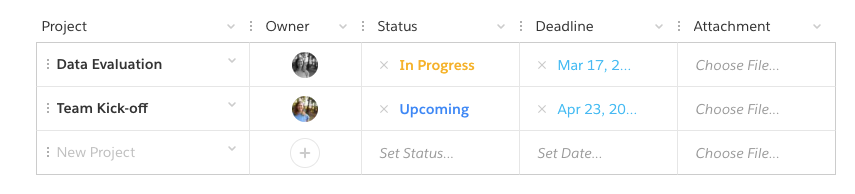
ドキュメントにプロジェクトトラッカーを挿入するには、「@project tracker」と入力して [挿入] を選択します。
プロジェクトトラッカーのヒント:
- プロジェクトを割り当て、監視、整理します。納期を設定してファイルを添付します。
- 列の名前を変更したり、列を並べ替えたりできます。ユーザー (所有者)、日付、ステータス、ファイル、プレーンテキストを格納できます。
- プロジェクトを並べ替えるには、プロジェクト名の左側にある 3 つの点をクリックし、新しい場所にドラッグします。
 デフォルト Live Apps (Salesforce + Quip)
次の Live Apps は、以下の Salesforce データに関連付けられており、Quip Advanced の顧客が使用できます。
Einstein Analytics、リレーションマップ、Salesforce リスト、Salesforce レコード
Salesforce Live Apps と対応する項目の概要については、こちらをお読みださい。
個々の Live App に関する具体的な情報は、次のリンクでご覧ください。 その他の Live Apps (サードパーティ)
独自の Live App またはオートメーションを構築しますか?Quip の Live Apps API をご確認ください。
Dropbox、Vidyard、Lucidchart など、Salesforce AppExchange 経由で利用できるさまざまなサードパーティの Live Apps もあります。こちらからご確認ください。
ナレッジ記事番号
000389891
この記事で問題は解決されましたか?
ご意見をお待ちしております。
