Vælg en organisation
How to Pull a HAR Log for Salesforce Quip
Udgivelsesdato: Oct 12, 2026
Beskrivelse
Quip Support may sometimes ask for a HAR log to help troubleshoot and diagnose an issue.
This article explains how to safely capture and share a HAR log for Quip.
Løsning
Quip Support may request a HAR log to troubleshoot and diagnose issues. This article explains how to create a HAR log safely and how to pull one for a Quip issue.
HAR Security Guidelines
Please read the HAR Security Guideline before creating them in the web browsers (Google Chrome, Safari, Microsoft Edge, Mozilla Firefox)
HAR (http archive) files may contain sensitive data, including cookies, authentication tokens, and personal information. This data can lead to security risks such as impersonation and unauthorized access.
When creating a HAR File, customers must ensure that the following safeguards are completed before the file is sent to Salesforce Support and Third Party Vendors.
- Sanitize: Sanitize files before sharing using a HAR sanitizer (Example - Cloudflare HAR sanitizer) or manually with a text editor, to redact sensitive information.
- Log Out of Sessions: If investigating non-authentication issues, log out of any active sessions before recording to enhance security and prevent capturing active session tokens.
- HAR Hygiene: Treat HAR files as Restricted. Restrict access to only appropriate personnel and ensure secure storage and transmission. HAR files must never be uploaded un-sanitized outside of Salesforce (e.g. ChatGPT).
Steps to Pull a HAR Log
- In the web browser where the issue or bug is presenting itself, open the corresponding Quip page
- Right click anywhere on the Quip page
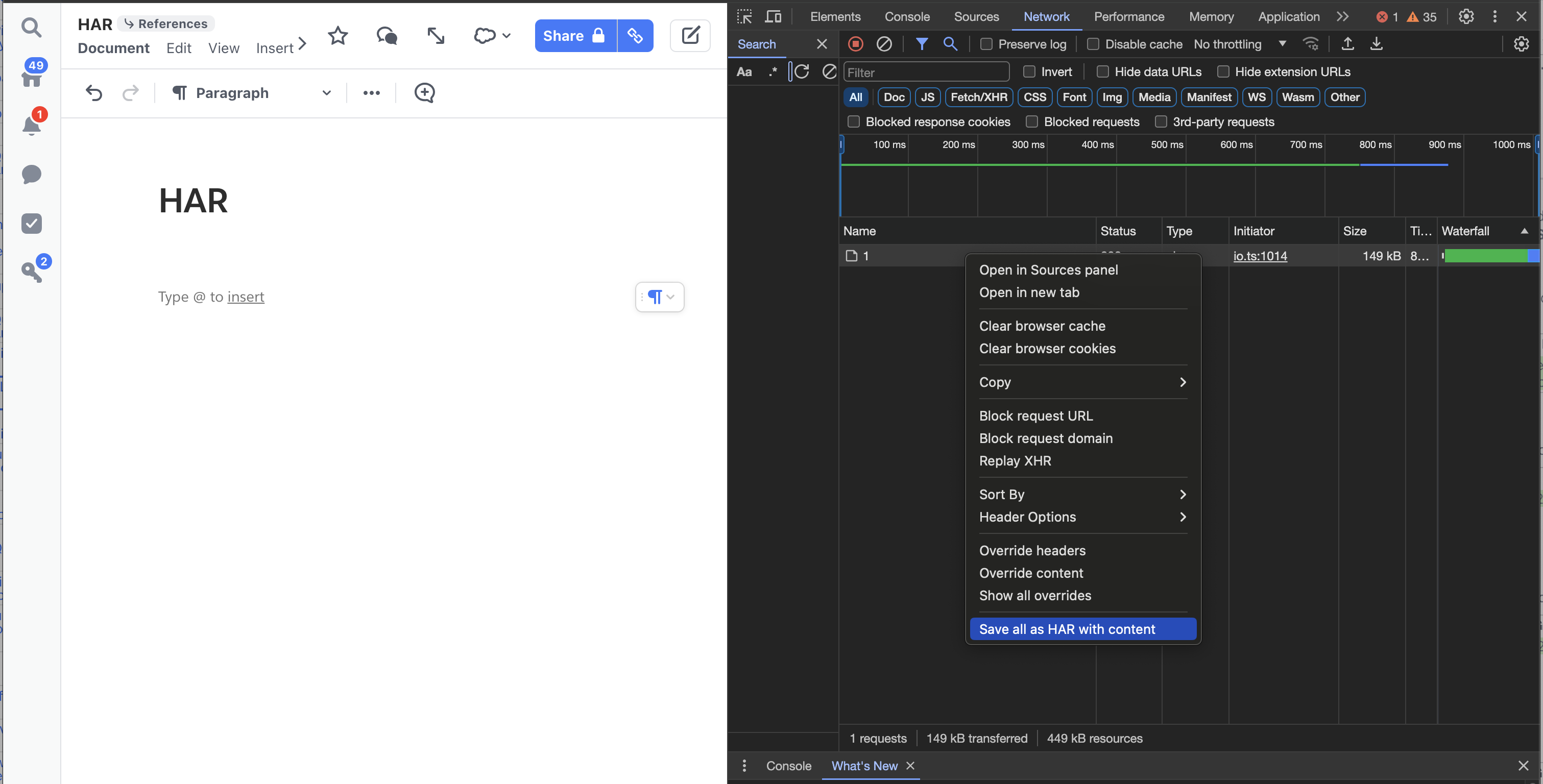
- Select Inspect (the screen will split to show Developer Console*)
- Select the Network tab
- Keep the Developer Console open and replicate the issue/bug (the Developer Console will show logs)
- Right click on any of the log lines and select Save all as HAR with content
- Upload the resulting HAR log file to the support case at https://help.salesforce.com
- You can also add a HAR file to a Quip document by using @file, or by dragging the file into the Quip document. We recommend then sharing the document with the Quip Support team.
*Developer Console
Yderligere ressourcer
Vidensartikelnummer
000390479
Løste denne artikel dit problem?
Giv os besked, så vi kan forbedre os!
