Valitse organisaatio
Get Ready For Your Peak Season - Best Practices and Troubleshooting for B2C Commerce
Julkaisupäivä: Aug 21, 2025
Kuvaus
This article is a gathering of the considerations and best practices when using the Commerce Cloud B2C platform. If you are using Salesforce Salesforce Order Management (SOM) and/or Omnichannel Inventory (OCI), please also see Get Ready For Your Peak Season - Considerations & Best Practices for SOM/OCI.
Ratkaisu
Platform Overview
A quick refresher of our multi-tenant architecture will help you to refine your understanding of the latest Commerce Cloud platform and its components.
"You can’t connect the dots looking forward; you can only connect them looking backwards." Steve Jobs
Doc: Platform Overview
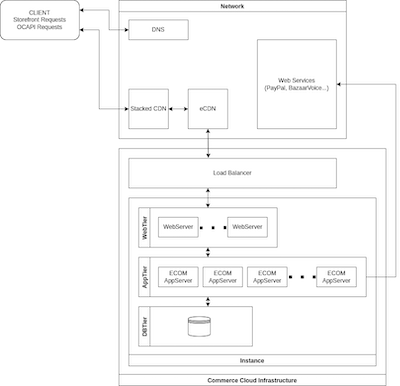
PLATFORM - External Layers
-
eCDN: Content Delivery, DDOS Protection, WAF, Static Content Caching, Origin Shielding
PLATFORM - CORE Layers
-
Load Balancer: Routing
-
Web Server: App Server Load Balancing, Content Caching, Page Assembly, Request Handling
-
App Server: Business Logic, Third Party Communications, DB Communications
-
Database Subsystem: Data Store
Site Performance Is a Shared Responsibility:
-
Salesforce provisions customers to multi-tenant environments to support their growing businesses, building in-app tools for testing and monitoring, and providing best practices.
-
Partners & Customers can configure and use the platform, following coding best practices, utilizing monitoring tools, and executing performance & load testing.
Proactive Strategies & Best practices
Taking into consideration customer stories and effective business cases, Commerce Cloud has gathered the best strategies and practices for your business to take a shortcut to success.
-
Hype/Flash Sales & Bot traffic: Our most recent promotional tactics and strategies
-
Custom code considerations: Make sure your integration follows our latest API and coding best practices so as to avoid extra, unnecessary processing and resolve inefficiencies
-
Caching: is key to your application performance. Achieving caching ratios above 70% will carry your business up to next speed
-
eCDN: Our embedded Content Delivery Network is configured by default as an additional caching layer but also has firewall functionality. Studying the specific traffic of your production, together we can leverage its usage. Nevertheless, we highly recommend you to stack a CDN (CloudFlare, Akamai, Cloud CDN...) on the top to enjoy its firewall capabilities independently.
-
Jobs: The Job Framework broadens data processing perspectives. Using third parties or exclusively CC APIs, non-optimal jobs can initiate critical issues.
-
Web Services: Frames external/service connections to your CC instances. Following these guidelines and the advised setup for each service will help you isolate your application from service performance. It will also let your application be available anytime, even if a service presents issues or has an extended unavailability.
-
Quotas: ensure the efficiency and stability of solutions built on the top of the platform
-
Housekeeping: keep your data system tight to avoid unexpected events
-
Retention Settings and - Doc: Configure Retention Settings
-
Order retention - Doc: Order Preferences
-
-
Custom Object retention - Make sure to define COs retention directly in the BM to automate their cleanup
-
Deprecated APIs usage - review corresponding log entries to identify deprecated APIs in use in the integration
-
Catalog Structure - Doc: How to optimise your product data
-
-
Load testing: provides the needed data to reach your target traffic
Performance & Troubleshooting
An exhaustive index of our troubleshooting tools with a reminder on how to work best with Commerce Cloud Support will provide you the latest information to tackle incoming challenges.
-
Scoping the issue and sharing the right details
-
Performance
-
Monitoring Tools - analyze your live metrics to identify the best selling strategies and maintain top performance
-
Troubleshooting Tools - get detailed analysis of specific parts of your integration
-
Developer Tools - in-browser client’s troubleshooting
-
Google Chrome: Chrome DevTools
-
Mozilla Firefox: Firefox DevTools User Docs
-
Doc: Create HAR files in supported browsers for advanced troubleshooting
-
-
Analyze Performance with Pipeline Profiler (Section: 3.9. Analyze Performance with Pipeline Profiler)
-
Doc: Log Center
-
Doc: Storefront Toolkit
-
Lisäresurssit
Knowledge-artikkelin numero
000390777
Ratkaisiko tämä artikkeli ongelmasi?
Anna palautetta, jotta voimme kehittyä!
