Select An Org
Salesforce Monthly Account Summary Usage Statement FAQs
Publish Date: Jan 22, 2026
Description
Find answers to frequently asked questions about entitlements, product usage, and the terminology used in your Monthly Account Summary email (usage statements) from Salesforce.
- What are consumption-based (or usage-based) products?
- What are usage types and subtypes?
- What is a multiplier?
- How will I receive my Multiplier Information going forward?
- How do I access my Multiplier Information?
- What is a tenant?
- What is a primary billing contact?
- How does Salesforce draw down usage from multiple contracts?
- How do I add to or change who gets Monthly Account Summary emails?
- What is a Monthly Account Summary?
- Who receives Monthly Account Summary emails?
- How will I receive my Monthly Usage Summary going forward?
- How do I access my usage information?
- Can I find usage data without getting Monthly Account Summary emails?
- Why does Salesforce provide Monthly Account Summaries?
- When does Salesforce send Monthly Account Summaries?
- How is my usage calculated if my contract starts or renews in the middle of the month?
- Why am I not receiving Monthly Account Summary emails?
- Is a Monthly Account Summary the same as an invoice?
- Who can I contact if there is a discrepancy in monthly usage?
- How do I re-enable or opt-out of Monthly Account Summary emails?
What are consumption-based (or usage-based) products?
Consumption-based (or usage-based) products are those that consume credits, users, capacity or other digital currency when they are used (collectively ‘entitlements”). Additionally, if your org uses Digital Wallet, “Entitlements” is the term your Monthly Account Summary will use to refer to your Digital Wallet card or groups of usage types (more on usage types below).
When a consumption-based product is purchased, the quantity of Entitlements for that product will be set forth in the Usage Details Table of the Order Form along with a Usage Rate that applies when the purchased entitlement has been exceeded as a result of a customer’s usage of that product. Once the amount of purchased entitlements has been used (or expires, meaning they are not used within the contracted time period), customers will be invoiced in arrears based on the Usage Rate or they can purchase additional increments of entitlements for usage (such as GBs of data storage). This is different than some of our other products which allow you to purchase access to the product for a set number of users.
Back to top
What are usage types and subtypes?
Some Entitlements can be broken down into usage types. Many consumption-based products and associated SKUs offer a set of resources that are defined by how you can use them and what counts as usage when you do. These metrics-defined resources are called “usage types.” Usage types can be anything from SMS messages to data queries depending on the product.
Some usage types can be broken down even further and consumed in multiple ways. We refer to these as "subtypes." For example, let’s say you have a Salesforce license to use Marketing Cloud and the Usage Details table of your Order Form shows a quantity of 1,000 Super Messages (including SMS/MMS) which you use to send SMS messages to Japan, France, and Italy. In that case, "Marketing Cloud" is the usage-based product, "Super Messages" is the overarching entitlement or usage type that is reflected in the Usage Details Table, and the "SMS messages" sent to Japan, France, and Italy are the usage subtypes.
Back to top
What is a multiplier?
Many usage types are subject to multipliers where different types of usage will result in consumption of a multiple of entitlements. As you interact with a usage-based product’s usage type, your consumed usage is multiplied by a predetermined number called a “multiplier” to get your total usage. In some cases, the multiplier is 1 (or 1:1), so your usage is simply subtracted from the quantity of your entitlement as shown in the Usage Details table of the Order Form. Factors like currency and market value can be determining factors for setting applicable multipliers. Whenever an entitlement is subject to multipliers, the Order Form will include a link to a multiplier table.
More intricate Salesforce products have multiple usage types, each with different multipliers, meaning they take more usage units each time you use them. For example, let's say the applicable multiplier table for SMS/MMS Messaging specifies that SMS messages sent to Japan have a multiplier of 30 (or 30:1), then every time you send 1 message to a recipient located in Japan, Salesforce multiplies that by 30 and subtracts it from your entitlement. So, if you send 40 messages to Japan, then 1,200 usage units will be subtracted from your entitlement (30 x 40 = 1,200).
How will I receive my Multiplier Information going forward?
Your Multiplier details are now provided as a PDF attachment (effective after 15th November) in the notification email you receive when your multiplier changes. Previously, these details were listed directly in the email body. Now, the same information is delivered in a PDF attachment for better organization, consistency, and readability.
How do I access my Multiplier Information?
When you receive a Multiplier Change email, simply open the message and locate the attached PDF file (effective after 15th November). This document contains your updated multiplier details, including the usage type, environment (production or sandbox), the new multiplier rate, and the effective date. You can view the PDF within the email or download it for your records.
What is a tenant?
A “tenant” is synonymous with your organization (“org”) or instance in Salesforce. Each tenant has a unique number. If you receive Monthly Account Summary emails, the tenants associated with the contract are shown on the right side above each Usage Type table in the Monthly Account Summary.
Back to top
What is a primary billing contact?
The “primary billing contact” is the person listed on your Salesforce Order Form as the billing contact, along with an associated email address. Billing notification emails, Monthly Account Summaries, multiplier notification emails, invoices, credit memos, system-generated renewal notices, and order confirmations from Salesforce are sent to the primary billing contact.
Back to top
How does Salesforce draw down usage from multiple contracts?
If your org has usage entitlements for products that appear on multiple contracts, Salesforce may pool those entitlements together so that you consume those entitlements that will expire the earliest. This avoids the risk of you losing an entitlement if its term has lapsed. Then, to the extent you have consumed all of your purchased entitlements, Salesforce applies the usage rate which is the lowest rate across all of your contracts. By allocating over-use to the contract with the lowest overage rate, customers pay the lowest contracted rate available.
Entitlements that are subject to pooled utilization will have the NOTICE - Pooled Utilization term associated to the product’s terms within the Product Terms Directory (PTD). If the entitlement is not subject to pooling, the NOTICE - Utilization term will apply (or an equivalent).
Back to top
How do I add to or change who gets Monthly Account Summary Emails?
Contact your Account Executive (AE) to add to or change the list of people in your org who receive Monthly Account Summary Emails.
Back to top
What is a Monthly Account Summary?
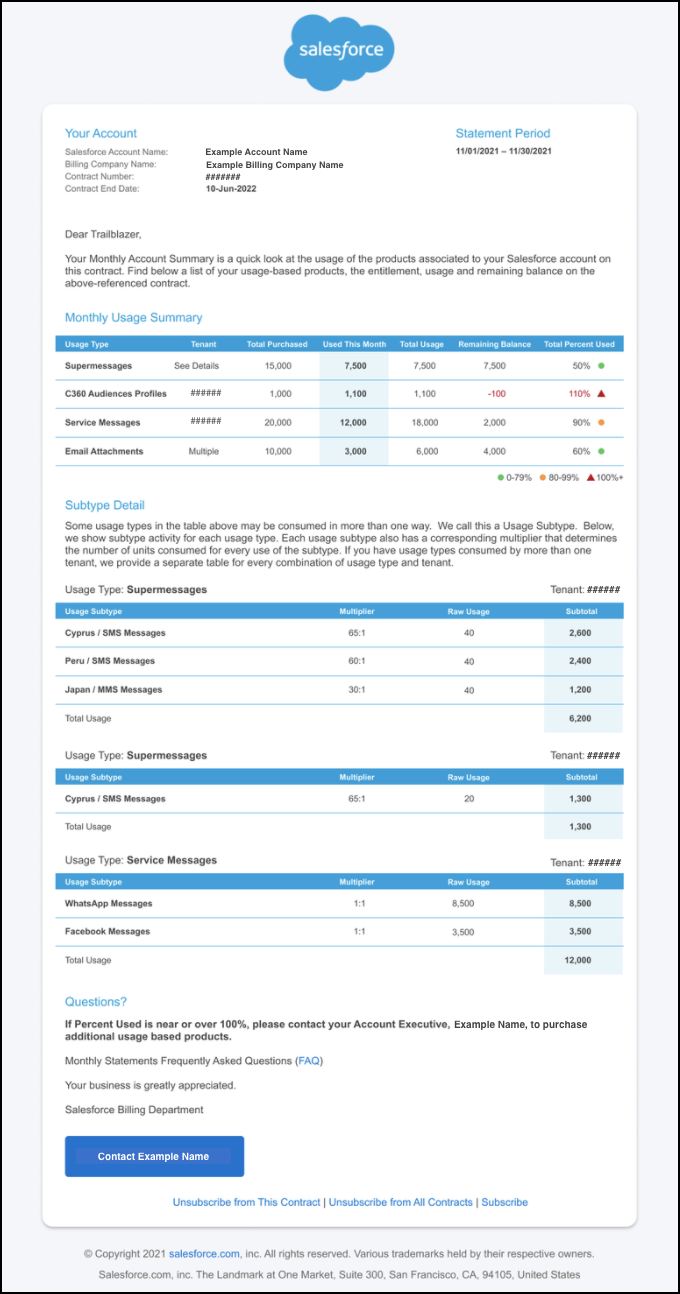
For some Salesforce contracts that allows for usage-based billing, Salesforce sends a monthly overview email called a Monthly Account Summary to the primary billing contact and entitlement notification contacts listed on the contract record. The Monthly Account Summary email shows the Salesforce usage-based products listed on the contract and additional details including the total usage of each product, the entitlements, and the remaining usage balance.
Back to top
Who receives Monthly Account Summary emails?
By default, Monthly Account Summary emails are sent to the AEs, primary billing contact, and any other entitlement notification contact listed on the Salesforce contract record. To see who these contacts are, check the signed Salesforce order form for the contract. To add to or change the list of email recipients in your org, contact your Account Executive (AE).
Back to top
How will I receive my Monthly Usage Summary going forward?
Your Monthly Usage Summary will now be provided as a PDF attachment (effective after 15th November) in the monthly email you receive. This change is designed to make your usage information easier to read and better organized.
Previously, usage details were included directly in the body of the email. Now, the same information is delivered in a PDF attachment, offering a cleaner and more consistent experience. While the delivery format has changed, the content remains exactly the same.
How do I access my usage information?
When you receive your Monthly Usage Summary email, simply open the message and look for the attached PDF file (effective after 15th November). This file contains your full monthly usage details. You can open it to review your usage and download it if you’d like to keep a copy for your records.
Can I find usage data without getting Monthly Account Summary emails?
If your products have Digital Wallet enabled, you’ll be able to see your consumption data within your Salesforce instance. If you know you have Digital Wallet enabled products or want to learn more, see our Digital Wallet help content.
Back to top
Why does Salesforce provide Monthly Account Summaries?
At Salesforce, trust is our #1 value. One of the ways we’re working to build that trust with you is by providing accurate, transparent, and predictable usage data via our Monthly Account Summaries. We also believe that regularly showing you how much or how little you’re using our products will prevent surprise overage invoices and help you make the most out of your Salesforce investment.
Back to top
When does Salesforce send Monthly Account Summaries?
Monthly Account Summaries are sent on the 10th of every month.
Back to top
How is my usage calculated if my contract starts or renews in the middle of the month?
Monthly Account Summary emails are sent on the 10th of every month and show your usage data from the previous month. Because of this timing, the day your contract starts or renews can affect the usage data shown in the first Monthly Account Summary after the renewal or contract start date. Below are some scenarios to explain how usage is calculated the month a contract starts or renews.
If your contract starts or renews on June 3:
- June 10 - No Account Summary email.
- July 10 - Account Summary email arrives; shows June 3 to June 30 usage.
- Aug 10 - Account Summary email arrives; shows July 1 to July 31 usage.
If your contract starts or renews on June 20:
- July 10 - Account Summary email arrives; shows June 20 to June 30 usage.
- Aug 10 - Account Summary email arrives; shows July 1 to July 31 usage.
Additionally, if you’re unsure of what time frame was included in your account summary, you can check the statement period dates listed in the top right of your Monthly Account Summary email.
Back to top
Why am I not receiving Monthly Account Summary emails?
Here’s why you might not be receiving Monthly Account Summaries and links to other FAQs on how to change that:
- Your Salesforce contract doesn't include usage-based products.
- You unsubscribed or opted out of the Monthly Account Summary emails.
- You're not the primary billing contact or an entitlement notification contact listed on the contract.
- Your contract has disabled overage billing. Talk to your Account Executive (AE) if you'd like to receive Monthly Account Summaries and you think this is why you're not.
Is a Monthly Account Summary the same as an invoice?
No. Monthly Account Summaries are not the same as invoices. Monthly Account Summaries are a snapshot of your usage within the last month and are provided to you for informational purposes only. Your invoice is how much your org is expected to pay Salesforce based on your contract terms and usage. In the event of a discrepancy in usage, the invoice is the source of truth.
Back to top
Who can I contact if there's a discrepancy in monthly usage?
Contact your Account Executive (AE) if you find a discrepancy in your monthly usage data.
Back to top
How do I re-enable or opt-out of Monthly Account Summary emails?
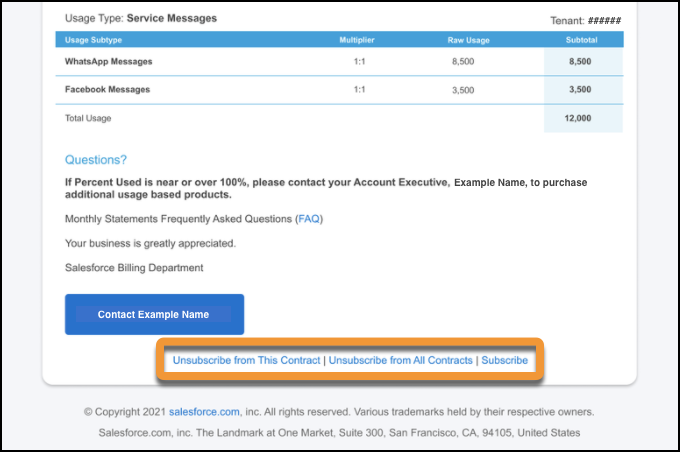
At the bottom of every Monthly Account Summary email, there are three links: Unsubscribe from this Contract | Unsubscribe from All Contracts | Subscribe. Click the appropriate link.
Back to top
Knowledge Article Number
000390885
Did this article solve your issue?
Let us know so we can improve!
