Valitse organisaatio
Values in Screen Element - Lookup field is removed when a validation fires upon submitting the flow
Julkaisupäivä: Oct 13, 2022
Kuvaus
Steps to Replicate the issue:
1) Create a screen flow.
2) On the screen element, add a text input and mark it as a required field.
3) Add a Lookup component and refer It to any sObject that contains a lookup field Eg: contact.accountId.
4) Debug the flow.
5) Populate a value in the lookup field and click Finish. Ensure that no values are entered in the Required text field
5) Observe that a validation fire and lookup field is wiped out after clicking on the finish button.
Ratkaisu
The solution is to have the Record ID input set to something In the lookup field. If using auto-outputs, you can set it to the component's own value, like {!myLookup.recordId} i.e (ApiName.recordid).
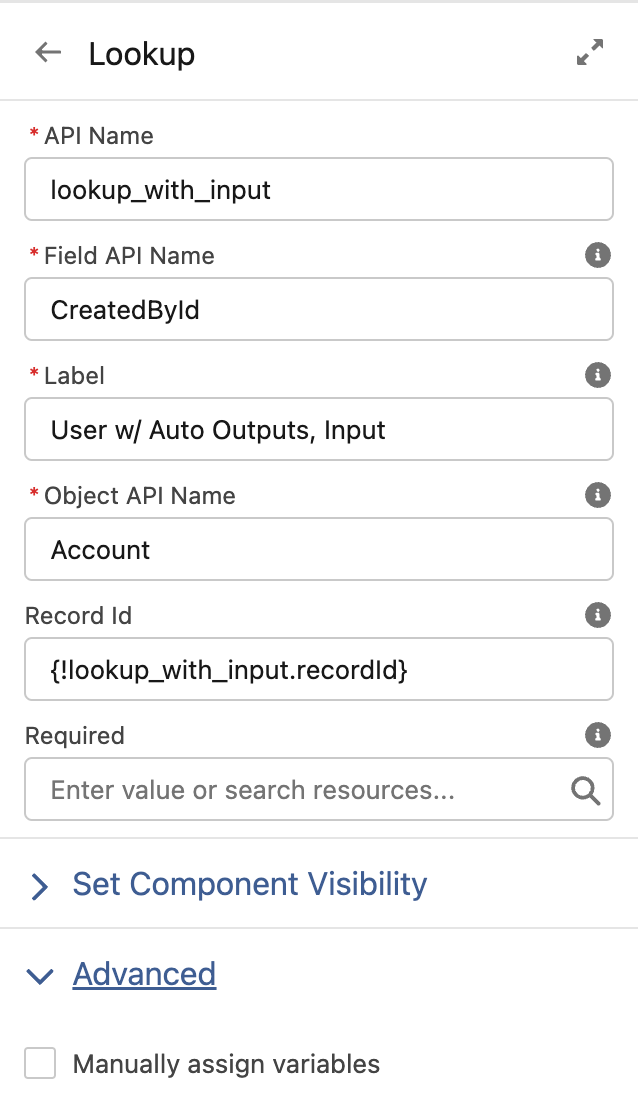
Note: By default, screen components that require Lightning runtime have no memory. If a user enters a value, navigates to another screen, and returns to the component’s screen, the user-entered value is lost. To enable a flow to remember the value of an attribute, set the attribute. The flow stores the value automatically. If you store values manually, store the attribute’s output value in a variable.
https://help.salesforce.com/s/articleView?id=sf.flow_ref_elements_screencmp_address.htm&type=5
Knowledge-artikkelin numero
000391007
Ratkaisiko tämä artikkeli ongelmasi?
Anna palautetta, jotta voimme kehittyä!
