Organisation auswählen
Option zum Teilen von Dateien in der Bibliothek über öffentlichen Link nicht verfügbar
Veröffentlichungsdatum: Apr 2, 2026
Beschreibung
Benutzer stellen möglicherweise fest, dass sie nicht die Möglichkeit zum Teilen von Dateien über einen Link für Dateien oder Ordner in Lightning haben.
Lösung
1. Inhaltszustellungen und öffentliche Links
Stellen Sie sicher, dass Sie dieses Menü auf der Setup-Seite sehen. Andernfalls wenden Sie sich an den Salesforce-Support, um es zu aktivieren. Wahrscheinlich ist der Grund eine fehlende Berechtigung.
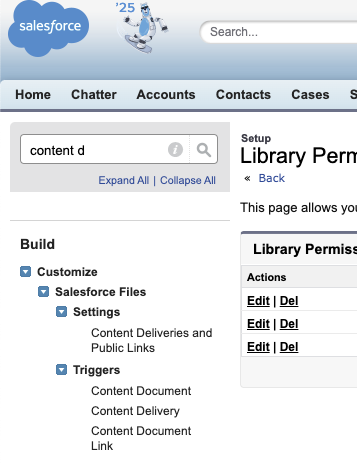
Wenn Sie die Optionen "Inhaltszustellungen" und "Öffentliche Links" sehen, aktivieren Sie die Option Öffentliche Links können für Benutzer aktiviert werden (erfordert Inhaltszustellungen).
2. Inhaltsberechtigungen
Stellen Sie sicher, dass Inhaltsberechtigungen aktiviert ist. Damit die Option angezeigt wird, wählen Sie unter "Salesforce CRM Content" in "Setup" die Option Salesforce CRM Content aktivieren aus.
3. Stellen Sie sicher, dass Salesforce CRM Content-Benutzer in Ihrem Benutzerdatensatz ausgewählt ist.
4. Nachdem die vorherigen Schritte festgelegt wurden, führen Sie die folgenden Schritte aus:
- Wechseln Sie in den Classic-Modus.
- Geben Sie unter "Setup" den Text Inhaltsberechtigungen ein. (Hinweis: Inhaltsberechtigungen verwalten ist nur in Classic verfügbar.)
- Wählen Sie die richtige Bibliotheksberechtigung aus (z. B. Autor, Betrachter, Workspace-Administrator oder Bibliotheksadministrator).
- Klicken Sie neben dem Berechtigungsnamen auf Bearbeiten.
- Wählen Sie die Berechtigung Inhalte zustellen aus.
- Klicken Sie auf Speichern.
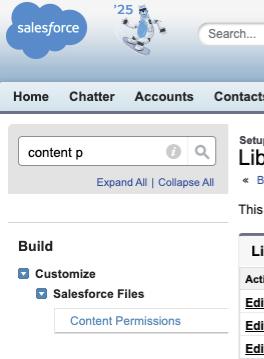
Die Option, Dateien über einen öffentlichen Link zu teilen, ist nun verfügbar.
Nummer des Knowledge-Artikels
000391143
Konnten Sie Ihr Problem mithilfe dieses Artikels lösen?
Geben Sie uns Feedback, damit wir uns verbessern können.
