Выбрать организацию
What to do if Googlebot traffic hits your B2C Commerce site
Дата публикации: Sep 22, 2025
Описание
These are a few steps to handle increased Googlebot traffic on your B2C Commerce sites.
Решение
- Log into Business Manager (BM) for your Production instance and select your site.
- Go to SEO | Robots.
- If you see the Use robots.txt File from deployed cartridge option, contact your development team to make the changes described in the 5th step to the robots.txt in the deployable code and then deploy the changes at your earliest connivence.
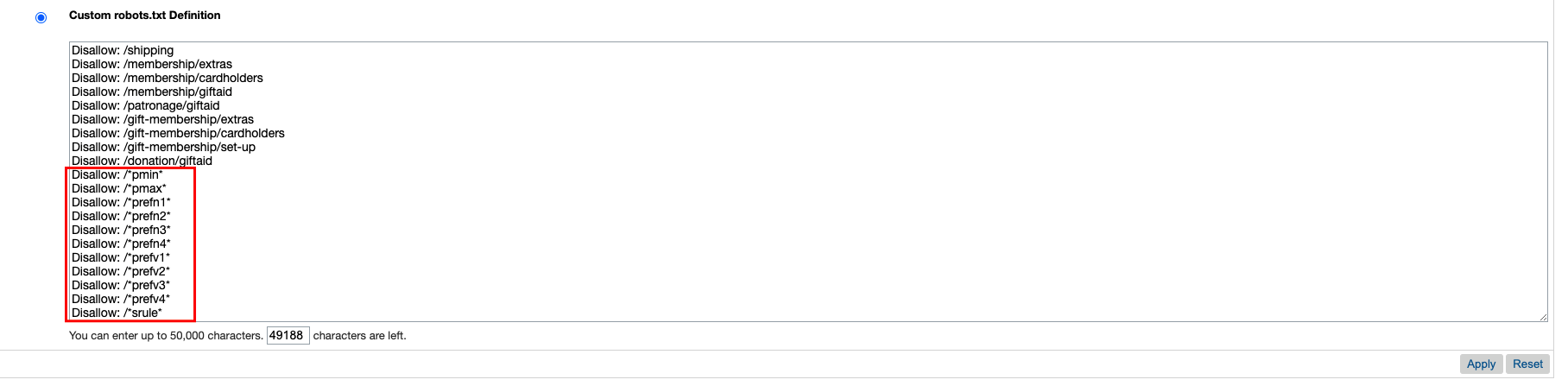
- Select the Custom robots.txt Definition option.
- Make the following change in the robots.txt section (Note: If you already have entries in that form, add the following to bottom ):
# Search refinement url parameters
Disallow: /*pmin*
Disallow: /*pmax*
Disallow: /*prefn1*
Disallow: /*prefn2*
Disallow: /*prefn3*
Disallow: /*prefn4*
Disallow: /*prefv1*
Disallow: /*prefv2*
Disallow: /*prefv3*
Disallow: /*prefv4*
Disallow: /*srule*
- Save your changes by hitting the Apply button.
- The steps above should be repeated on all your sites as well as on Staging if you replicate your SEO configuration to Production.
- In order to get the changes populated to all your instances quicker, you can perform a restart as outlined in Start, Stop, and Restart Instances in Control Center once you are done with all changes for all your sites.
Номер статьи базы знаний
000391193
Эта статья решила вашу проблему?
Оставьте свой отзыв, чтобы мы могли стать лучше!
