Выбрать организацию
Polish and WebP functionality in B2C Commerce embedded CDN (eCDN)
Дата публикации: Nov 19, 2025
Решение
What is WebP?
WebP is an image format for the web. The three image formats below can be converted to WebP:
- JPEG
- GIF
- PNG
What is Polish in eCDN?
The B2C Commerce platform's embedded CDN (eCDN) has an automatic image optimization feature, which offers different polish levels - which will reduce the size of images. It compresses images and removes unnecessary data so that they’re delivered to browsers more quickly.
Although Polish can now produce WebP images by converting them from other formats, it can't consume WebP images to optimize them. If you upload a WebP image, Polish won't do anything with it.
Polish has two modes: lossless and lossy.
Lossless (called as Polish Level Basic in Business manager)
In lossless mode, JPEG images are optimized to remove unnecessary data, but the image displayed is unchanged.
In this mode, gif and png image types are changed.
Lossy (called as Polish Level Basic+JPEG in Business manager)
In lossy mode, the quality of JPEG images is reduced, which can reduce visual quality and allows it to further reduce the size of the image data.
Where can polish levels be configured?
Polish settings are unique for every zone so you will need to configure each one you have in Business Manager by going to Administration > Sites > Embedded CDN Settings > [zone] > Speed.
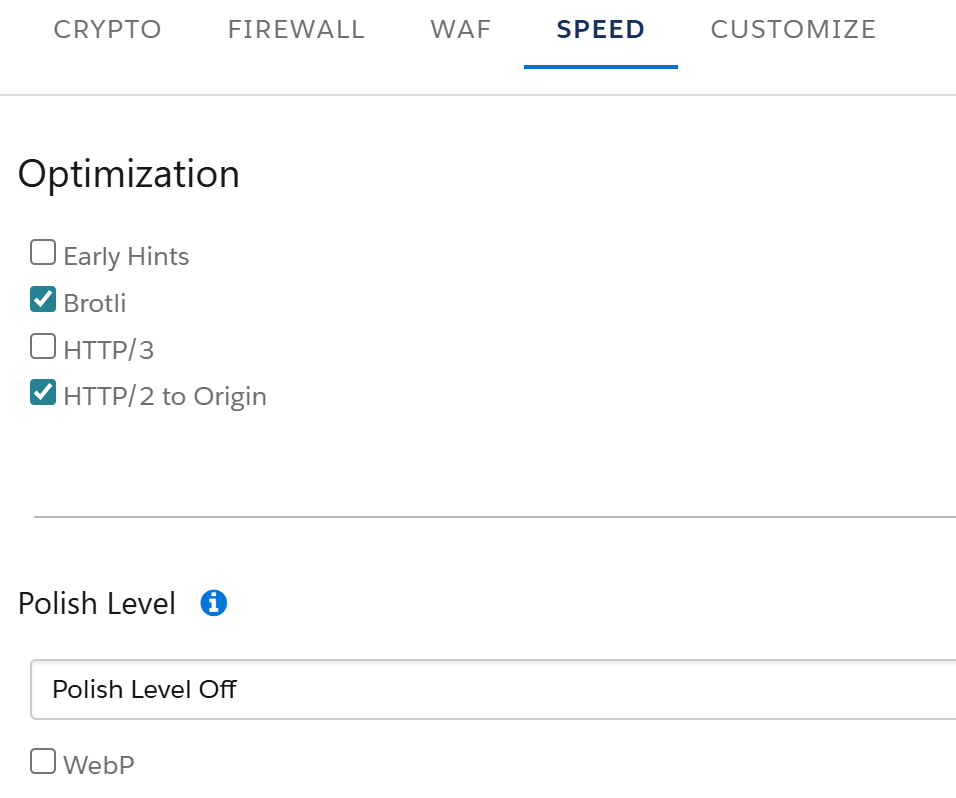
- Polish Level Off - No image modification occurs. No compression.
- Polish Level Basic - Image file size is reduced without impacting visual quality. This option removes metadata for PNG, GIF, and JPEG files. It also results in lossless compression of PNG and GIF files. In this mode, JPEG images are optimized to remove unnecessary data, but the image displayed is unchanged.
- Polish Level Basic+JPEG - In addition to the actions for the basic level, file size of JPEG images is reduced using lossy compression, which can reduce visual quality. Large JPEG images are converted to progressive images (site visitors see an increasingly detailed image as the file is downloaded). This functionality is applied only to images served through the B2C Commerce platform's eCDN and Dynamic Imaging Service (DIS). Images retrieved from third-party sites aren’t modified.
Polish Level - WebP conversion
You can enable the automatic creation of WebP images by checking the WebP box in the Polish settings for a zone. When this checkbox is enabled, Polish will optimize images just as it always has, and it will also convert and serve WebP images, which will be served only if its data is significantly lower than the original format).
WebP Compatibility and Configuration Requirements
The WebP image format is only supported when used in conjunction with the Polish Level optimization feature. To ensure proper functionality, only the following configurations are supported:
- Polish Level Basic + WebP - PNG and GIF files are optimized and converted to WebP format.
- Polish Level+JPEG + WebP - Along with compression of the images, JPEG images are also converted to WebP format.
How to validate successful image conversions to WebP format?
You will see the following headers if Lossy WebP conversion is applied:
Content-Type: image/webp
Cf-polished: qual=85, origFmt=jpeg, origSize=” (Note: cf-polished will only be added in the header if Polish Level BASIC+JPEG is selected)
Content-Length: [compressed size of image]
Note: ‘origSize’ would be the uploaded image's original size.
A Lossless compression won't trigger these headers. In case the WebP images are not served, the attribute value pair below can be added in the header:
Cf-polished: origSize=1163 status=“webp_bigger”
webp_bigger: Polish attempted to convert to WebP, but the image was optimized at the origin server or was created using a low-quality setting.
Note: WebP conversion does not change the URLs of images, even if the file extension in the URL implies a different format. For example, a JPEG image at https://example.com/picture.jpg that has been converted to WebP will still have that same URL. The “Content-Type” HTTP header tells the browser the true format of an image.
Headers in the Browser
Inspect > Network tab
Refresh Page
Check the headers for images
What happens if WebP images are uploaded instead of JPEGs?
Although Polish can now produce WebP images by converting them from other formats, it can't consume WebP images to optimize them. If you put a WebP image on an origin site, Polish won't do anything with it.
Is every image converted to WebP served?
In case the conversion to WebP doesn’t produce a result smaller than the original image, no WebP image is served. Rather, the original image size and format are considered. This is indicated by the attribute value pair in the header: cf-polished: origSize=1163 status=“webp_bigger”. If you serve low-quality JPEG images at the origin (quality setting 60 or lower), it may not be beneficial to convert them to WebP. This is because low-quality JPEG images have blocky edges and noise caused by compression, and these distortions increase the file size of WebP images. We recommend serving high-quality JPEG images (quality setting from 80 through 90) at your origin server to avoid this issue.
If your origin server or Content Management System (CMS) has a built-in image converter or optimizer, it may interfere with the polish process. It doesn’t make sense to apply lossy optimizations twice to images, because quality degradation will be larger than the savings in file size.
Additional Information:
- When an image is fetched from your origin, our systems automatically optimize it in the eCDN cache. Subsequent requests for the same image will get the smaller, faster, optimized version of the image, improving the speed of your website.
- WebP compression will be applied immediately to new images only. Images already cached on the eCDN will be converted to WebP only at the time they expire in the eCDN cache and are retrieved from the origin again.
- The B2C Commerce platform will NOT purge eCDN cache as it is a "heavy" action and could impact performance in a negative way. Caching time is controlled by "Time to Live (TTL) of Static Content".
- In order to get a WebP compressed image your browser must support WebP and the image must be cached at the eCDN level (HTTP response header cf-cache-status: HIT).
- The first request to a URL will fetch the image from the origin and deliver it unchanged to the client and cache it at the eCDN level. The client will get the cached WebP image from the eCDN from the second request on.
Номер статьи базы знаний
000391415
Эта статья решила вашу проблему?
Оставьте свой отзыв, чтобы мы могли стать лучше!
