Välj en organisation
How to export customer credit card data from Business Manager in B2C Commerce
Publiceringsdatum: Jan 16, 2026
Beskrivning
For tokenization of existing customer credit cards, it is required to export stored credit cards.
Uppgift
For tokenization of existing customer credit cards, it is required to export stored credit cards.
Steg
Exporting credit card data can be accomplished via custom job as outlined below:
1. Create an RSA key-pair
openssl req -x509 -newkey rsa:2048 -keyout nopass.key -out nopass.crt -days 365 -nodes
openssl pkcs12 -export -out nopass.p12 -inkey nopass.key -in nopass.crt
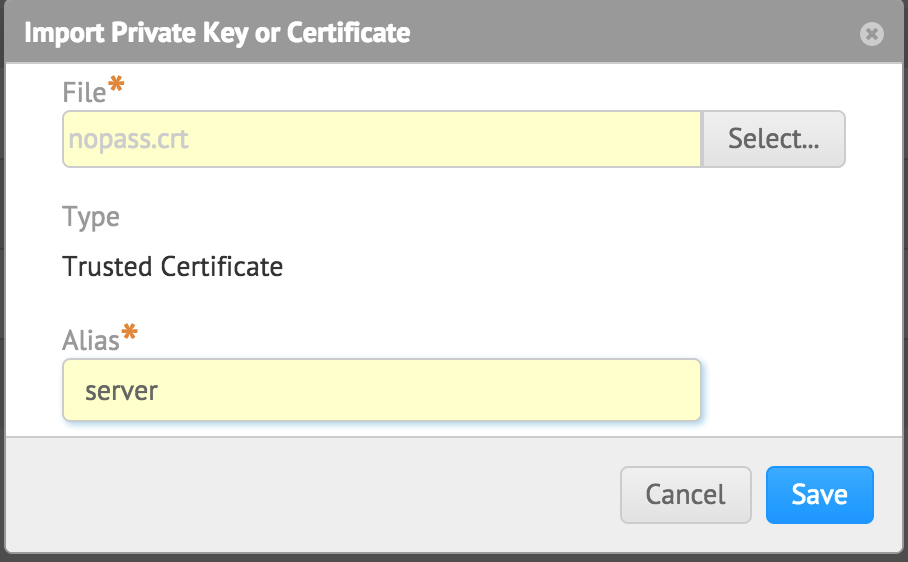
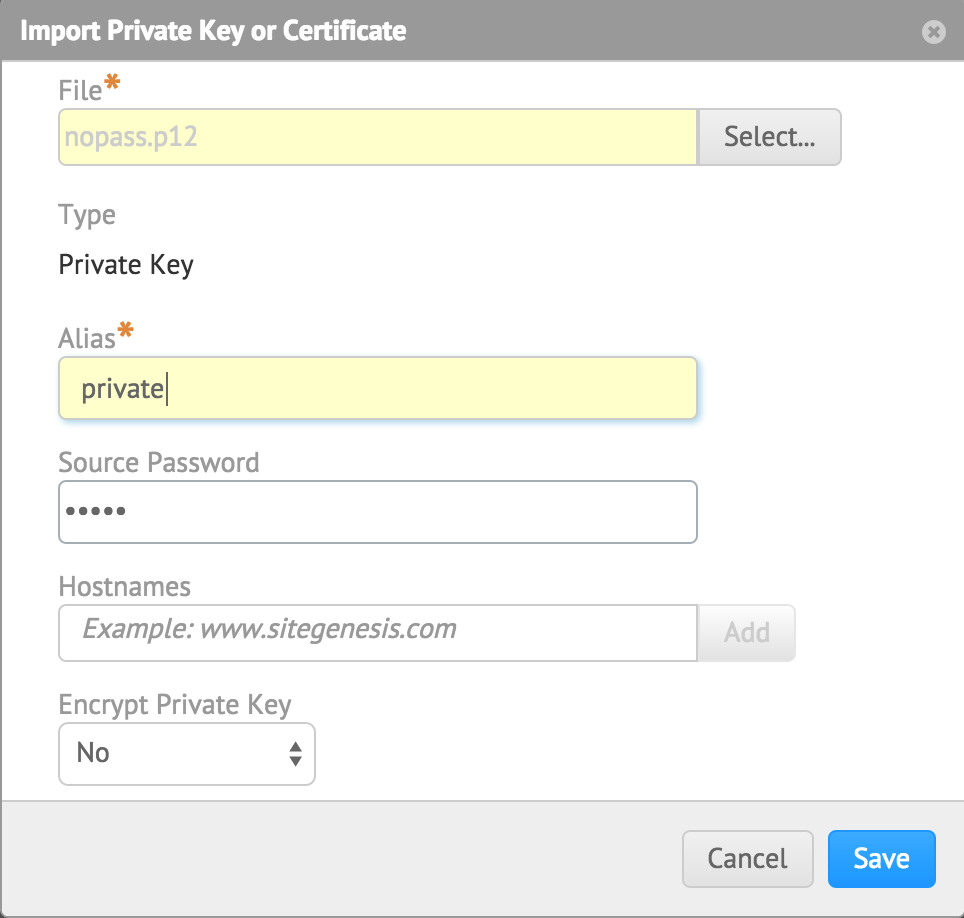
2. Upload the nopass.crt (certificate) and nopass.p12 (private key) into Business Manager via Administration > Operations > Private Keys and Certificates.
3. Create a job through the customer base and export the credit card data via getEncryptedCreditCardNumber.

var profile : dw.customer.Profile = dw.customer.CustomerMgr.getProfile('00000003');
var instruments : Collection = profile.getWallet().getPaymentInstruments(dw.order.PaymentInstrument.METHOD_CREDIT_CARD);

var certRef : dw.crypto.CertificateRef = new dw.crypto.CertificateRef("server");
var keyRef : dw.crypto.CertificateRef = new dw.crypto.KeyRef("private");

var custPay : PaymentInstrument = null;
var cipher : Cipher = null;
var encryCC = '';
var decCC = '';

for each (var e : PaymentInstrument in instruments){
    encryCC = e.getEncryptedCreditCardNumber(dw.order.PaymentInstrument.ENCRYPTION_ALGORITHM_RSA, certRef);
    if(!empty(encryCC)){
    dw.system.Logger.error("CC " + encryCC);
    }
}
4. You can decrypt the CC data using the imported private key.
cipher = new Cipher();

decCC = cipher.decrypt(encryCC, keyRef, dw.order.PaymentInstrument.ENCRYPTION_ALGORITHM_RSA, null, 0);
dw.system.Logger.error("CC_decrypted " + decCC);
Please note that the above is just an example. You should never store credit card information in plain text in log files, or anywhere else!
5. The exported encrypted data can be decrypted on the provider side with the private key.
//textCC.txt has the encrypted data
cat textCC.txt | base64 -D | openssl rsautl -decrypt -inkey nopass.p12
The same procedure can be done for order payment instruments. You can use an API method to tokenize credit cards, as shown in the documentation PaymentInstrument.setCreditCardToken(token : String)
Lösning
Exporting credit card data can be accomplished via custom job as outlined below:
1. Create an RSA key-pair
openssl req -x509 -newkey rsa:2048 -keyout nopass.key -out nopass.crt -days 365 -nodes
openssl pkcs12 -export -out nopass.p12 -inkey nopass.key -in nopass.crt
2. Upload the nopass.crt (certificate) and nopass.p12 (private key) into Business Manager via Administration > Operations > Private Keys and Certificates.
3. Create a job through the customer base and export the credit card data via getEncryptedCreditCardNumber.
var profile : dw.customer.Profile = dw.customer.CustomerMgr.getProfile('00000003');
var instruments : Collection = profile.getWallet().getPaymentInstruments(dw.order.PaymentInstrument.METHOD_CREDIT_CARD);

var certRef : dw.crypto.CertificateRef = new dw.crypto.CertificateRef("server");
var keyRef : dw.crypto.CertificateRef = new dw.crypto.KeyRef("private");

var custPay : PaymentInstrument = null;
var cipher : Cipher = null;
var encryCC = '';
var decCC = '';

for each (var e : PaymentInstrument in instruments){
    encryCC = e.getEncryptedCreditCardNumber(dw.order.PaymentInstrument.ENCRYPTION_ALGORITHM_RSA, certRef);
    if(!empty(encryCC)){
    dw.system.Logger.error("CC " + encryCC);
    }
}
4. You can decrypt the CC data using the imported private key.
cipher = new Cipher();

decCC = cipher.decrypt(encryCC, keyRef, dw.order.PaymentInstrument.ENCRYPTION_ALGORITHM_RSA, null, 0);
dw.system.Logger.error("CC_decrypted " + decCC);
Please note that the above is just an example. You should never store credit card information in plain text in log files, or anywhere else!
5. The exported encrypted data can be decrypted on the provider side with the private key.
//textCC.txt has the encrypted data
cat textCC.txt | base64 -D | openssl rsautl -decrypt -inkey nopass.p12
The same procedure can be done for order payment instruments. You can use an API method to tokenize credit cards, as shown in the documentation PaymentInstrument.setCreditCardToken(token : String)
Knowledge-artikelnummer
000391673
Löste denna artikel ditt problem?
Berätta för oss vad vi kan förbättra!
