Velg en organisasjon
How to Replace a Certificate on eCDN
Publiseringsdato: Sep 30, 2024
Beskrivelse
Løsning
Perform the following steps:
- Log in to the Business Manager and navigate to Administration -> Sites -> Embedded CDN Settings.
- Select a zone.
- In the popup window, select the Crypto tab.
- To the right of the certificate, there are two icons, for Replace and Delete:
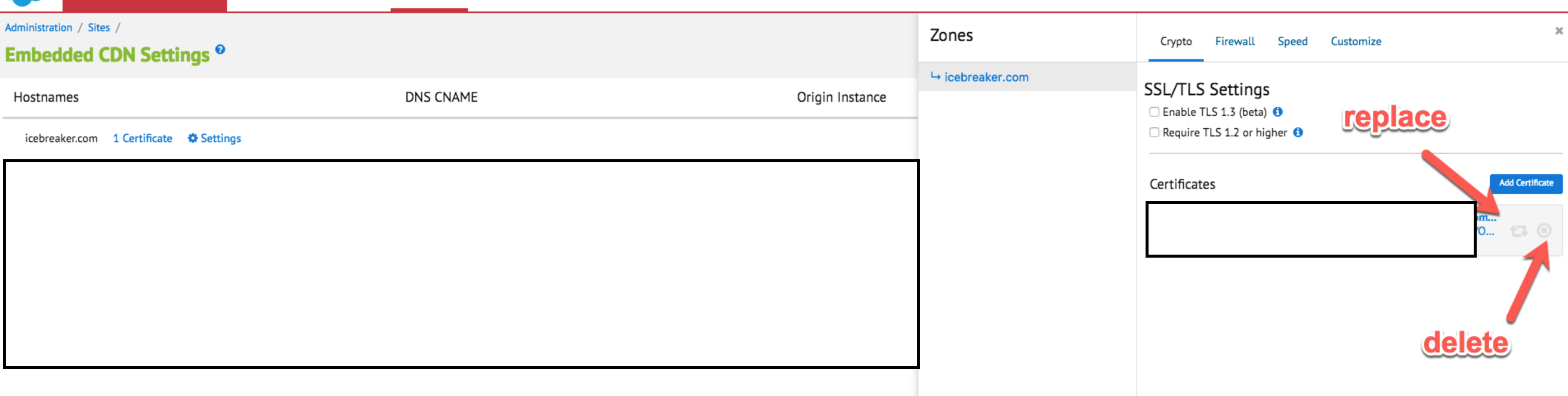
- Copy and paste the certificate and private key into the Certificate and Private Key fields. When pasting into the text fields, include the BEGIN and END lines surrounding the certificate or key data.
Note: When you try to Add Certificate, if a certificate for that domain already exists, you'll get the following error:
Certificate with this type already exists: You already have a certificate of this signature type
Flere ressurser
Knowledge-artikkelnummer
000391695
Hjalp denne artikkelen med å løse problemet ditt?
La oss få vite det slik at vi kan forbedre!
