組織を選択
How to Validate an SSL Intermediate Chain
公開日: May 30, 2026
説明
An SSL (Secure Sockets Layer) certificate chain must be valid for browsers and Salesforce to trust an SSL certificate. A certificate chain is considered valid when a chain of authority can be established from the end-entity certificate, through one or more intermediate certificates, up to a trusted Root Certificate stored in the browser or operating system.
This article explains how to manually validate whether an SSL intermediate certificate chain is correctly assembled. This is particularly relevant when configuring custom domains, Named Credentials, or SSL certificates in Salesforce — where an invalid or incorrect intermediate chain can cause trust errors.
解決策
Environment : Instance Type: Production
Procedure : An SSL certificate is considered valid by the browser when a chain of authority can be established from each certificate in the chain to the next. The last cert in the chain should match a Root Certificate stored in your browser or OS.
Hence, the goal when manually validating a chain is to match up the Issuer of a certificate to the Common Name of the next certificate up in the chain, until you get to a certificate that chains to the a Root Certificate in your browser. The root certificate itself can be included in the chain, but this is typically not necessary.
For example, take the following certificate chain:
$ openssl x509 -in cert.txt -issuer -noout
issuer= /C=US/O=Entrust, Inc./OU=See www.entrust.net/legal-terms/OU=(c) 2012 Entrust, Inc. - for authorized use only/CN=Entrust Certification Authority - L1K

$ openssl x509 -in entrustintermediate1.txt -subject -issuer -noout
subject= /C=US/O=Entrust, Inc./OU=See www.entrust.net/legal-terms/OU=(c) 2012 Entrust, Inc. - for authorized use only/CN=Entrust Certification Authority - L1K
issuer= /C=US/O=Entrust, Inc./OU=See www.entrust.net/legal-terms/OU=(c) 2009 Entrust, Inc. - for authorized use only/CN=Entrust Root Certification Authority - G2

$ openssl x509 -in entrustintermediate2.txt -subject -issuer -noout
subject= /C=US/O=Entrust, Inc./OU=See www.entrust.net/legal-terms/OU=(c) 2009 Entrust, Inc. - for authorized use only/CN=Entrust Root Certification Authority - G2
issuer= /C=US/O=Entrust, Inc./OU=www.entrust.net/CPS is incorporated by reference/OU=(c) 2006 Entrust, Inc./CN=Entrust Root Certification Authority

$ openssl x509 -in entrustroot.txt -subject -issuer -noout
subject= /C=US/O=Entrust, Inc./OU=www.entrust.net/CPS is incorporated by reference/OU=(c) 2006 Entrust, Inc./CN=Entrust Root Certification Authority
issuer= /C=US/O=Entrust, Inc./OU=www.entrust.net/CPS is incorporated by reference/OU=(c) 2006 Entrust, Inc./CN=Entrust Root Certification Authority
As you can see, the Issuer of the certificate matches the Common Name of the next cert up in the chain (text highlighted in matching colors to emphasize this). The final certificate in this example is a Root Certificate, which matches one already stored in the browser or OS.
As a counter-example, take the following output:
$ openssl x509 -in cert.txt -issuer -noout
issuer= /C=US/O=thawte, Inc./CN=thawte SHA256 SSL CA

$ openssl x509 -in intermediate.txt -subject -issuer -noout
subject= /C=US/O=Thawte, Inc./CN=Thawte SSL CA
issuer= /C=US/O=thawte, Inc./OU=Certification Services Division/OU=(c) 2006 thawte, Inc. - For authorized use only/CN=thawte Primary Root CA

$ openssl x509 -in root.txt -subject -issuer -noout
subject= /C=US/O=thawte, Inc./OU=Certification Services Division/OU=(c) 2006 thawte, Inc. - For authorized use only/CN=thawte Primary Root CA
issuer= /C=ZA/ST=Western Cape/L=Cape Town/O=Thawte Consulting cc/OU=Certification Services Division/CN=Thawte Premium Server CA/emailAddress=premium-server@thawte.com
In this example, the Issuer of cert.txt doesn't match the Common Name of intermediate.txt (text is in red), and hence, this doesn't chain properly. In this case, this is an incorrect Intermediate. The correct intermediate should have a Common Name of "thawte SHA256 SSL CA"
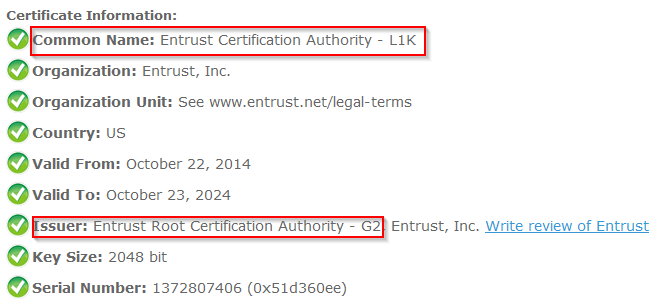
Additional Info : Alternatively, a webtool like SSL Shopper's Certificate Decoder can identify the Common Name and Issuer of each certificate in the chain. The principle of matching the Issuer to the Common Name of the next cert up in the chain is the same, the only difference is how you obtain those values.
For example, the Common Name and Issuer information of entrustintermediate1.txt from above are highlighted in the following output:
ナレッジ記事番号
000391704
この記事で問題は解決されましたか?
ご意見をお待ちしております。
