Seleziona un'organizzazione
Validation Rule to Restrict Number of Selections in a Multi-Picklist Field
Data pubblicazione: Jun 30, 2026
Descrizione
For example:
You have a multi-picklist field named Community Tags (API Name Community_Tags__c) on the User object with the following values:
- All Star Architect
- Daring Developer
- Confident Consultant
- Awesome Admin
- Data Fam
- Dream Designer
- Moment Marketer
- Muley
- Net Zero Hero
- Service Star
- Slack Star
- Super Seller
You want to restrict users to select any 3 options in a multi-picklist field
Risoluzione
Available in: both Salesforce Classic and Lightning Experience
In Salesforce Classic: Setup | Customize | Validation Rules
In Lightning Experience: Setup | Object Manager | User | Validation Rules
Create a Validation Rule on a User object with the following steps below
Step 1: Go to Setup | Object Manager | User | Validation Rules and click on the New button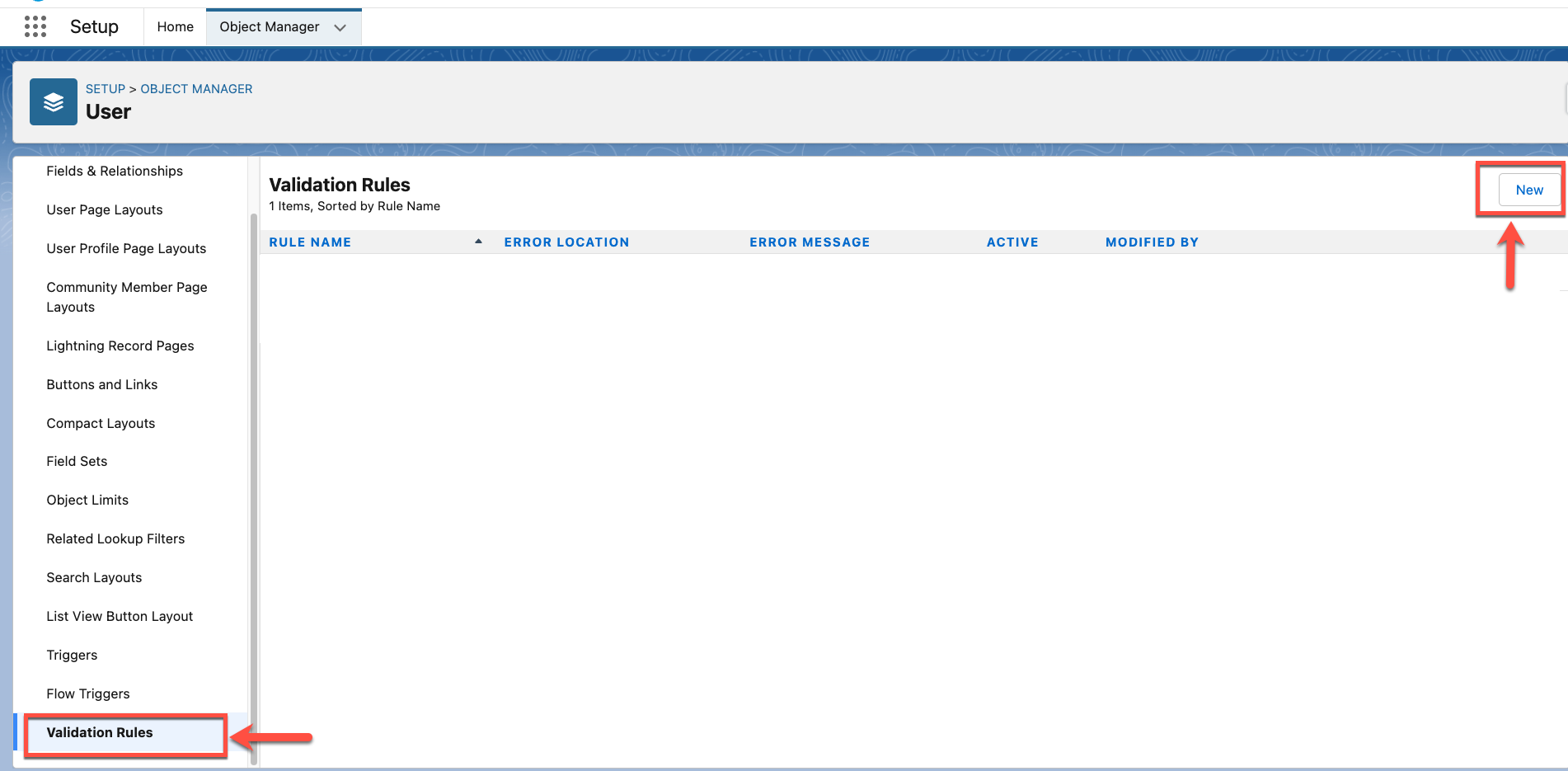
Step 2: Type Validate Community Tags selection in the Rule Name field and copy the below formula in the Error Condition Formula section. 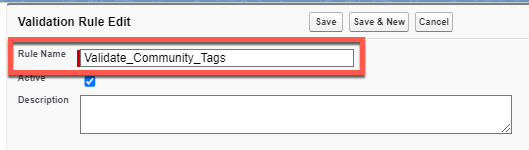
Formula sample below:
IF(INCLUDES(Community_Tags__c, "All Star Architect"),1,0) +
IF(INCLUDES(Community_Tags__c, "Daring Developer"),1,0) +
IF(INCLUDES(Community_Tags__c, "Confident Consultant"),1,0) +
IF(INCLUDES(Community_Tags__c, "Awesome Admin"),1,0) +
IF(INCLUDES(Community_Tags__c, "Data Fam"),1,0) +
IF(INCLUDES(Community_Tags__c, "Dream Designer"),1,0) +
IF(INCLUDES(Community_Tags__c, "Moment Marketer"),1,0) +
IF(INCLUDES(Community_Tags__c, "Muley"),1,0) +
IF(INCLUDES(Community_Tags__c, "Net Zero Hero"),1,0) +
IF(INCLUDES(Community_Tags__c, "Service Star"),1,0) +
IF(INCLUDES(Community_Tags__c, "Slack Star"),1,0) +
IF(INCLUDES(Community_Tags__c, "Super Seller"),1,0) > 3
Step 3: Click on the Check Syntax button to validate the formula.

Step 4: Type the relevant error message: "You are not allowed to select more than three values for Community Tags" in the Error Message field. Select the Error Location
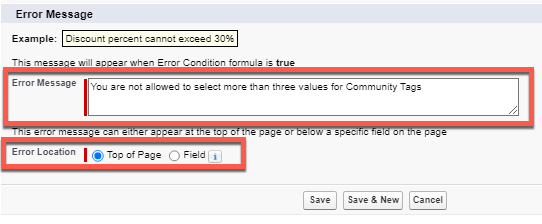
Step 5: Click on the Save button.
Step 4: Type the relevant error message: "You are not allowed to select more than three values for Community Tags" in the Error Message field. Select the Error Location
Step 5: Click on the Save button.
_______________________________________________
Written By: Usman Ali | Salesforce Answers Leader
Usman Ali is a Salesforce Architect at Dubai Holding Asset Management. He brings more than 10+ years of Salesforce ecosystem experience to the table, with several nominations for good measures. He enjoys being challenged and engaged with projects and team that requires him to work outside of his comfort and knowledge set. He takes pride in helping other trailblazers in the Trailblazer Community and is the group leader of Developer Group, Dubai, UAE.
Submissions reflect only the opinions of the user who made available the Submission and not the opinions of Salesforce, regardless of whether the user is affiliated with Salesforce, and may contain or constitute products, services, information, data, content and other materials made available by or on behalf of third parties ("Third Party Materials). Salesforce neither controls nor endorses, nor is Salesforce responsible for, any Third Party Materials, including their accuracy, validity, timeliness, completeness, reliability, integrity, quality, legality, usefulness or safety, or any applicable intellectual property rights. Any Submissions made available through any message board or forum in response to posted questions, or that otherwise purports to answer any questions, including any questions about Salesforce or Programs, are made available for your general knowledge only and should never be relied upon as answers to your specific questions (even if an answer is marked as a “best” answer or with any similar qualifications). You should always contact Salesforce support for answers to your specific questions. Salesforce has no control over Submissions, and is not responsible for any use or misuse (including any distribution) by any third party of Submissions.
If you have questions, tap into the wisdom of our entire Trailblazer Community here: https://trailhead.salesforce.com/trailblazer- community/feed
Risorse aggiuntive
https://help.salesforce.com/s/articleView?id=platform.fields_about_field_validation.htm&type=5
Numero articolo Knowledge
000391882
Questo articolo ha risolto il problema?
Facci sapere, così possiamo migliorare!
