Select An Org
Delete Calendar Events Within Salesforce
Publish Date: Apr 2, 2026
Description
This article describes how to delete a Calendar Event in Salesforce. This applies to standard users with the appropriate permissions on their profile and the Event record. If the Delete button is not visible, see the Additional Resources section for common permission-related causes.
Resolution
To delete a Calendar Event in Salesforce, the user must navigate to the event directly via the Calendar. Note that delete permissions depend on record ownership and sharing settings.
Here are steps on how you can delete your Calendar Events within Salesforce.
1. Click on the Calendar Navigation Menu item
2. Find and click on the Event you wish to delete (you should also be able to hover over the Event and see a delete button pop up)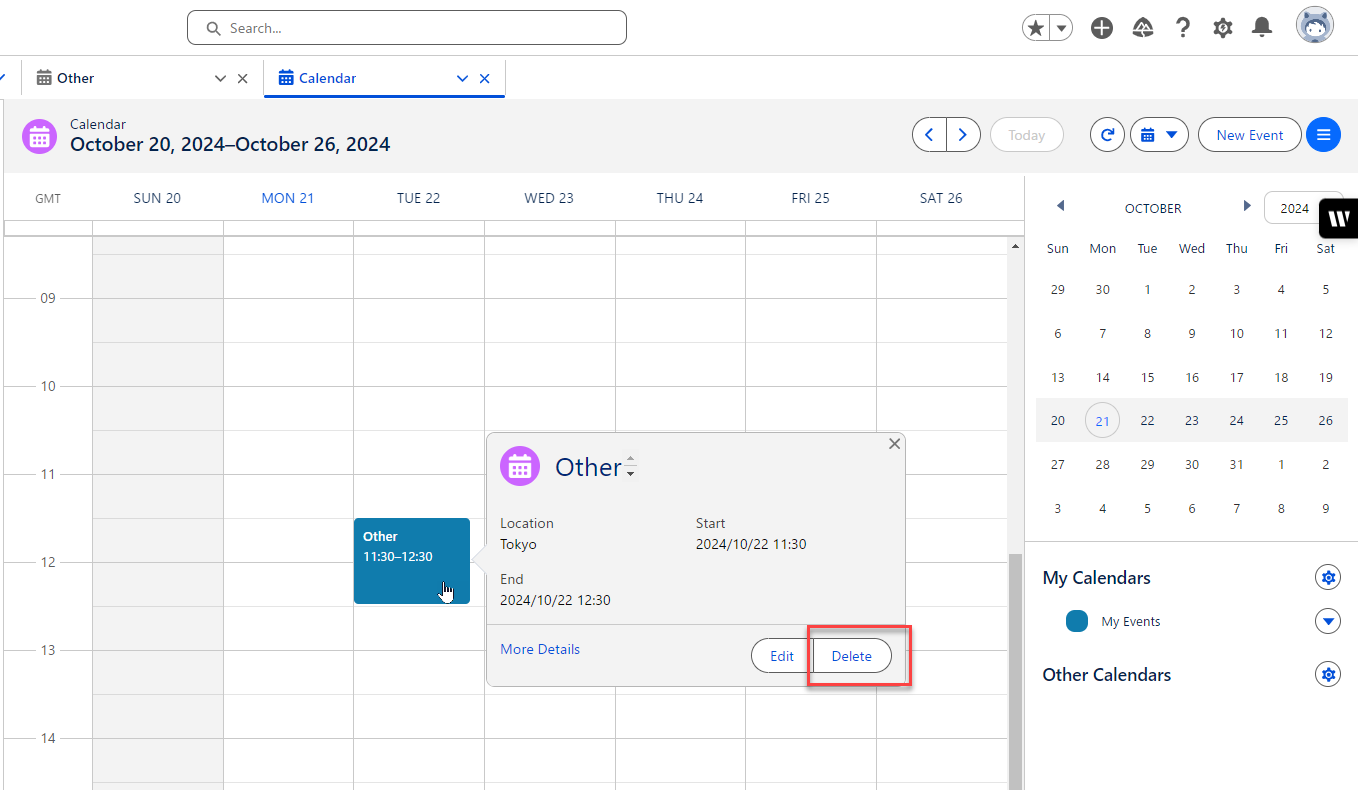
3. Once in the Event click on the drop-down arrow on the top right (next to New Contact, New Opportunity and New Case) and click on the delete button
Additional Resources
If the Delete button is not displayed, the possible causes are:
1. Ownership and Permissions: Unless the user is the "Owner" of the associated/related record, or has the "Modify All Data" permission set on their profile, or "Modify All" on the associated/related object, the Event record cannot be deleted if the Activity Object is set to "Controlled by Parent" in the Organization Wide Sharing Settings.
2. Organization Wide Sharing Settings: If the Activity Object is set to "Controlled by Parent" in the Organization Wide Sharing Settings, a standard user with "Full Access" permission on the public calendar will not be able to delete an Event record created on the Public Calendar, even if they are the creator of the Event and have all necessary profile permissions for "Edit Task and Events".
3. Related/Associated Object: If the Event is related/associated with an Object record or a Contact/Lead record, the related object or associated Contact/Lead record dictates the delete permission for the Event record as the Parent Object controls it.
Check the permissions and owership of the record above if the Delete button is not displayed.
Knowledge Article Number
000392302
Did this article solve your issue?
Let us know so we can improve!
