Select An Org
Mobile Publisher for Experience Cloud Apps and Enhanced Domains
Publish Date: Jun 5, 2024
Description
This knowledge article contains important information about the impact of the Deploy Enhanced Domains (Release Update) (please right-click the link and select open in a new tab) for Mobile Publisher for Experience Cloud apps. Salesforce will continue to update this article as new information becomes available.
Please follow all the steps in this article to make sure that your apps continue working when enhanced domains are enabled in your org, if your Mobile Publisher apps don't use a custom domain.
As a reminder, enhanced domains will be enforced in all orgs starting in Winter ‘24. To help you test, Salesforce deployed Enhanced Domains in sandbox and non-production orgs with Winter ’23. Salesforce deploys this feature in all orgs with Spring ’23 and Summer ’23. You can opt out of the auto-deployment of Enhanced Domains before Spring ’23. For more information, refer to the Enhanced Domains Timeline.
What are Enhanced Domains?
Enhanced domains are the future standard for domains used to access your Salesforce org. They change the URL format of Experience Cloud sites that don’t use a custom domain. The Deploy Enhanced Domains (Release Update) (please right-click the link and select open in a new tab) is available now for testing and is scheduled to be enforced in Winter ‘24.
How do Enhanced Domains Impact Mobile Publisher for Experience Cloud Apps?
When enhanced domains are enabled in an org, users accessing an Experience Cloud site with the old URL format from a web browser are automatically redirected to the new URL format. For Mobile Publisher for Experience Cloud apps on versions older than 10.0, this redirect can't be performed and results in a service disruption.
Resolution
What Action is Salesforce Taking?
Salesforce has released version 10.0 (iOS) and 10.1 (Android) of your apps, in order to prevent a Mobile Publisher for Experience Cloud apps service disruption when enhanced domains are enabled in an org. These new versions are now published in the App Store and Google Play. A Product and Services notification from Salesforce has been sent to the admins of all impacted orgs, indicating that these new versions are available.
The new app versions are automatically installed on users’ phones if automatic updates are enabled (see Apple Support: How to manually update apps on your Apple device and Google Support: Update your Android apps).
Previously, Salesforce provided the ability to configure in Experience Builder for Aura sites an update message for your Mobile Publisher for Experience Cloud app users. For this Winter ‘23 Patch release, you can configure different update messages that either encourage or require your users to update to the version of your app that supports enhanced domains.
What Action Do I Need to Take?
Take the following actions if your Mobile Publisher apps don't use a custom domain:
- Ensure that versions 10.0 and 10.1 of your app have been uploaded by Salesforce to the App Store and Google Play, respectively. Salesforce has sent a Product and Services notification to the admins of all impacted orgs, notifying them of the availability of the updated app versions.
You can also check on the status of user updates by logging into your Apple and Google developer account and then viewing the
- If you need more time, you can opt-out of the auto-deployment of Enhanced Domains before Spring ’23. Deselect the My Domain option Automatically deploy enhanced domains with Spring '23. However, enhanced domains will be enforced in all orgs starting in Winter ‘24. For more information, refer to the Enhanced Domains Timeline.
Known Issues
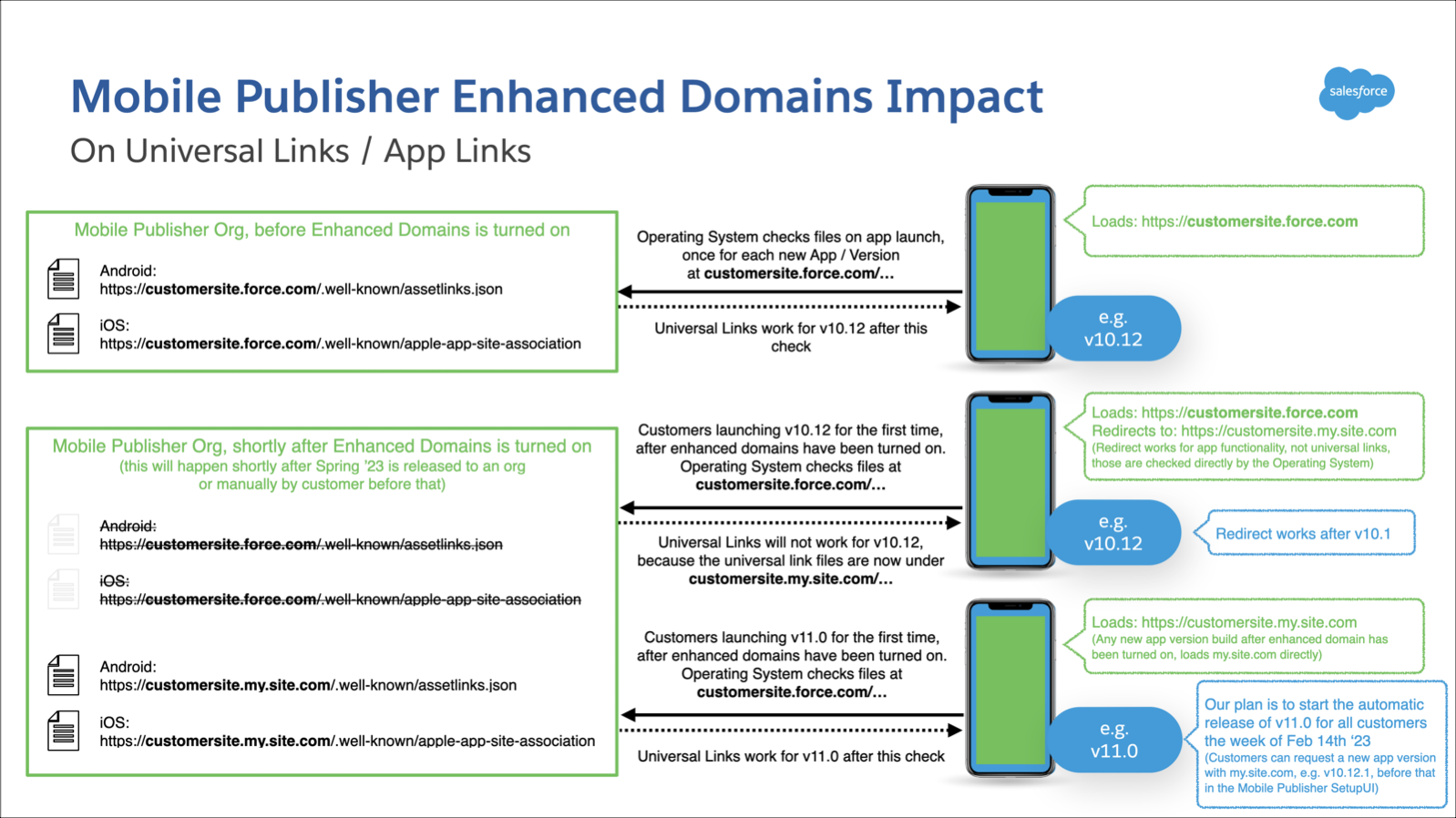
Universal Links
When a new app version is installed and launched, the app checks if universal links are working. This behavior is controlled by the OS (iOS and Android), which Salesforce cannot change. Due to the OS behavior, Salesforce expects universal links to stop working for new users or existing users who install an app update after enhanced domains are enabled.
The next app version released by Salesforce, either automatically or if requested by a customer, will contain the new enhanced domains. Universal links will work correctly for all users after they install this version.
URL Mangement
If you've added force.com URLs in the URL Management section of the Mobile Publisher Setup UI, you need to update each force.com URL, and request a new binary to avoid breaking the URLs.Go to the URL Management section in the Mobile Publisher Setup UI and make the following changes.
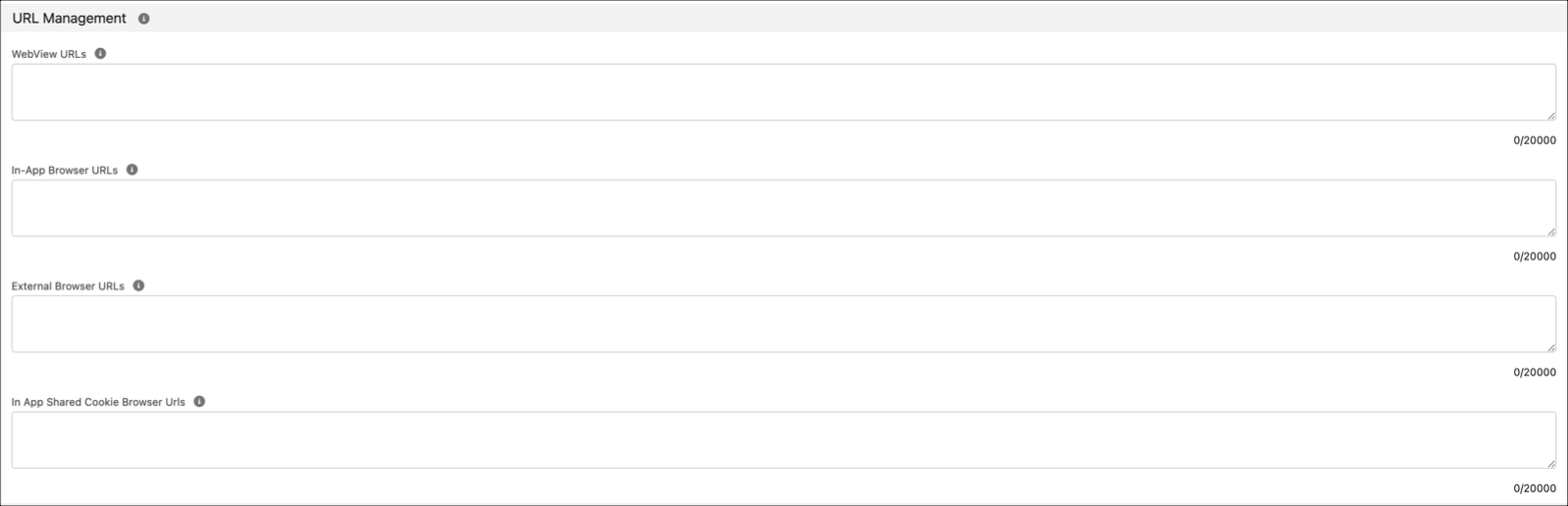
- For each force.com URL that you have in the four URL Management fields, add the same URL with my.site.com instead of force.com.
- Don't delete the original force.com URLs. Having both force.com and my.site.com URLs ensures that your URLs will work correctly before and after enhanced domains are enabled.
- Submit the updated URLs and request a new binary version. This new app version should have working URLs before and after enhanced domains are enabled.
- This new app version needs to be live in the app stores before enhanced domains are enabled.
Where can I ask questions about this change?
Join the My Domain and Enhanced Domains group in the Trailblazer Community.
Knowledge Article Number
000392345
Did this article solve your issue?
Let us know so we can improve!
