選擇組織
Auto Submit Salesforce Campaign Record into Approval Process with Flow
發佈日期: Apr 2, 2026
描述
解決方案
Step 1: Create an Approval Process:
- Click Setup.
- In the Quick Find box, type Approval Processes.
- Click on the Create New Approval Process | Use Standard Setup Wizard button.
- Select the Campaign object for Manage Approval Processes For drop-down.
- Now create an approval process, as shown in the following screenshot:
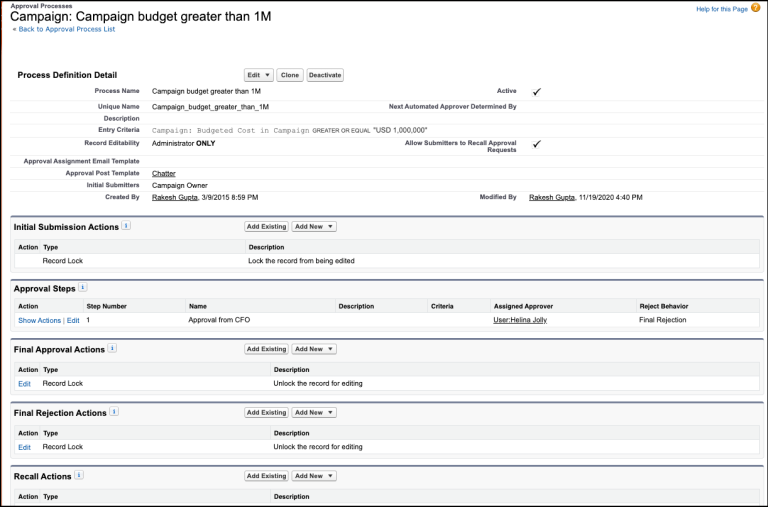
Step 2.1: Salesforce Flow – Define Flow Properties:
As we have a requirement for submitting the record into the approval process, this is why we have to use the After-save flow.
- Click Setup.
- In the Quick Find box, type Flows.
- Select Flows then click on the New Flow.
- Select the Record-Triggered Flow option and click on Next and configure the flow as follows:
- How do you want to start building: Freeform
- Trigger the Flow When: A record is created or updated
- Run Flow: After the record is saved
- Object: Campaign
- Select All Condition Are Met (AND).
- Set Conditions
- Row 1
- Field: Campaign | IsActive
- Operator: Equals
- Value: {!$GlobalConstant.True}
- Click Add Condition
- Row 2
- Field: Campaign | Budgeted Cost in Campaign
- Operator: Greater Than
- Value: 1000000
- Row 1
- Select Only when a record is updated to meet the condition requirements.
- Click Done.
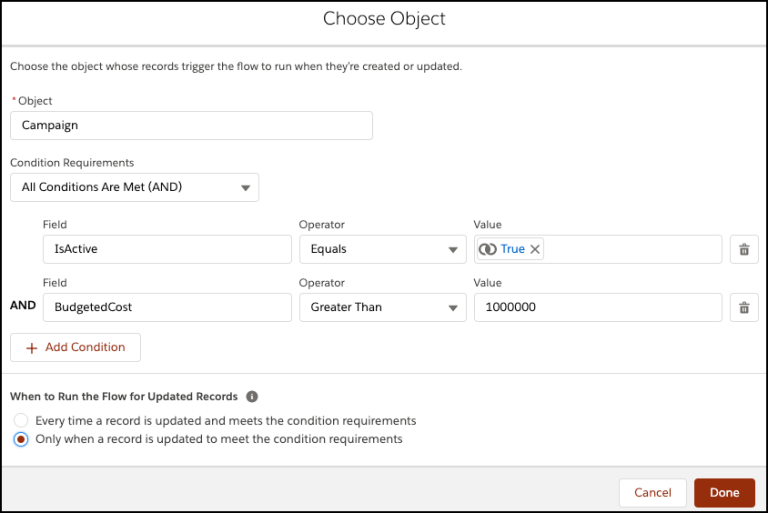
Step 2.2: Salesforce Flow – Call an Acton – Submit Record for Approval:
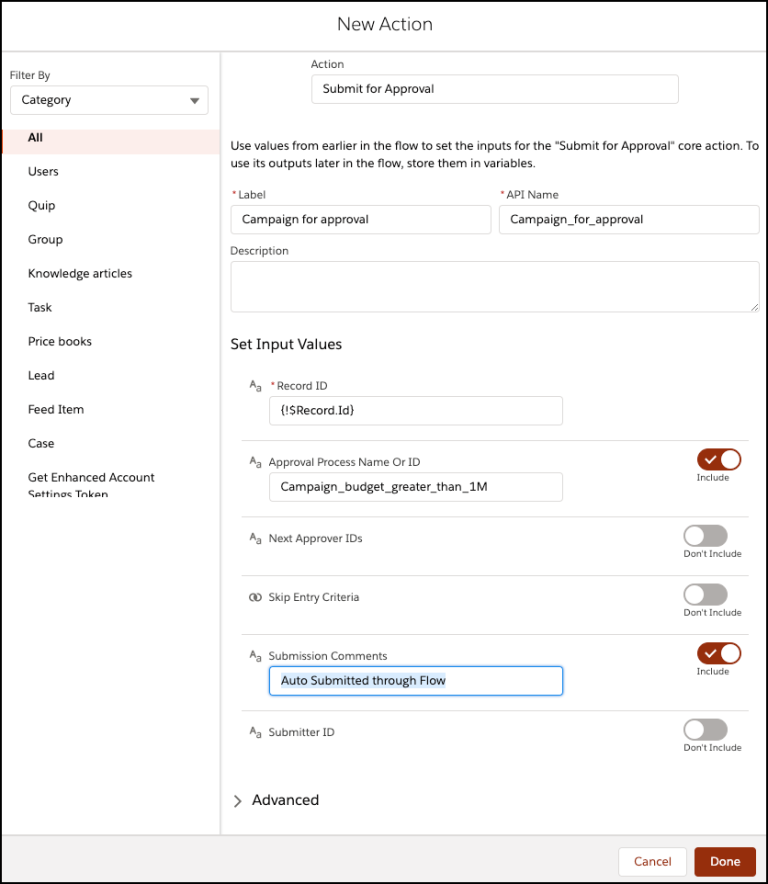
The next step is to submit the campaign record for approval. For this, we will call the Submit for Approval core action.
- Under Toolbox, select Element.
- Drag-and-drop Action element onto the Flow designer.
- In the Action box, type Submit for Approval.
- Click on the Submit for Approval Core action.
- Set Input Values:
- Record ID: {!$Record.Id}
- Approval Process Name Or ID: Campaign_budget_greater_than_1M
- Submission Comments: Auto Submitted through Flow
- Click Done.
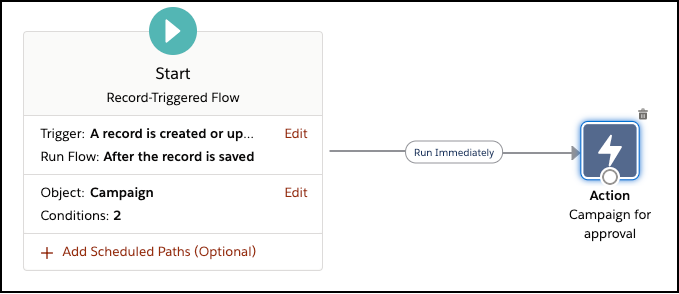
In the end, your Flow will look like the following screenshot:
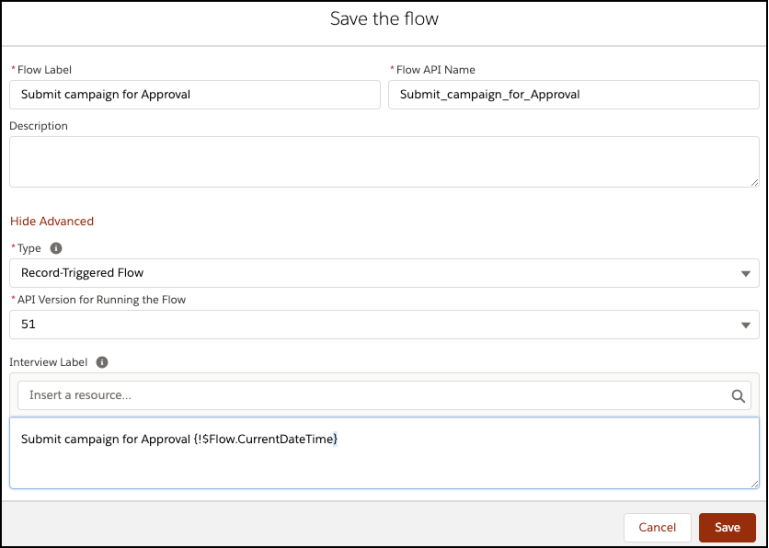
- Click Save.
- Enter Flow Label the API Name will auto-populate.
- Click Show Advanced.
- Type: Record-Triggered Flow
- API Version for Running the Flow: 51
- Interview Label: Submit campaign for Approval {!$Flow.CurrentDateTime}
- Click Save.
9. Once everything looks good, click the Activate button.
____________________________________________________________________________________________________
Written By: Rakesh Gupta | Salesforce MVP
Rakesh is Senior Solution Architect, Salesforce MVP, and Author. With a background in computer science, Rakesh is passionate about solution design and process automation
Submissions reflect only the opinions of the user who made available the Submission and not the opinions of Salesforce, regardless of whether the user is affiliated with Salesforce, and may contain or constitute products, services, information, data, content and other materials made available by or on behalf of third parties ("Third Party Materials). Salesforce neither controls nor endorses, nor is Salesforce responsible for, any Third Party Materials, including their accuracy, validity, timeliness, completeness, reliability, integrity, quality, legality, usefulness or safety, or any applicable intellectual property rights. Any Submissions made available through any message board or forum in response to posted questions, or that otherwise purports to answer any questions, including any questions about Salesforce or Programs, are made available for your general knowledge only and should never be relied upon as answers to your specific questions (even if an answer is marked as a “best” answer or with any similar qualifications). You should always contact Salesforce support for answers to your specific questions. Salesforce has no control over Submissions, and is not responsible for any use or misuse (including any distribution) by any third party of Submissions.
If you have questions, tap into the wisdom of our entire Trailblazer Community here: https://trailhead.salesforce.com/trailblazer-community/feed
知識文章編號
000392569
此文章是否解決您的問題?
請讓我們知道,以便我們改進!
