Выбрать организацию
Capture CCP Logs for Debugging Salesforce Voice
Дата публикации: Jun 1, 2026
Описание
When you encounter error messages via error toasts/banners on the UI while working with Salesforce Voice (formerly Service Cloud Voice), the Agent Debug Information file can help identify underlying issues. This file contains logged errors and relevant information. The CCP (Contact Control Panel) logs captured in this file record real-time event data from the Omni-Channel widget during voice call operations such as inbound calls, outbound calls, call transfers, and more.
Решение
To capture CCP (Contact Control Panel) logs for Salesforce Voice troubleshooting, navigate to the Omni-Channel widget in the Console Application and download the Agent Debug Information file. This file contains logged errors and event data that help Support Engineers diagnose voice call issues.
Steps :
- Log in to the Org
- Open the Console Application with Omni-Channel and voice.
- On the Utility tab, pop up the Omni-Channel widget
- Under the Phone Tab, Click the Gear Icon (settings)
- Under Debugging section, Click the link titled "Download Agent Debug Information"
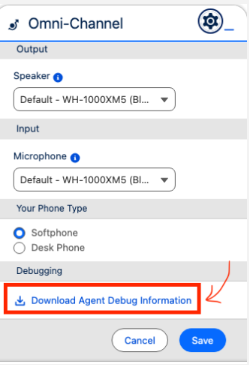
Attach this file to the case so that the Support engineer can review it.
NOTE - This "Agent debug information" log file resets the underlying information if the page is refreshed. To ensure the error information is captured, Please avoid refreshing the Omni-Channel page before downloading this information.
Дополнительные ресурсы
- Salesforce Help: Troubleshoot Service Cloud Voice
- Salesforce Help: Set Up Salesforce Voice with Amazon Connect
Номер статьи базы знаний
000392578
Эта статья решила вашу проблему?
Оставьте свой отзыв, чтобы мы могли стать лучше!
