Selecteer een organisatie
Create a report to display Percentage of a Value in a 'Text' Data type field
Publicatiedatum: Feb 21, 2026
Beschrijving
Client wants to see the percentage of English Speakers based on the Type of Accounts.
Oplossing
Let's assume the Contact object has a custom "Text" data type field 'Languages__c' where different languages are added as text values.
So, in order to calculate the percentage of English speakers:
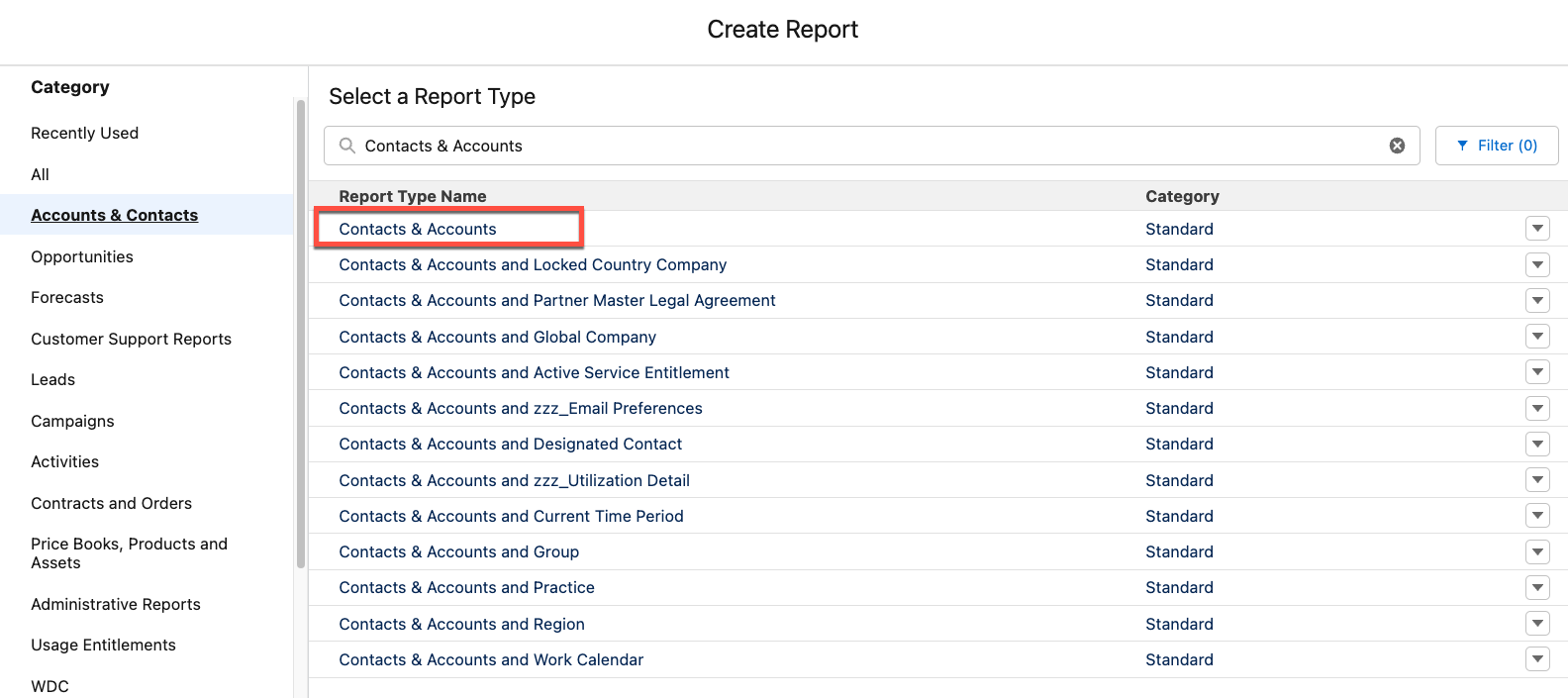
Step 2: From the Filters pane, update the filters to decide which Contact and Account need to be displayed on the report. Specify the range of Created Dates etc., based upon the individual's use case.
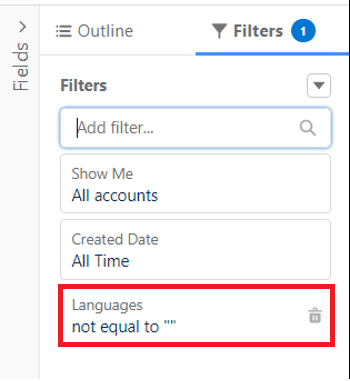
Step 3: In order to exclude the null values of 'Languages__c' field from the report, create a filter to make this field 'not equal to' NULL.
Step 4: From the Outline pane, add the necessary fields to the Columns section, including the First Name, Last Name, Account Name, etc., as per client's requirements.
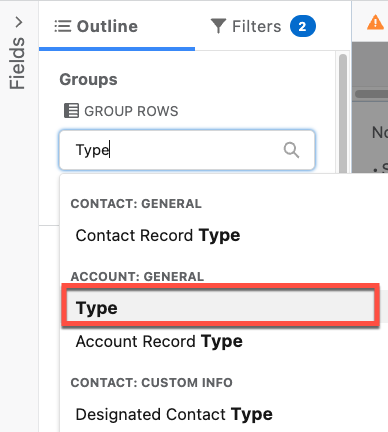
Step 5: From the Groups section of the Outline pane, add Type field under Group Rows by searching for the Type field.
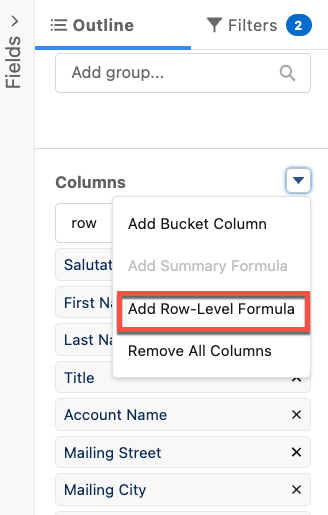
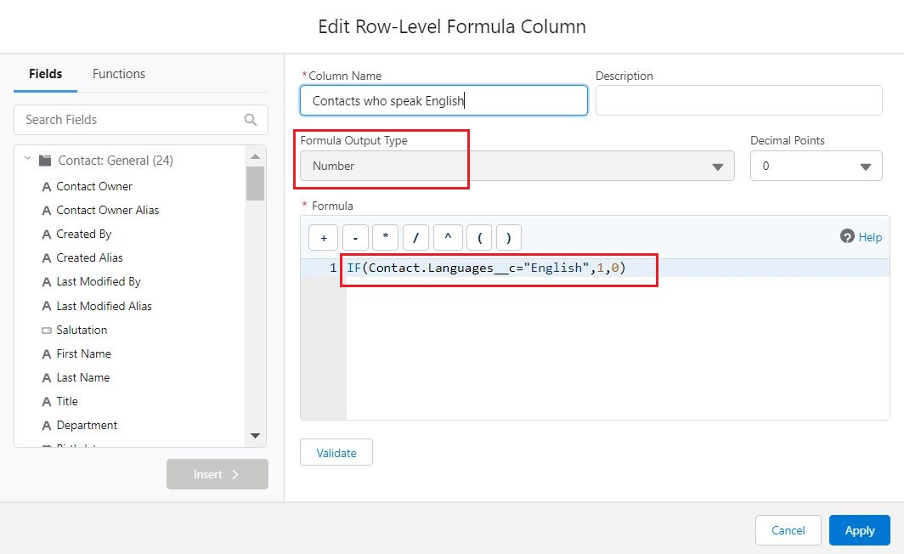
Step 6: From the Outline pane, under the Columns section, create a Row-Level Formula column by clicking on | Add Row-Level Formula.
Step 7: Provide the Column Name, Description, Formula Output Type equals Number, Decimal Points equals 0 and Formula equals:
IF(Contact.Languages__c="English",1,0)
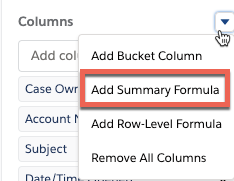
Step 8: From the Outline pane, under the Columns section, create a Summary Formula column by clicking on | Add Summary Formula.
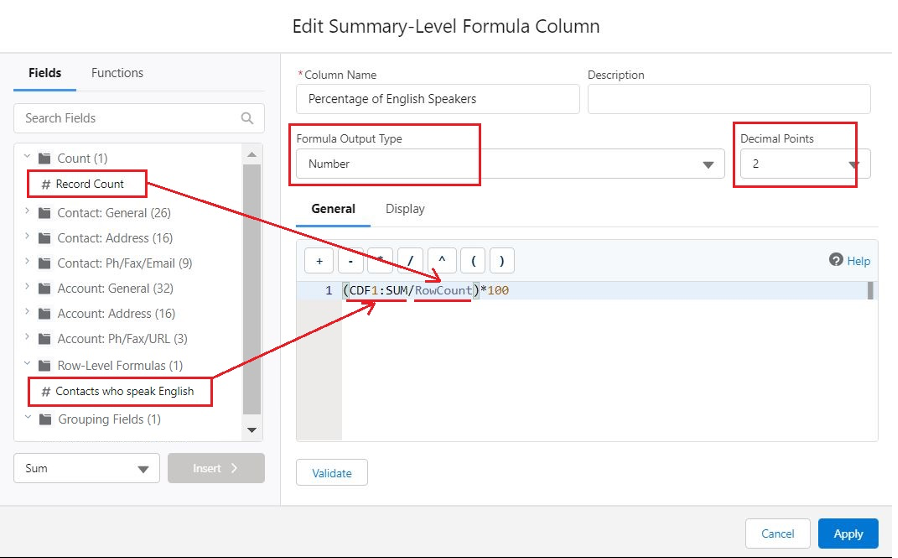
Step 9: Provide the Column Name, Description, Formula Output Type equals Number, Decimal Points equals 2 and Formula equals:
(Contacts who speak English/Count)*100 as shown below.
Step 10: In order to save and run the report, provide a name to the report and click Save & Run.
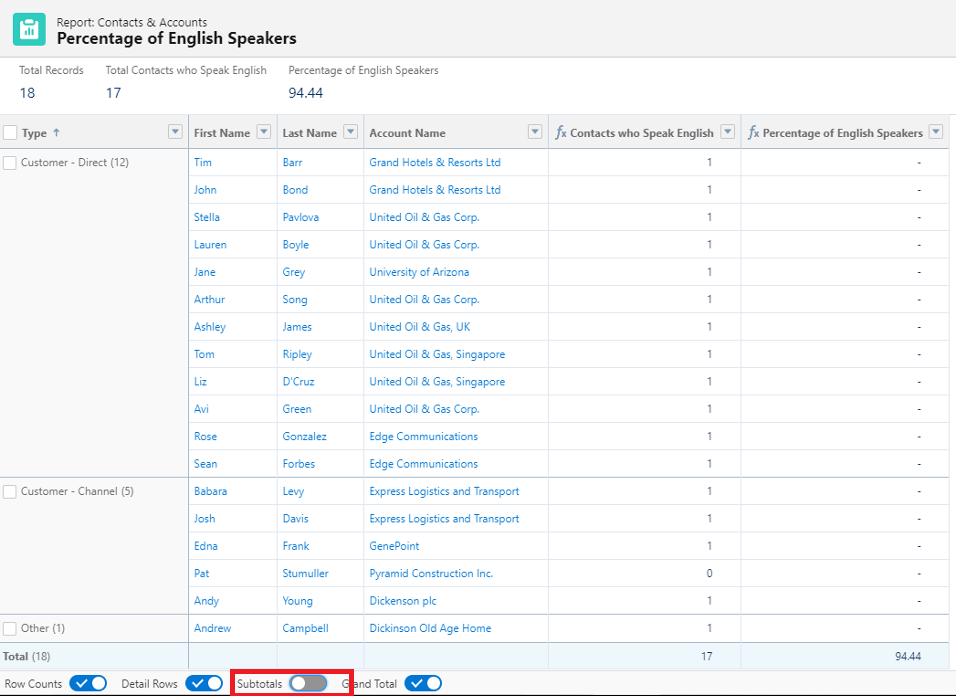
Step 11: Toggle On the Subtotals button at the bottom of the report in order to view the percentage of English speakers based on Type of Account, otherwise turn off the button to see the overall percentage.
___________________________________________________________________________
Written by: Ajaypreet Singh Saini | Salesforce Answers Leader
Ajaypreet Singh Saini is working as a Salesforce Implementation Specialist at Grantbook. Prior to Grantbook, Ajaypreet served as a Salesforce Administrator for 2 years working on Sales Cloud where he was responsible for configuring and administrating complex processes and maintaining the security of Salesforce instance.
Submissions reflect only the opinions of the user who made available the Submission and not the opinions of Salesforce, regardless of whether the user is affiliated with Salesforce, and may contain or constitute products, services, information, data, content and other materials made available by or on behalf of third parties ("Third Party Materials). Salesforce neither controls nor endorses, nor is Salesforce responsible for, any Third Party Materials, including their accuracy, validity, timeliness, completeness, reliability, integrity, quality, legality, usefulness or safety, or any applicable intellectual property rights. Any Submissions made available through any message board or forum in response to posted questions, or that otherwise purports to answer any questions, including any questions about Salesforce or Programs, are made available for your general knowledge only and should never be relied upon as answers to your specific questions (even if an answer is marked as a “best” answer or with any similar qualifications). You should always contact Salesforce support for answers to your specific questions. Salesforce has no control over Submissions, and is not responsible for any use or misuse (including any distribution) by any third party of Submissions.
If you have questions, tap into the wisdom of our entire Trailblazer Community here: https://trailhead.salesforce.com/trailblazer-community/feed
Ajaypreet Singh Saini is working as a Salesforce Implementation Specialist at Grantbook. Prior to Grantbook, Ajaypreet served as a Salesforce Administrator for 2 years working on Sales Cloud where he was responsible for configuring and administrating complex processes and maintaining the security of Salesforce instance.
Submissions reflect only the opinions of the user who made available the Submission and not the opinions of Salesforce, regardless of whether the user is affiliated with Salesforce, and may contain or constitute products, services, information, data, content and other materials made available by or on behalf of third parties ("Third Party Materials). Salesforce neither controls nor endorses, nor is Salesforce responsible for, any Third Party Materials, including their accuracy, validity, timeliness, completeness, reliability, integrity, quality, legality, usefulness or safety, or any applicable intellectual property rights. Any Submissions made available through any message board or forum in response to posted questions, or that otherwise purports to answer any questions, including any questions about Salesforce or Programs, are made available for your general knowledge only and should never be relied upon as answers to your specific questions (even if an answer is marked as a “best” answer or with any similar qualifications). You should always contact Salesforce support for answers to your specific questions. Salesforce has no control over Submissions, and is not responsible for any use or misuse (including any distribution) by any third party of Submissions.
If you have questions, tap into the wisdom of our entire Trailblazer Community here: https://trailhead.salesforce.com/trailblazer-community/feed
Knowledge-artikelnummer
000392581
Heeft dit artikel uw probleem opgelost?
Laat ons weten wat we kunnen doen om te verbeteren!
