Velg en organisasjon
Filter Blank Value of a Date Field in Dashboards
Publiseringsdato: Aug 18, 2026
Beskrivelse
When a dashboard needs to surface records where a Date field has not been filled in — for example, Contacts without a Birthdate or Cases without a Close Date — a special filter configuration is required, as blank date values cannot be selected through the standard date picker.
Løsning
This article explains how to create a dashboard filter that surfaces records with a blank Date field value, since blank dates can't be selected through the standard date picker.
Steps to Create the Filter
- Click the Edit button.
- Click the + Filter button.
- In the Field input, select Birthdate.
- Display name: Birthdate
- Under Filter values, click New Filter Values.
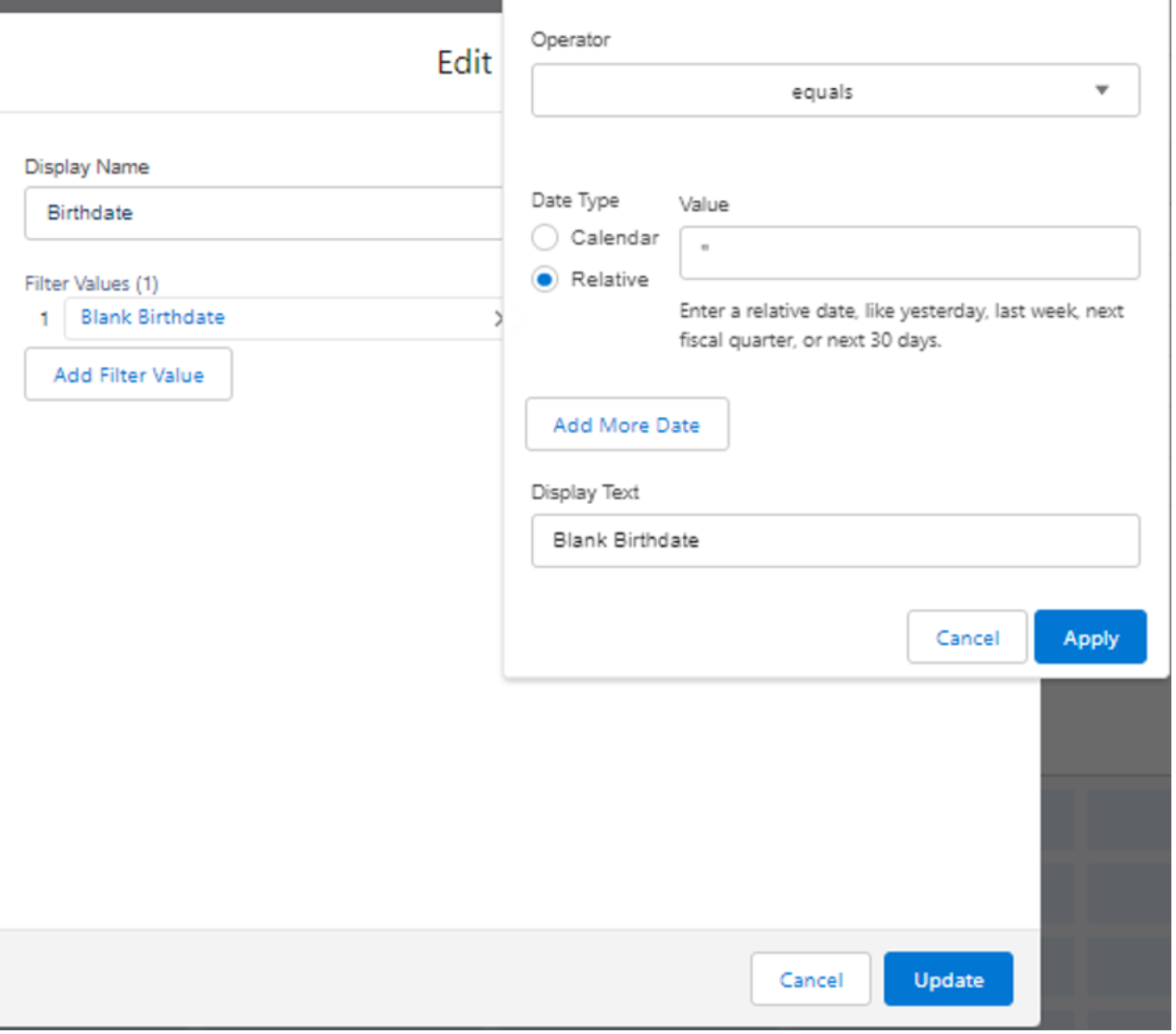
- Configure the filter values:
- Operator: select Equals.
- Date type: select Relative.
- Value: leave blank / enter "" (the Apply button stays disabled without input).
- Display Text: enter Blank Birthdate.
- Click Apply.
- Click the Add button.
- Click Save, then Done. Contacts with a blank Birthdate will now appear in the dashboard.
Note
To edit the Display Text after saving, start again from step 4.
Knowledge-artikkelnummer
000392585
Hjalp denne artikkelen med å løse problemet ditt?
La oss få vite det slik at vi kan forbedre!
