Выбрать организацию
Filter Blank Value of a Date Field in Dashboards
Дата публикации: Aug 18, 2026
Описание
When a dashboard needs to surface records where a Date field has not been filled in — for example, Contacts without a Birthdate or Cases without a Close Date — a special filter configuration is required, as blank date values cannot be selected through the standard date picker.
Решение
This article explains how to create a dashboard filter that surfaces records with a blank Date field value, since blank dates can't be selected through the standard date picker.
Steps to Create the Filter
- Click the Edit button.
- Click the + Filter button.
- In the Field input, select Birthdate.
- Display name: Birthdate
- Under Filter values, click New Filter Values.
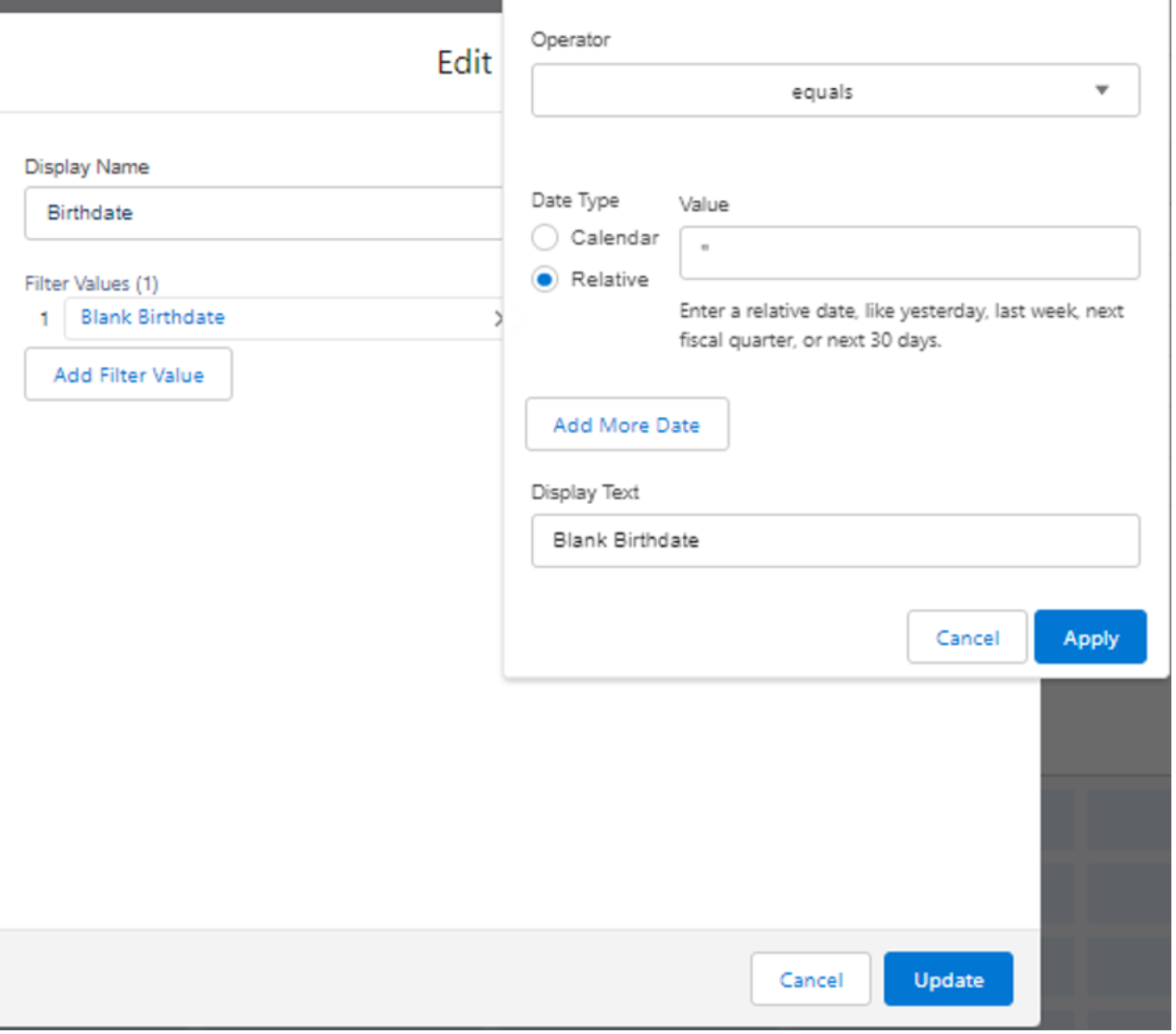
- Configure the filter values:
- Operator: select Equals.
- Date type: select Relative.
- Value: leave blank / enter "" (the Apply button stays disabled without input).
- Display Text: enter Blank Birthdate.
- Click Apply.
- Click the Add button.
- Click Save, then Done. Contacts with a blank Birthdate will now appear in the dashboard.
Note
To edit the Display Text after saving, start again from step 4.
Дополнительные ресурсы
Номер статьи базы знаний
000392585
Эта статья решила вашу проблему?
Оставьте свой отзыв, чтобы мы могли стать лучше!
