조직 선택
목록 뷰 만들기 및 업데이트
게시 일자: Aug 21, 2026
상세 설명
솔루션
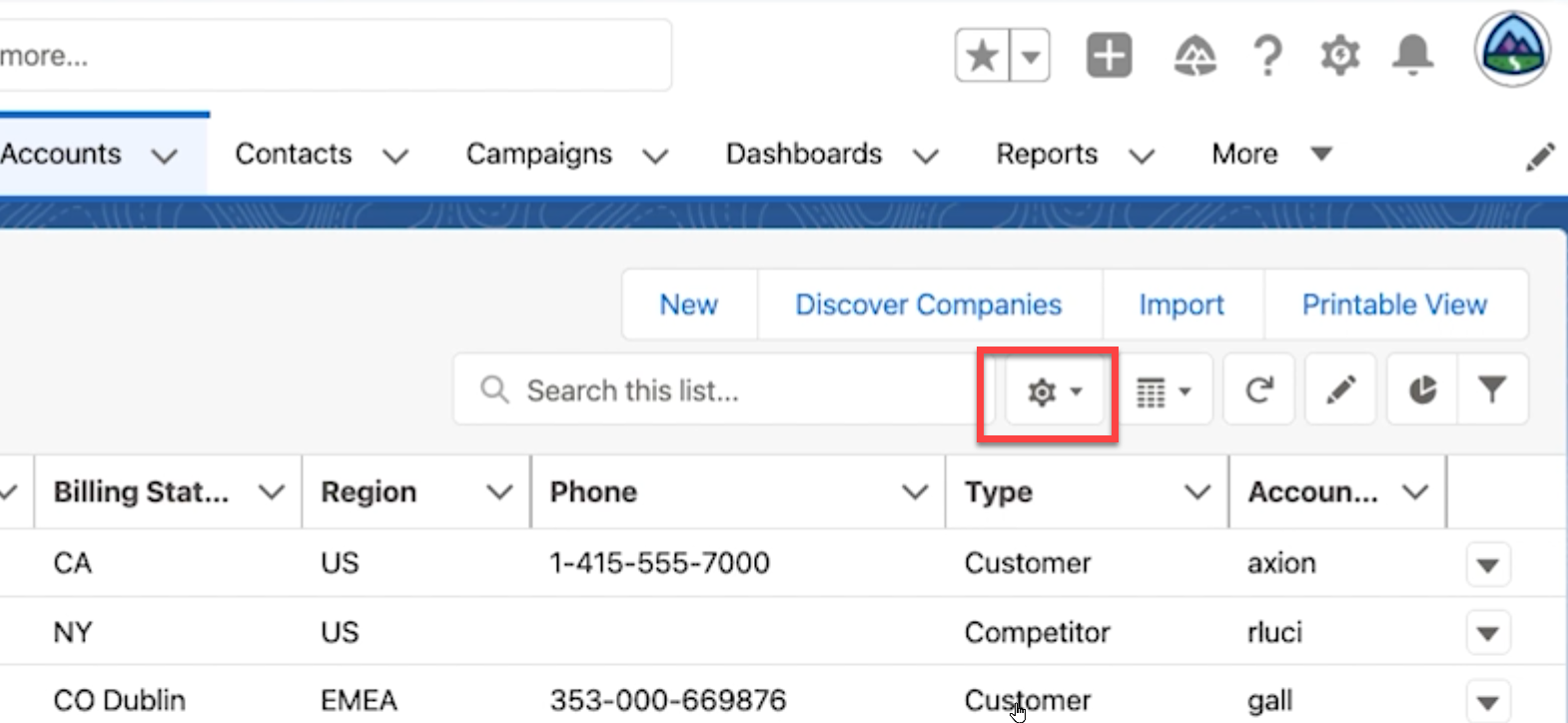
목록 뷰를 만들거나 복원하려면 먼저 특정 개체의 탭을 클릭합니다.
참고: 목록 뷰를 만들거나 복제하는 옵션을 사용하려면 ‘Display as(다른 이름으로 표시)’ 아이콘의 옵션을 테이블 또는 칸반으로 설정해야 하며, 분할 뷰로 설정해서는 안 됩니다.
- "Search this list(이 목록 검색)" 오른쪽에 있는 톱니바퀴 드롭다운을 클릭합니다.
- New(새로 만들기)를 클릭합니다.
- 새 목록 뷰에 이름을 지정합니다.
- "Who sees this list view?(이 목록 뷰를 볼 수 있는 사람)"에서 비공개인지, 아니면 모든 사람이 볼 수 있는 사용 권한을 갖는지 선택합니다.
- 저장을 클릭합니다.
새 목록 뷰로 이동하면 기본적으로 필터 영역이 열립니다. 여기에서 내 레코드만 표시하거나 모든 레코드를 표시하도록 필터를 업데이트할 수 있습니다. Add Filter(필터 추가)를 클릭하여 해당 개체 내에 있는 표준 및 사용자 지정 필드를 기반으로 필터를 더 추가할 수도 있습니다. 필터에 원하는 정보가 이미 표시되어 있는 경우에는 X를 클릭하여 필터 창을 닫을 수 있습니다.
참고: 목록 뷰의 필터는 오른쪽 상단에 있는 깔때기 아이콘을 클릭하여 언제든지 액세스할 수 있습니다. 최근 본 항목을 제외한 모든 목록 뷰에 필터를 추가할 수 있습니다.
추가 자원
목록 뷰 사용
목록 뷰 만들기 및 사용자 정의
Knowledge 기사 번호
000392853
이 기사를 통해 문제를 해결했습니까?
개선을 위한 의견을 보내주세요.
