Välj en organisation
Error: "insufficient access rights on cross-reference id" When Saving a Case Record with a Flow or Process That Sends an Email
Publiceringsdatum: May 2, 2025
Beskrivning
When saving a Case record that has a process or flow configured to send an email, some users receive the error "insufficient access rights on cross-reference id" even though they appear to have access to all related records.This error occurs when the user does not have access to the email template folder used by the process or flow. Access to the Case record itself is not sufficient — the user must also have access to the folder that contains the email template referenced in the process or flow.
Lösning
This error can occur when the user doesn't have access to the email template folder used by the process.
Step 1: Locate the Email Template Folder in Salesforce Setup
Navigate to the Classic Email Templates setup page:
In Salesforce Classic: Setup | Communication Templates | Classic Email Templates
In Lightning Experience: Gear Icon | Setup | Email | Classic Email Templates
Step 2: Share the Email Template Folder with the Affected Users
-
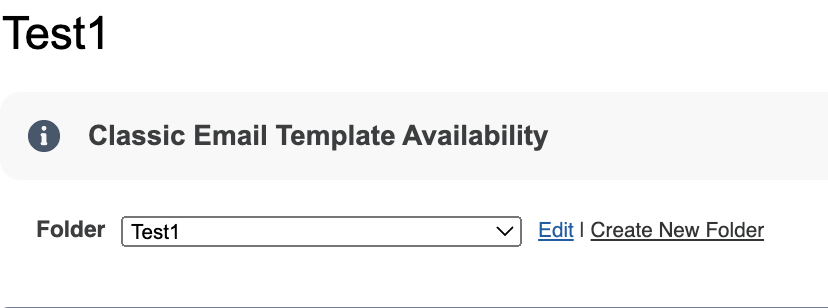
Click the folder dropdown and locate the folder that contains the email template used by the process or flow.
Note: Not all folders will be available to edit. For example, the Unified Public Classic Email Templates is an out-of-the-box template that cannot be edited. - Click Edit.
- Choose one of the following sharing options:
- Select This folder is accessible by all users to grant access to all users in the org.
- Select This folder is accessible only by the following users: and then select the appropriate users via Public Groups, Roles, and Territories. Move the group from Available for Sharing to Shared To.
- Click Save.
Notes:
- The Folders and Enhanced Sharing option is available in Salesforce Lightning to allow users to create, edit, and delete folders and share their folders and templates. In Setup, select Email | Lightning Email Templates and switch the setting to On.
- For more information on Managing Folders please review this Salesforce Help.
- If receiving this error sending emails, please review the steps listed in the Salesforce article, Error "Insufficient access rights on Cross Reference ID" on Attempts to Send Emails.
Please note that Case Assignment Rules are invoked immediately upon saving the Case record, as part of the standard order of execution. The error "Insufficient access rights on cross-reference ID" can occur if the user does not have access to the Email Template Folder associated with the template used in the Case Assignment Rule. Hence this behavior should be considered when troubleshooting access-related issues during automated operations like email notifications. - View the information regarding this error and the API in API Error 'insufficient access rights on cross-reference id'.
Because this error has several causes, if the above information does not assist, please contact Salesforce Support.
Knowledge-artikelnummer
000392899
Löste denna artikel ditt problem?
Berätta för oss vad vi kan förbättra!
