Select An Org
DocuSign Quote Gen for Salesforce CPQ Plus
Publish Date: Mar 5, 2026
Description
Important Links:
- Gen for Salesforce Admin Guide
- AppExchange Package Installation Link
- Get Started with DocuSign Gen for Salesforce
Note: DocuSign Gen installs under the package name DocuSign Apps Launcher.
DocuSign Gen License Provisioning
The package updates from Trial to Manual status when the package is first configured during the setup process (auto-provisioning). The initial package activation follows the path below:
- Open DocuSign App Launcher
- Go into Configure → Should automatically prompt activation if the customer has CPQ+
- If you are using DocuSign eSignature along with DocuSign Gen you will use your active/paid DocuSign account. If you are only using DocuSign Gen please setup the account linked in the DocuSign Gen for Salesforce: Getting Started Guide.
Note: The DocuSign Gen for Salesforce package is an optional package for Salesforce CPQ Plus. If this package does not appear under your account, reach out to your Account Executive to help provision the package licenses.
Integrate DocuSign Gen in Production
We recommend following the steps in your Admin guide to ‘Connect Your Salesforce Organization to a DocuSign Account’ and subsequent section steps to ‘Connect a DocuSign production account to your Salesforce organization’.
Integrate DocuSign Gen in a Full Sandbox
We recommend taking the following steps:
- Use Match Production Licenses button to move the DocuSignSalesforceCPQAddOn license from Production to Sandbox to get started
- The following steps should be followed every time you refresh a sandbox or create a new one
- Set up your Production account with Gen and create a sandbox copy of it
- Immediately disconnect the Sandbox org from your DocuSign production account using the DocuSign Apps Launcher troubleshooting page. It can be found by navigating to Setup → Build → Develop → VisualForce Pages, finding the TroubleShooting page (having dfsle namespace) and clicking on Preview.
- Follow the steps in the 'Disconnect Account and Reset Users' page.
- In DocuSign Apps Launcher setup, log into your DS Developer sandbox account to complete sandbox setup.
Note: for Developer accounts, you will need to use the ‘Log into Demo Account’ option under ‘Advanced Options’ during the ‘Log In’ step of the connection process
For initial setup of a new sandbox:
- In the Document Generation page in DocuSign Apps Launcher setup, start a 30-day Gen trial
- Contact Salesforce Support to have the Gen trial converted to a full sandbox account.
Provision DocuSign Gen in a Developer/Partial Sandbox
We recommend taking the following steps:
- Use Match Production Licenses button to move the DocuSignSalesforceCPQAddOn license from Production to Sandbox to get started
- Install DocuSign Gen for Salesforce from the AppExchange in the Demo/UAT Salesforce org.
- In DocuSign Apps Launcher setup, log into your DS Developer sandbox account to complete account setup. Note: for Developer accounts, you will need to use the ‘Log into Demo Account’ option under ‘Advanced Options’ during the ‘Log In’ step of the connection process
- In the Document Generation page in DocuSign Apps Launcher Setup, start a 30-day Gen trial
- Contact Salesforce Support to have the Gen trial converted to a full sandbox account.
Common Error Messages:
- Refer to the Gen Troubleshooting Guide
- “Failed to initiate document generation. Please try again later.”
- Due to the trial DocuSign account being inactive
- “DocuSign Gen is not Configured for your account.”
- Due to expired DS Gen account or Activated account that is not able to be auto provisioned (see best practice below you may need to update your DocuSign Gen to the newest version)
Best Practices:
- Only one Salesforce org can be connected to any DocuSign account. i.e. Dev DocuSign Account connected to Dev Salesforce Org. Having two SF orgs connected will cause connection issues.
- User connecting to DocuSign must be an Admin within DocuSign. If they are not a DocuSign Admin, the connection will fail. Note the necessary permissions detailed in the DS Admin Guide
- Only one Dev DocuSign account can be created with each email address (email address must be unique for each DS account).
- Write-back setup can be found under Step 4: Create Salesforce merge fields to add to your template on page 80 of the setup guide (step 3). Document write-back on pages 99-100
Using DocuSign Gen - Online Resources:
- DocuSign Gen for Salesforce Admin Guide
- Transitioning to the new DocuSign Gen for Salesforce app
- DocuSign Gen (and CLM) Advanced Syntax Reference
Resolution
Creating Templates
Steps to Create a DocuSign Gen Word Template (Pages 61-82)
- Under DocuSign Apps Launcher navigate to DocuSign Gen Templates Tab and press New.
- Add Template Name, Select Data Source “Quote”, select Microsoft Word and then select ‘Create Button’.
- Add Data Fields to Your Word Template(s) Salesforce Fields.
- Select the Salesforce data fields, then copy and paste the anchor text where you want them to appear on your Word templates. This map to the Salesforce Fields.
- Upload the Word Template(s) that you just added the anchor fields to on the next step.

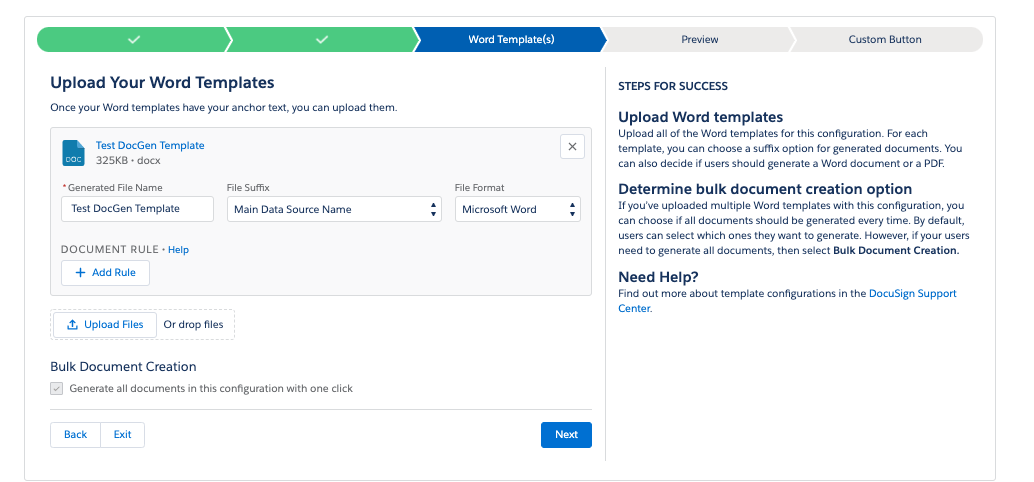
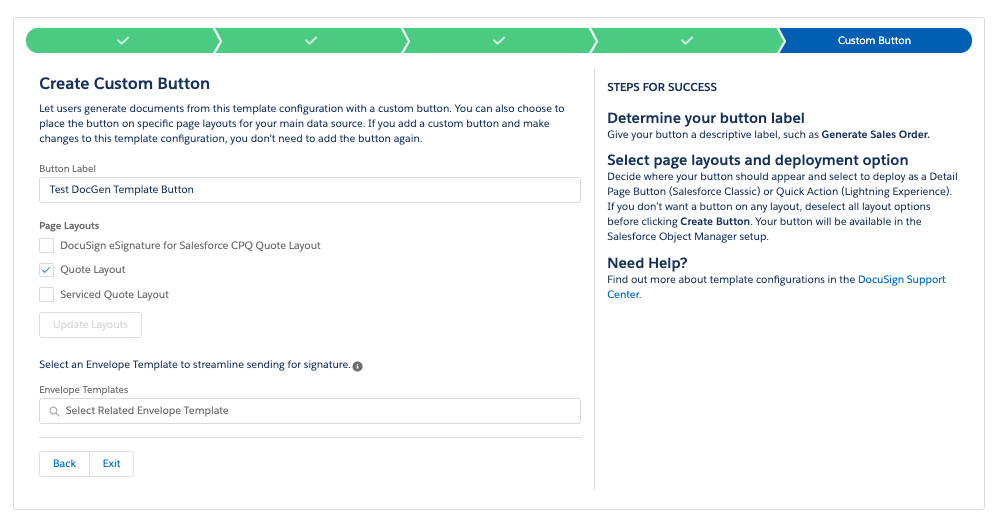
- Preview the solution or proceed to the Custom Button creation.
- Select the Page Layout where you want to add the Custom Button. Note: Update Layouts button may throw an error. If so, you’ll need to manually add the button to your Page Layout.
- Once the Template is completed you can navigate back to the object where you added the Button, then test the solution and follow the below steps to send for signature.
Test your setup:
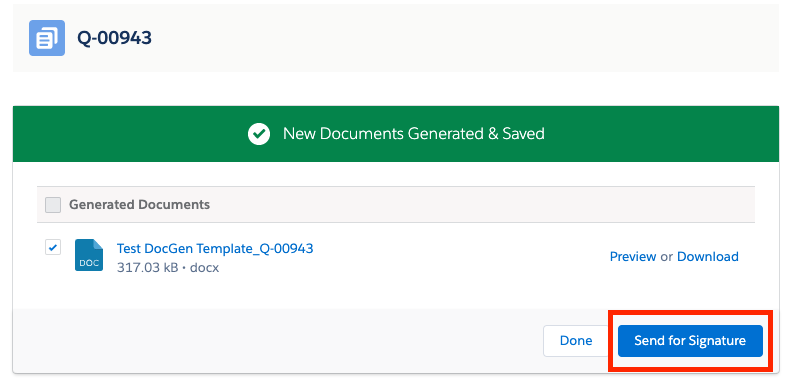
- Navigate to Quote and press the DocuSign button created during the template creation steps.
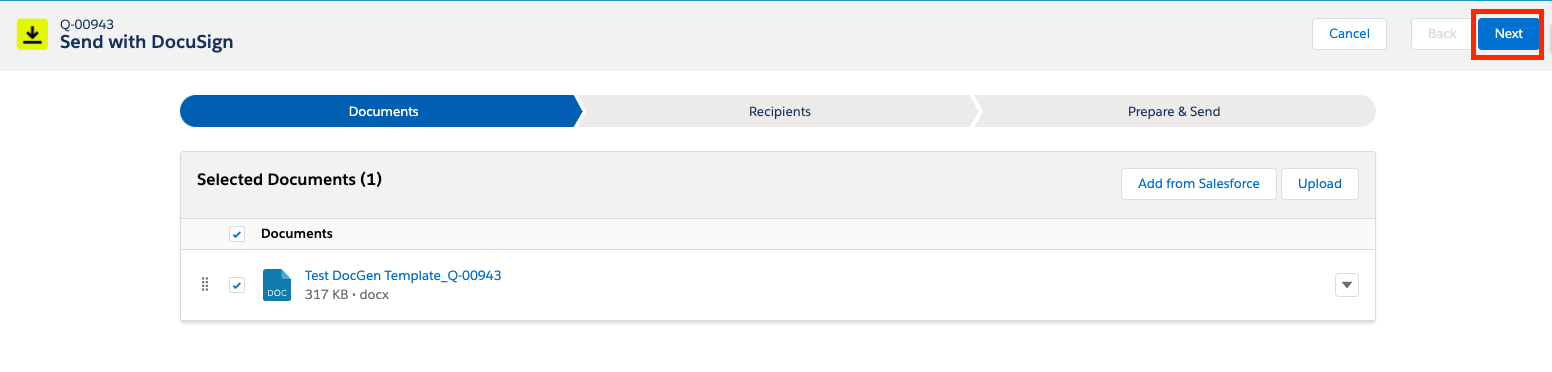
- Select Send for Signature
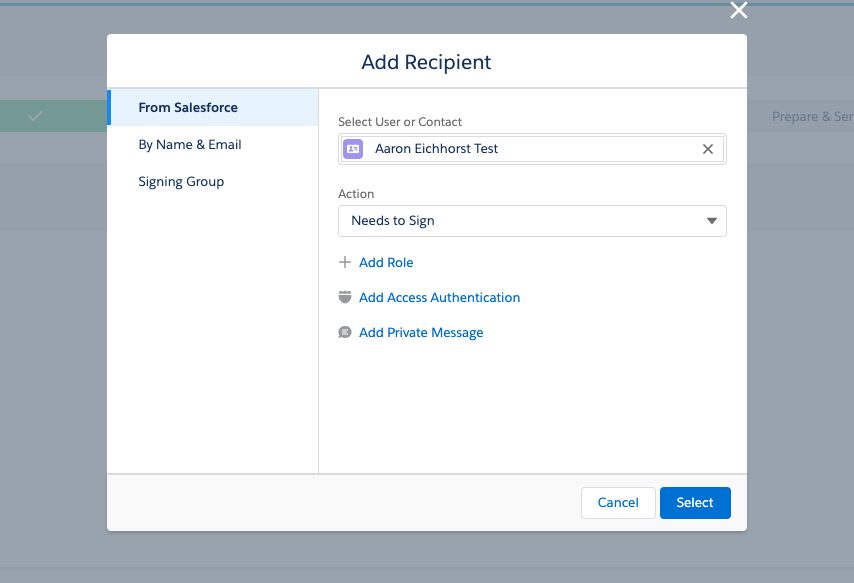
- Follow the stages and add a recipient if not auto-populated
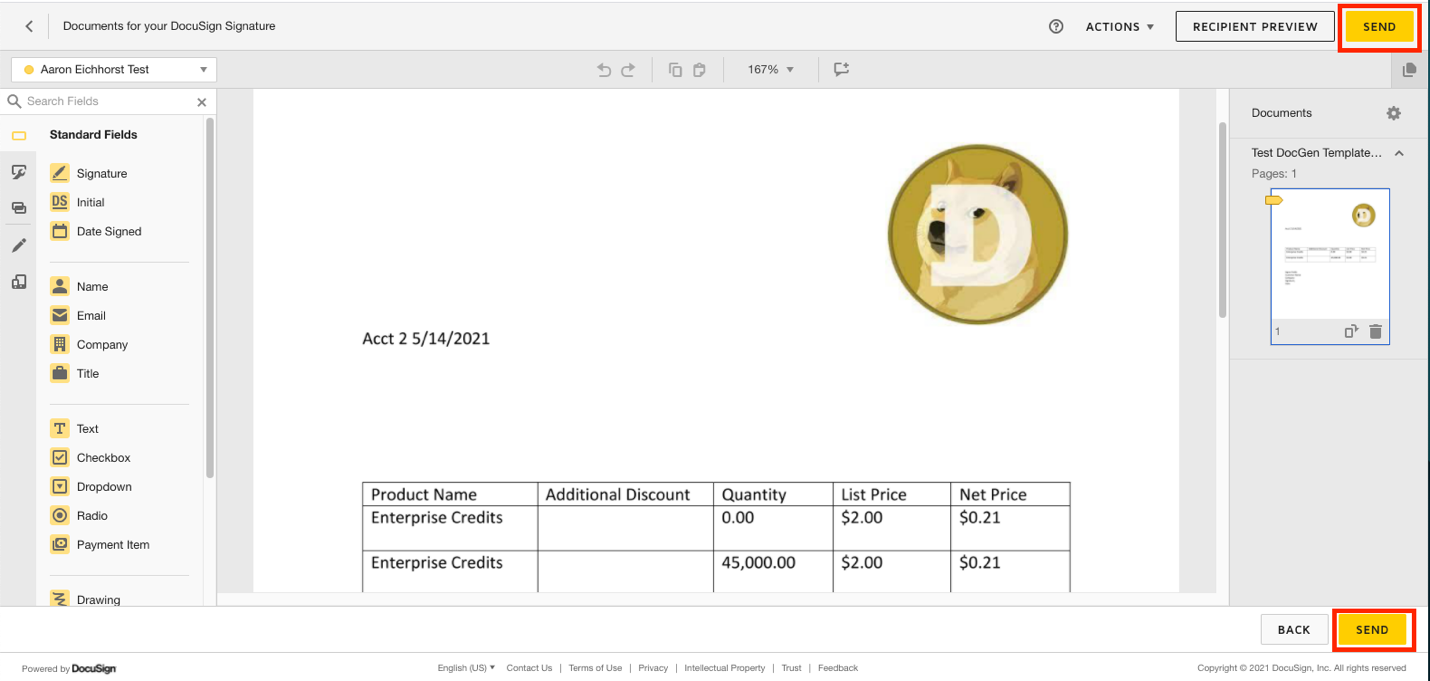
- From here it’s the standard DocuSign interface where you can send for signature.

Knowledge Article Number
000392994
Did this article solve your issue?
Let us know so we can improve!
