組織を選択
Quip の絵文字、GIF、およびステッカー
公開日: Feb 9, 2024
説明
この記事は、絵文字、GIF、およびステッカーを使用して Quip でチャット、コメント、会話を楽しく、一風変わったものにする方法について学習するのに役立ちます。
解決策
絵文字、GIF、およびステッカー
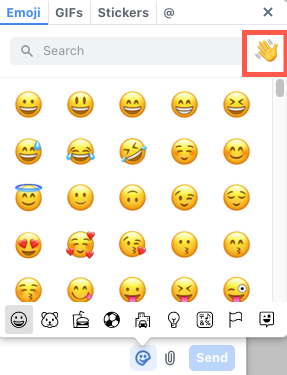
チャット、コメント、または会話ペインのどこにいる場合でも、メッセージに絵文字、GIF、およびステッカーを追加できます。絵文字ピッカーをクリックすると、絵文字、GIF、およびステッカーのキーボードが開きます。会話に適した反応をクリックして送信します。
また、絵文字を使用してメッセージに反応することもできます。
絵文字のデフォルトのスキントーンの設定
自分自身をより適切に表現するために、Quip で絵文字や絵文字の反応のデフォルトのスキントーンを設定します。以下の方法に沿ってください:
- デスクトップまたは Web の Quip ドキュメントで会話ペインを開きます。
- 絵文字ピッカーをクリックします (ヒント: これはペーパークリップの横にあるスマイルフェイスアイコンです)。
- 右上にある 👋 ボタンをクリックし、好きなスキントーンを選択します。
この設定は、デスクトップとモバイルにまたがって記憶されます。
注: モバイルでデフォルトのスキントーンを設定することはできません。Quip Android アプリケーションでは、デフォルトのスキントーンがサポートされません。
GIF
Quip では GIF で楽しむことができます。お気に入りの TV の連続ものを見たいですか。簡単です。
絵文字ピッカー、[GIF] タブの順にクリックし、検索バーを使用して完全な GIF を見つけます。
ステッカー
ステッカーを使用して、会話をより活発で、かつ一風変わったものにします。絵文字ピッカー、[Stickers (ステッカー)] タブの順にクリックし、検索バーを使用してさまざまなステッカーを見つけます。
質問/フィードバック
サポートチームに連絡してケースを登録してください。その手順はこちらでご確認ください。
ナレッジ記事番号
000393268
この記事で問題は解決されましたか?
ご意見をお待ちしております。
