Seleccionar una organización
How to Create a Report Formula for Number of Days Between Two Dates in Salesforce
Fecha de publicación: May 5, 2026
Descripción
If you have a significant date in Salesforce and want to run a report that includes that date and to determine how many days have passed between that date and another date, a row-level formula can be used or you can add a Formula field if you need to utilize it for several reports.
Solución
Row Level Formula:
1. Go to the Reports tab.
2. Click on the New Report button.
3. Select a Report Type for your target Object such as Leads.
4. Select Start Report.
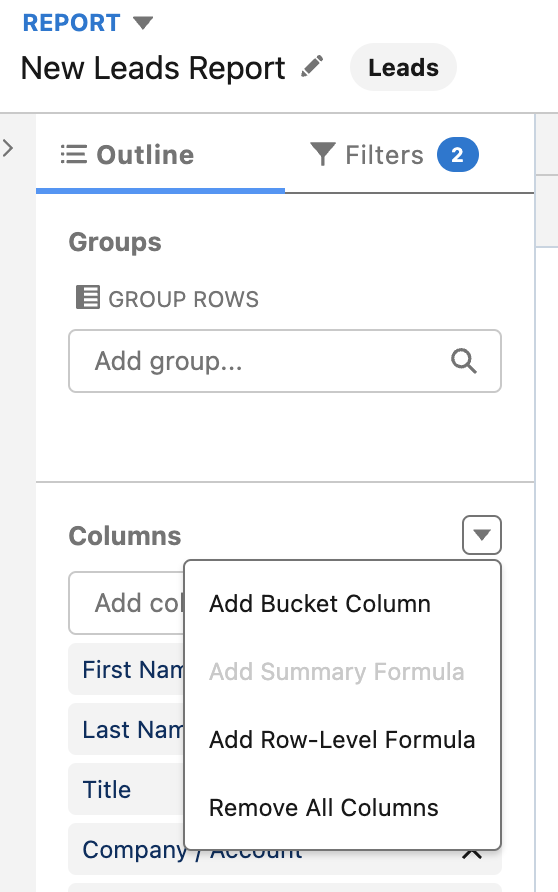
5. Click on Columns drop-down arrow and select Add Row-Level Formula.
6. Enter a Column Name.
7. Build your formula by selecting your first date field and subtracting it from another date field.
8. Select Validate.
9. Click Apply.
Formula field:
1. Go to Setup.
2. Go to Object Manager.
3. Click on your target Object.
4. Select Fields & Relationships
5. Select the New button.
6. Select Formula and click Next.
7. Enter a Field Label name.
8. Build your Formula field by selecting Number as the Formula Return Type and click Next.
9. On the New Custom Field screen, select your first date field and subtract it to another date field.
10. Click on Check Syntax.
11. Select Next and Save.
The following video walks through both methods — the Row-Level Formula and the Formula Field approach — for calculating the number of days between two dates.
Note:
**If your date field stores both a date and a time (Date/Time data type), wrap it in the DATEVALUE() function to extract the date portion before subtracting.
**When creating a formula field, avoid using &BR() function as this will limit the availability of the field to be used in row-level formula.
Recursos adicionales
Build a Formula Field
Write a Row-Level Formula
Sample Date Formulas - Including date and time
If you don't see the formula you need, visit the Trailblazer Community group - Formulas - Help, Tips and Tricks
Número del artículo de conocimiento
000393431
¿Resolvió este artículo su problema?
¡Háganos saber cómo podemos mejorar!
