Vælg en organisation
Regain Access to Your Account When Multi-Factor Authentication Is Required (for Products Built on the Salesforce Platform)
Udgivelsesdato: Aug 20, 2024
Beskrivelse
All Salesforce customers are contractually required to use multi-factor authentication (MFA) when accessing Salesforce products (effective February 1, 2022). MFA is a default part of the direct login process for production orgs of products built on the Salesforce Platform. A direct login is when a user accesses their account with their Salesforce username and password. If you're having difficulty logging in because of MFA, here's how to get access to your Salesforce account. If necessary, a Salesforce admin can temporarily disable MFA for all users. For full details about the contractual MFA requirement, see the Salesforce MFA FAQ.
Løsning
Important: All internal users who log in through the user interface to a Salesforce org (including partner solutions) must use MFA for every login. If this article doesn't help you log in when MFA is part of the direct login process, contact Salesforce Customer Service. See this article for chat and phone call options.
For All Users
When Salesforce enables MFA for the direct login process, your org has a 30-day grace period during which all users can continue to log in without MFA. To access your account without MFA while the grace period is active:
-
Log in with your username and password.
-
Click the Log In Without Setting Up MFA link at the bottom of the registration screen, which appears each time you log in until you set up MFA. Depending on your org, the registration screen looks like one of these options.
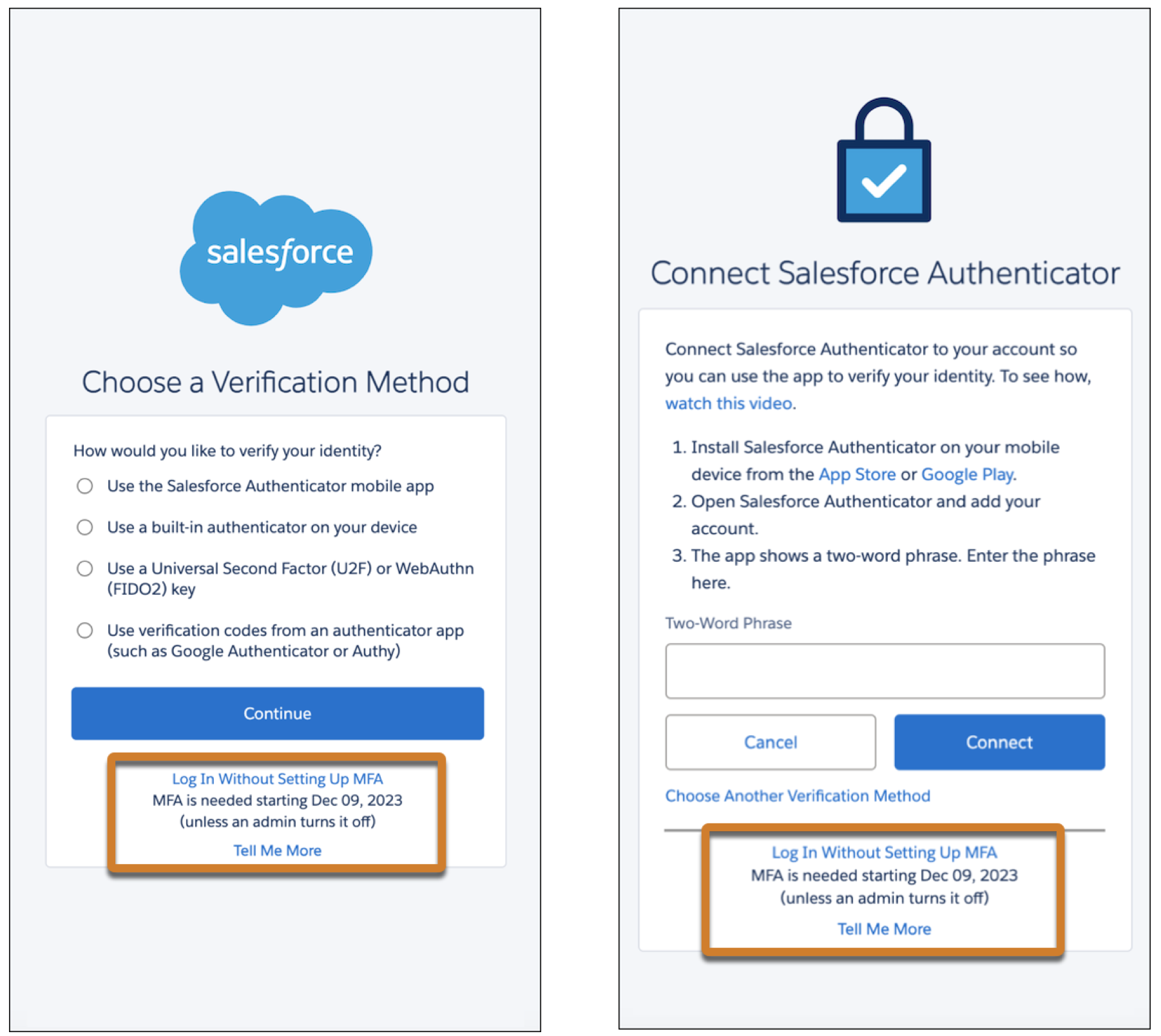
Here's a little more detail on how the grace period works:
-
The grace period starts the first time any user logs in after your production org goes live.
-
The same 30-day period applies to all users in your org. For example, if you log in 20 days after the grace period started, you personally can skip MFA for 10 more days.
-
The link to skip MFA shows the date when the grace period ends for everyone in your org.
When your org’s grace period ends, you must provide an MFA verification method in addition to your username and password before you can log in. Setting up a verification method takes just a few minutes — simply follow the prompts after you log in. See Register for Multi-Factor Authentication in Salesforce Help for guidance on the types of verification methods available to you. If you’re not sure which method to use or have questions about MFA, talk to your Salesforce admin.
For Salesforce Admins
If the 30-day grace period doesn’t provide enough time for your users to get ready for MFA, Salesforce admins can temporarily disable it.
-
From Setup, in the Quick Find box, enter Identity, and select Identity Verification.
-
Deselect the Require multi-factor authentication (MFA) for all direct UI logins to your Salesforce org checkbox.
-
Save your changes.
Keep in mind that turning off MFA means you're no longer complying with the contractual MFA requirement, so plan to re-enable it as soon as possible. All Salesforce admins for your org see a recurring in-app reminder until MFA is turned on again.
Another Consideration for Admins: MFA-Exempt Use Cases
See if your production org has any of the MFA-exempt use cases that must be manually excluded from MFA by a Salesforce admin. Check out Exclude Exempt Users from MFA in Salesforce Help for the list of exempt use cases and the steps to exclude them.
Get More Information & Help
-
Register Verification Methods for Multi-Factor Authentication (Help)
-
Everything You Need to Know About Multi-Factor Authentication for Salesforce Orgs (Knowledge Article)
-
Get Ready for Multi-Factor Authentication: Tips to Help Users Recover Access (Blog Post)
-
Salesforce MFA FAQ (Knowledge Article)
-
How Multi-Factor Authentication Works to Protect Account Access (Video)
-
How to Contact Salesforce (Call and Chat options are available when it's not possible to log in)
Vidensartikelnummer
000394046
Løste denne artikel dit problem?
Giv os besked, så vi kan forbedre os!
