Organisation auswählen
Salesforce Field Service (SFS) Drag and Drop Scheduling of Service Appointment is Not Working on Dispatcher Console Gantt Chart
Veröffentlichungsdatum: Jan 30, 2026
Beschreibung
When a dispatcher performs a Drag and Drop scheduling of a Field Service Service Appointment (SA) on the Gantt, then it moves back to its original place and the following errors occur:
Action Could Not Be Performed
"Upsert failed. First exception on row 0 with id xxxxxxxx; first error: INSUFFICIENT_ACCESS_OR_READONLY, insufficient access rights on object id: [xxxxxxxxxxx]"
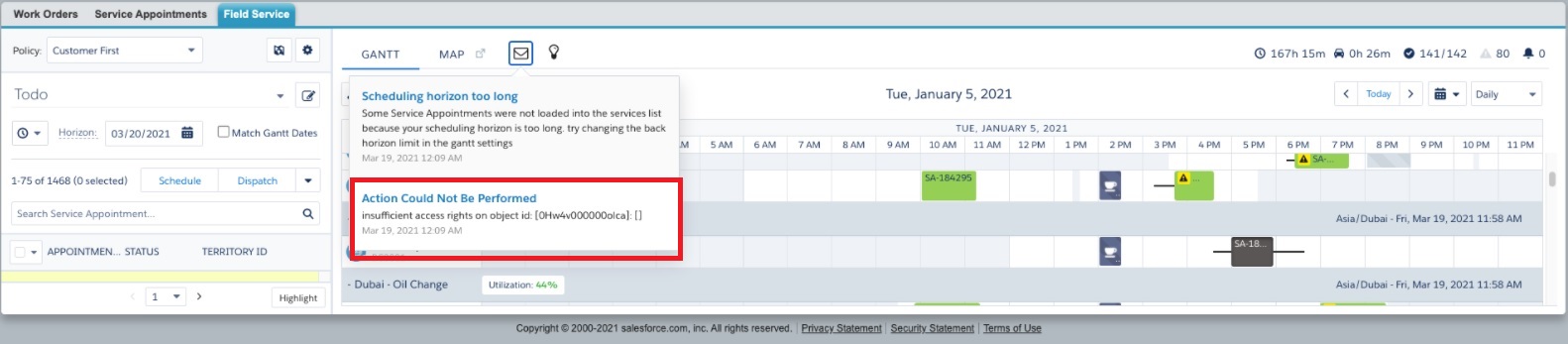
Here is the error in the browser HTTP Archive (HAR) logs:
- [{"statusCode":400,"type":"exception","tid":416,"ref":false,"action":"FSL.ctrl001_Gantt","method":"saveChangesToServiceAppointment","message":"Upsert failed. First exception on row 0 with id xxxxxxxxxxxx; first error: INSUFFICIENT_ACCESS_OR_READONLY, insufficient access rights on object id: [xxxxxxxxxxxxx]: []"
Lösung
When the Drag and Drop of the Field Service Service Appointment on the Gantt has the error that the "Action Could Not Be Performed", this happens as the Service Resource has only 'Public Read Only' access in the Default External Access under Setup --> Sharing Setting --> Default Sharing Settings --> Organization-Wide Default.
Please check the below screenshot for further references:
The Resource Absence has the Child-to-Parent relationship with Service Resource, so Service Resource should have the Public Read Only/Write access for Default External Access instead of Public Read Only.
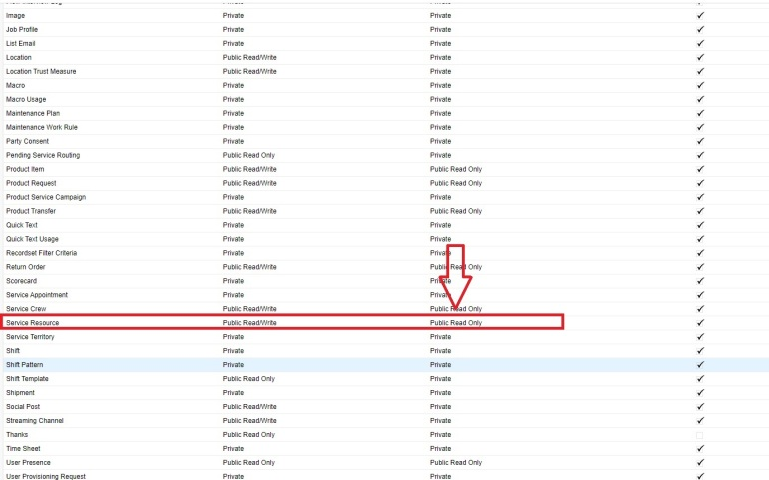
We can enable such sharing settings in two ways, either org-wide (for all) or with sharing rules (for one or a few).
We can use sharing rules, if this needs to be share with only few resources.
Nummer des Knowledge-Artikels
000394105
Konnten Sie Ihr Problem mithilfe dieses Artikels lösen?
Geben Sie uns Feedback, damit wir uns verbessern können.
