Выбрать организацию
Use of abort option on Gantt in optimization request In Salesforce Field Service (SFS) for Old Engine optimization
Дата публикации: May 11, 2026
Описание
In Salesforce Field Service (SFS), the Abort button is visible in the Gantt view for certain optimization request types, allowing users to cancel an in-progress optimization. However, when executing a Fill-in Schedule optimization request, the Abort option is not available in the Gantt.
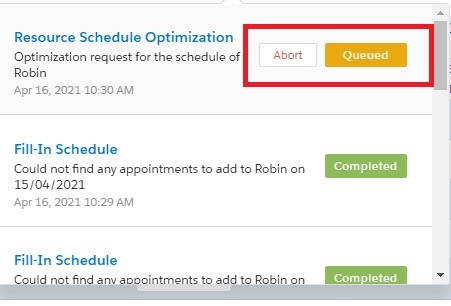
Abort Option in Resource Scheduling Optimization (RSO):
***********************************************************************
In the Resource Scheduling Optimization (RSO) Gantt view, an Abort button is visible in the toolbar, allowing the user to cancel the running optimization request.
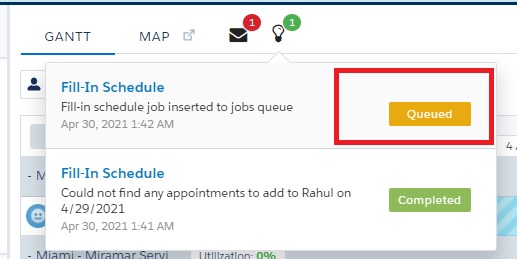
Abort option is missing in the Fill-In Schedule:
*********************************************************
In the Fill-In Schedule Gantt view, the Abort button is absent from the toolbar. No cancel or abort option is available for this optimization action type.
Решение
The Abort option is designed exclusively for server-side optimization processes — specifically Global Optimization, Resource Schedule Optimization (RSO), and In-Day Optimization. These operations run as asynchronous server jobs that can be interrupted mid-execution.
Dynamic Gantt actions such as Fill-in Schedule, Group Nearby, and Fix Overlaps are executed differently and do not support abort functionality. Although these actions do generate an Optimization Request record (which can be seen in the Gantt), they are processed synchronously and cannot be stopped once initiated.
Summary of Abort availability by optimization type:
- Global Optimization — Abort available
- Resource Schedule Optimization (RSO) — Abort available
- In-Day Optimization — Abort available
- Fill-in Schedule — Abort NOT available
- Group Nearby — Abort NOT available
- Fix Overlaps — Abort NOT available
Дополнительные ресурсы
Номер статьи базы знаний
000394106
Эта статья решила вашу проблему?
Оставьте свой отзыв, чтобы мы могли стать лучше!
