Välj en organisation
How to Roll out the Dynamic Activity Composer
Publiceringsdatum: Nov 29, 2023
Beskrivning

Lösning
Below are instructions for how to setup In-App Guidance for showing users a notification about the change when using Salesforce. You can modify the text and relevant settings to fit your business needs.
If you would prefer to install the In-App guidance rather than configuring manually, you can install here and skip to the step where you set the start date and end date.
- From Lightning Experience Setup, in the Quick Find box, enter In-App Guidance, and then select In-App Guidance
- Click the blue Add button to create a new In-App Guidance
- Navigate to an page with the new activity publisher on it, or a page with the legacy one on it
- Click the blue Add at the top right of the page
- Select Single Prompt then click Next
- Change the Prompt Location to Any Page, Any App
- Select Docked Prompt then click Next
- Click here, then right-click on the gif and save the file to your computer
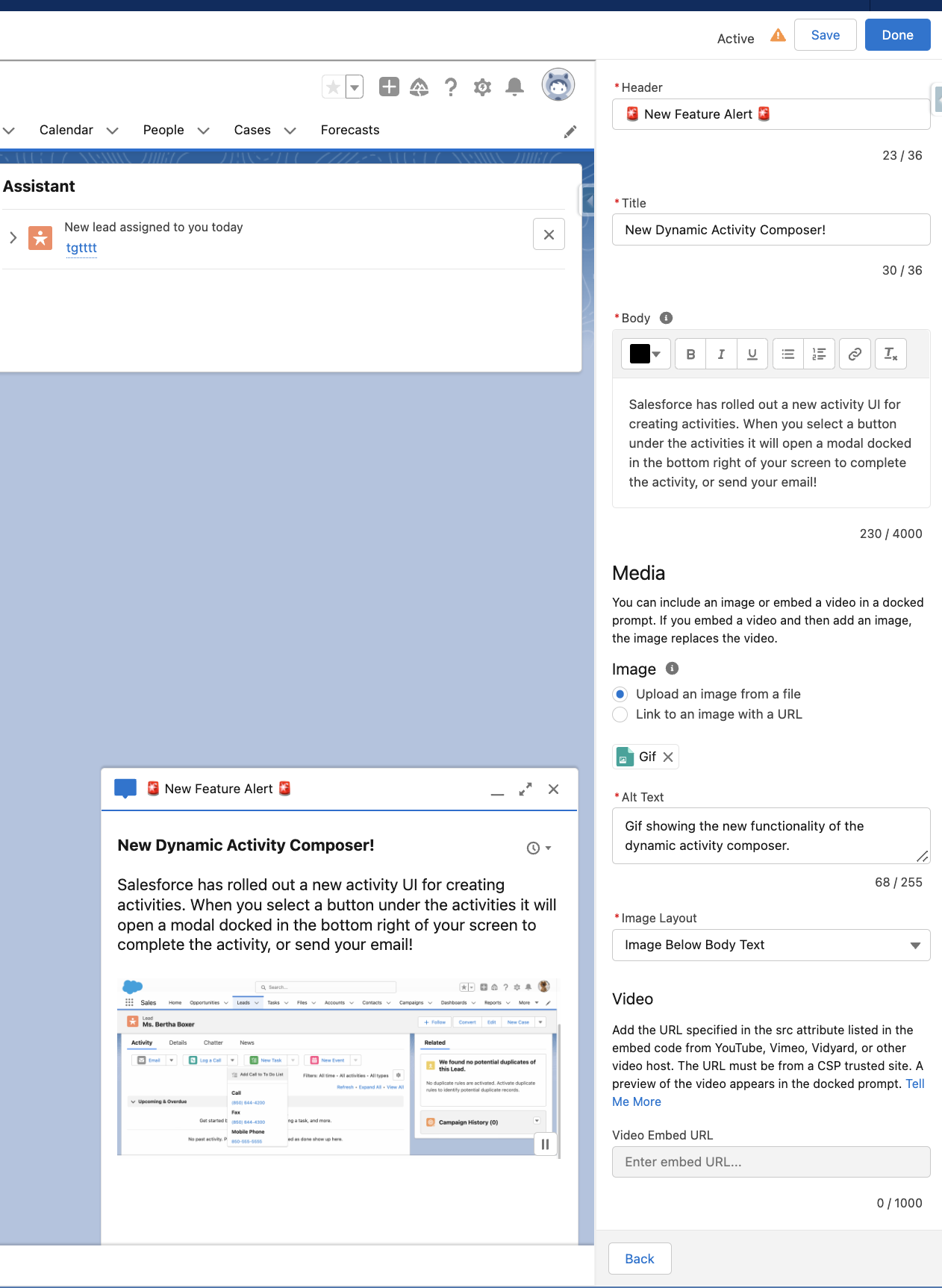
- Use the below info for the prompt
Header: 🚨 New Feature Alert 🚨
Title: New Dynamic Activity Composer!
Body: Salesforce has rolled out a new activity UI for creating activities. When you select a button under the activities it will open a modal docked in the bottom right of your screen to complete the activity, or send your email!
Image: Upload an image from a file (Upload the Gif you downloaded)
Alt Text: Gif showing the new functionality of the dynamic activity composer.
Image Layout: Image Below Body Text
- Click Save in the top right
- On the Action screen you can leave this blank and click Next
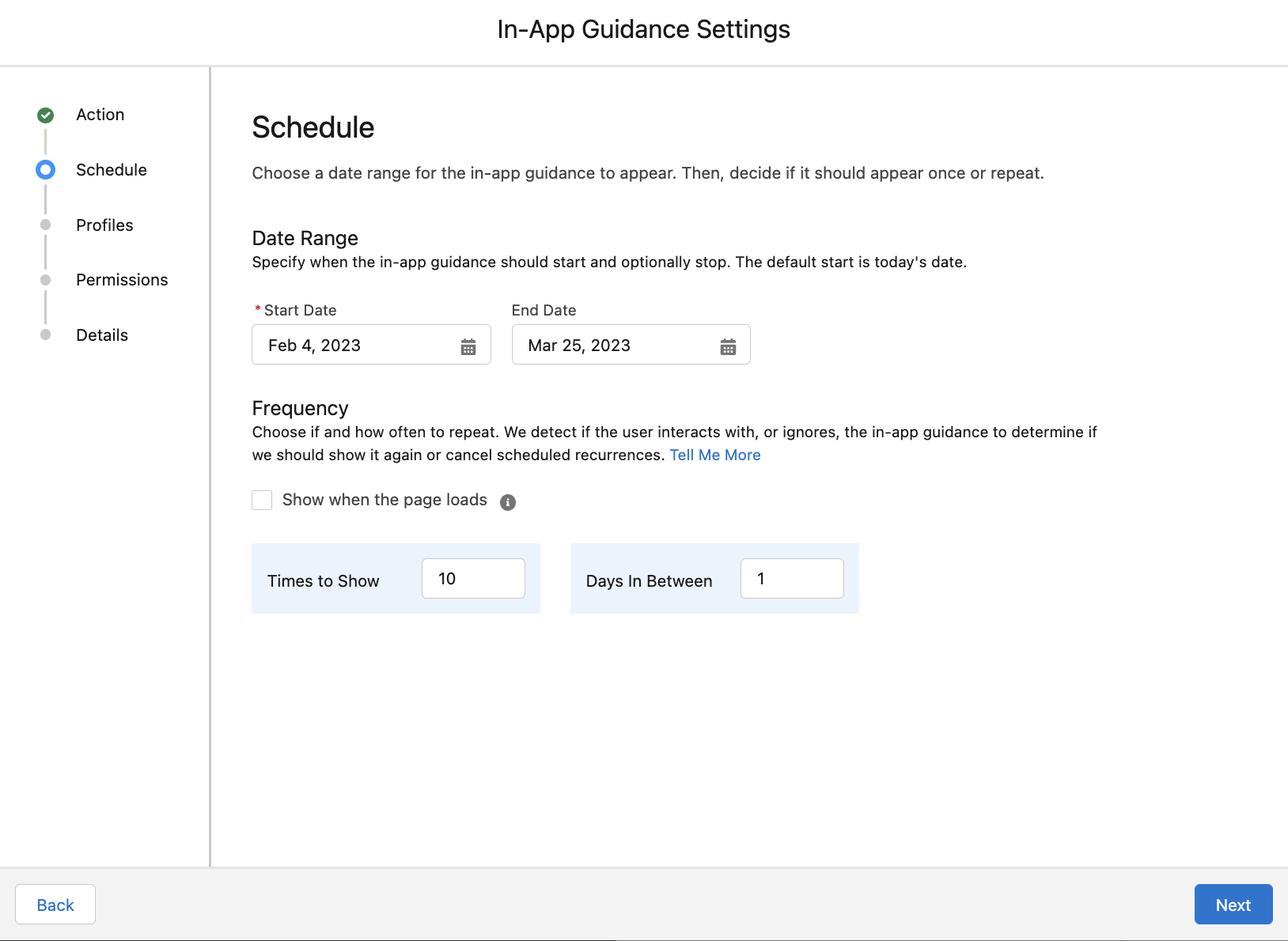
- On the schedule screen set the start date to the day your org is going to be updated to Spring 23’ and set the frequency to show 10 times with 1 day in between, then click Next
Pro Tip: Go on trust.salesforce.com and see when your org is going to be updated to Spring 23’
- Leave the profiles set to No profile restriction and click Next
- Leave the permissions set to No permission restrictions and click Next
- Fill-out the required info to save then click Done
Name: In-App Guidance User Training
API Name: InAppGuidanceUserTraining
Description: This is the change management to notify users of the new change for Spring 23' Dynamic Activity Composer rollout.
See also
- Switch Between the Tabbed and Dynamic Activity Composer
- Take Action More Quickly in the Dynamic Activity Composer
- Salesforce Help: Lightning App Builder
- Get Started with In-App Guidance in Lightning Experience
- Define Prompts in Lightning Experience
- Monitor In-App Guidance in Lightning Experience
- Knowledge Article: In-App Guidance Prompts FAQ
______________________________________________
Written By: Andrew Russo | Salesforce Answers Leader
Andrew Russo is an Archa-Admin-Eloper-Analyst at BACA Systems. He has been in the Salesforce ecosystem since 2017 and has deep platform knowledge with over 12 years of Lightning experience. He empowers Trailblazers to become more proficient in their use of Salesforce.
Submissions reflect only the opinions of the user who made available the Submission and not the opinions of Salesforce, regardless of whether the user is affiliated with Salesforce, and may contain or constitute products, services, information, data, content and other materials made available by or on behalf of third parties ("Third Party Materials). Salesforce neither controls nor endorses, nor is Salesforce responsible for, any Third Party Materials, including their accuracy, validity, timeliness, completeness, reliability, integrity, quality, legality, usefulness or safety, or any applicable intellectual property rights. Any Submissions made available through any message board or forum in response to posted questions, or that otherwise purports to answer any questions, including any questions about Salesforce or Programs, are made available for your general knowledge only and should never be relied upon as answers to your specific questions (even if an answer is marked as a “best” answer or with any similar qualifications). You should always contact Salesforce support for answers to your specific questions. Salesforce has no control over Submissions, and is not responsible for any use or misuse (including any distribution) by any third party of Submissions.
If you have questions, tap into the wisdom of our entire Trailblazer Community here: https://trailhead.salesforce.com/trailblazer-community/feed
Knowledge-artikelnummer
000394309
Löste denna artikel ditt problem?
Berätta för oss vad vi kan förbättra!
