Valitse organisaatio
Report on Opportunities That Are Two Weeks Past the Close Date
Julkaisupäivä: Apr 2, 2026
Kuvaus
In Salesforce Reports, you can use the Relative Date filter feature to identify Opportunity records whose Close Date has passed by a specific number of days. This is useful for sales managers and admins who want to track missed or overdue opportunities .
for example, open deals whose projected close date was more than two weeks ago. Unlike static date filters, Relative Date filters automatically update as time passes, so the report always reflects the correct window without requiring manual edits. This article walks through creating a Salesforce Opportunities report filtered to show only open records with a Close Date more than 14 days in the past.
Ratkaisu
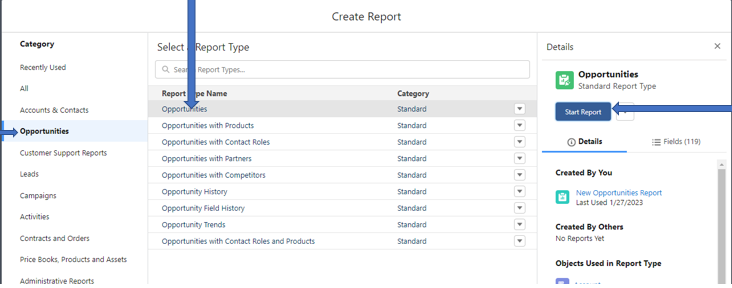
Step 1. Create a Report on Opportunity. From the Report tab click on New Report, Select Opportunities from the Category and Report Type as Opportunities. Click on Start Report button on right-hand side
Step 2. Under the Filters section, modify Close Date filter by clicking on it. From Filter by Close Date panel, select Date as Created Date and Range as All Time. Click Apply button
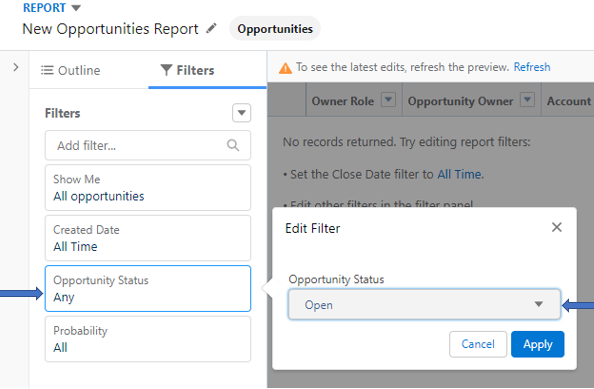
Step 3. Edit the Opportunity Status from the Filters panel. Click on the Opportunity Status and Edit Filter to the Opportunity Status as Open. Click Apply.
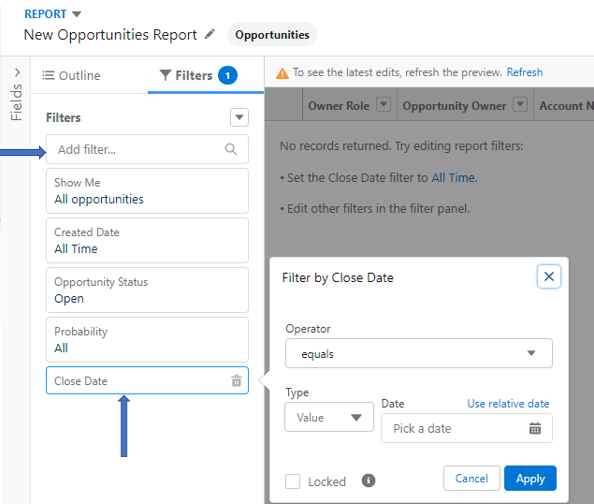
Step 4. From the Filters panel, click on Add filter. In the Add filter field, enter and select Close Date
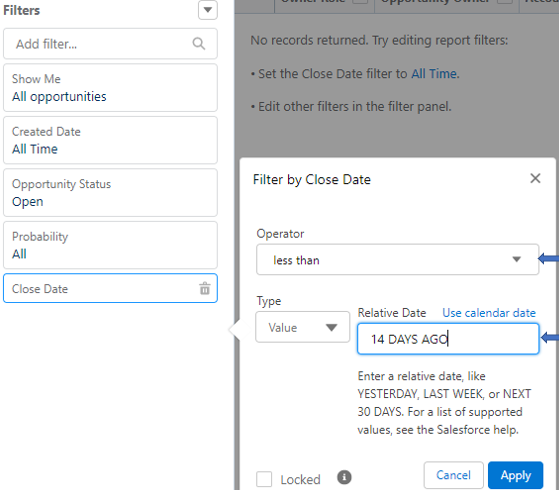
Step 5. Under the Filters by Close Date screen, select the operator less than and click on Relative Date. Type 14 DAYS AGO in the Relative Date field. Select the Apply button
Step 6. Save & Run your report in order to see opportunities that are two weeks past the closed date and are still open.
Knowledge-artikkelin numero
000394475
Ratkaisiko tämä artikkeli ongelmasi?
Anna palautetta, jotta voimme kehittyä!
