Seleccionar una organización
Configure multiple Marketing Cloud instances with Azure SSO by enabling User Picker Flow
Fecha de publicación: Dec 20, 2024
Descripción
Background
Marketing Cloud's single sign-on (SSO) library requires a Identity Provider (IdP) EntityID for each SSO-enabled enterprise to look up the account associated with a login assertion.IdP EntityID is a primary key in our IdP metadata records. IdP metadata saved in Setup > Data Management > Key Management will overwrite any existing metadata for a given EntityID, across accounts, complicating its reuse in multiple enterprises. Primary key enforcement applies across stacks 1-10, and separately across stacks 12-51. In general, avoid reuse of IdP EntityIDs.
To accommodate multiple Marketing Cloud enterprises, some IdPs support the use of unique IdP EntityIDs for each service. Notably, Microsoft Azure only supports a single global EntityID. To accommodate this, Marketing Cloud User Picker Flow is used to allow SSO to negotiate multiple enterprises.
A single set of IdP metadata is saved with each Marketing Cloud enterprise owned by an organization (1:Many relationship between IdP metadata and Marketing Cloud EIDs). A user picker is displayed at login, showing all Marketing Cloud enterprises matching the given IdP EntityID & Federation ID.
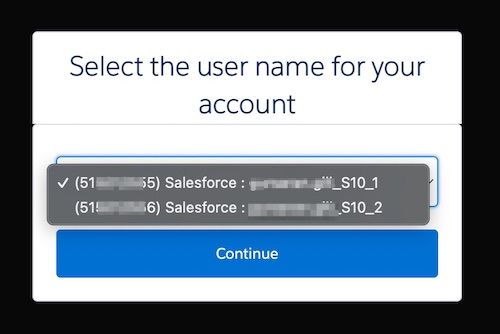
Enable the User Picker Flow with the instructions below.
Solución
User Picker Flow Setup
First, complete basic SSO configuration at the IdP and one of your Marketing Cloud enterprises.Then, in each remaining Marketing Cloud enterprise:
- In the next EID, navigate to Setup > Data Management > Key Management
- Click Create, then SSO Key to add IdP metadata
- Add the IdP metadata from the initial account's configuration
- Enable SSO at the account level in this enterprise by navigating to Setup > Security > Security Settings > Single Sign-On Settings > Enable SSO
- Add Federation ID for each user as needed. These should be unified across enterprises.
Número del artículo de conocimiento
000394512
¿Resolvió este artículo su problema?
¡Háganos saber cómo podemos mejorar!
