Выбрать организацию
Field Service Visualforce Pages Show a Blank Page or CSP Error When the "Enable Clickjack Protection for Customer Visualforce Pages with Headers Disabled" Setting Is Enabled
Дата публикации: May 12, 2026
Описание
When enabling the security setting "Enable clickjack protection for customer Visualforce pages with headers disabled" — as recommended by the Salesforce Health Check — Field Service Visualforce pages may display a blank page or an error referencing Content Security Policy (CSP) settings blocking content.
CSP (Content Security Policy) is a browser security mechanism that restricts which external domains a web page is allowed to load content from. When clickjack protection is enabled for Visualforce pages with headers disabled (showHeader="false"), it can block Salesforce Lightning and Visualforce domain iframes used by Field Service Visualforce pages, unless those domains are explicitly added to the Trusted Domains list in Salesforce Session Settings.
Note: This setting protects against clickjack attacks on Visualforce pages that have headers disabled.
Решение
Root Cause
Field Service Visualforce pages use iframes that load content from the Salesforce Lightning domain (.lightning.force.com) and the Visualforce domain (.vf.force.com). When clickjack protection is enabled without these domains being trusted, the browser blocks the iframe content, resulting in a blank page or CSP error.
Steps to Resolve
To resolve this issue, add two domains to the Trusted Domains section in Salesforce Session Settings:
- Log in to the Salesforce org as a System Administrator.
- Go to Setup.
- In the Quick Find box, search for Session Settings.
- Scroll to the Trusted Domains section.
- Click Add Domain.
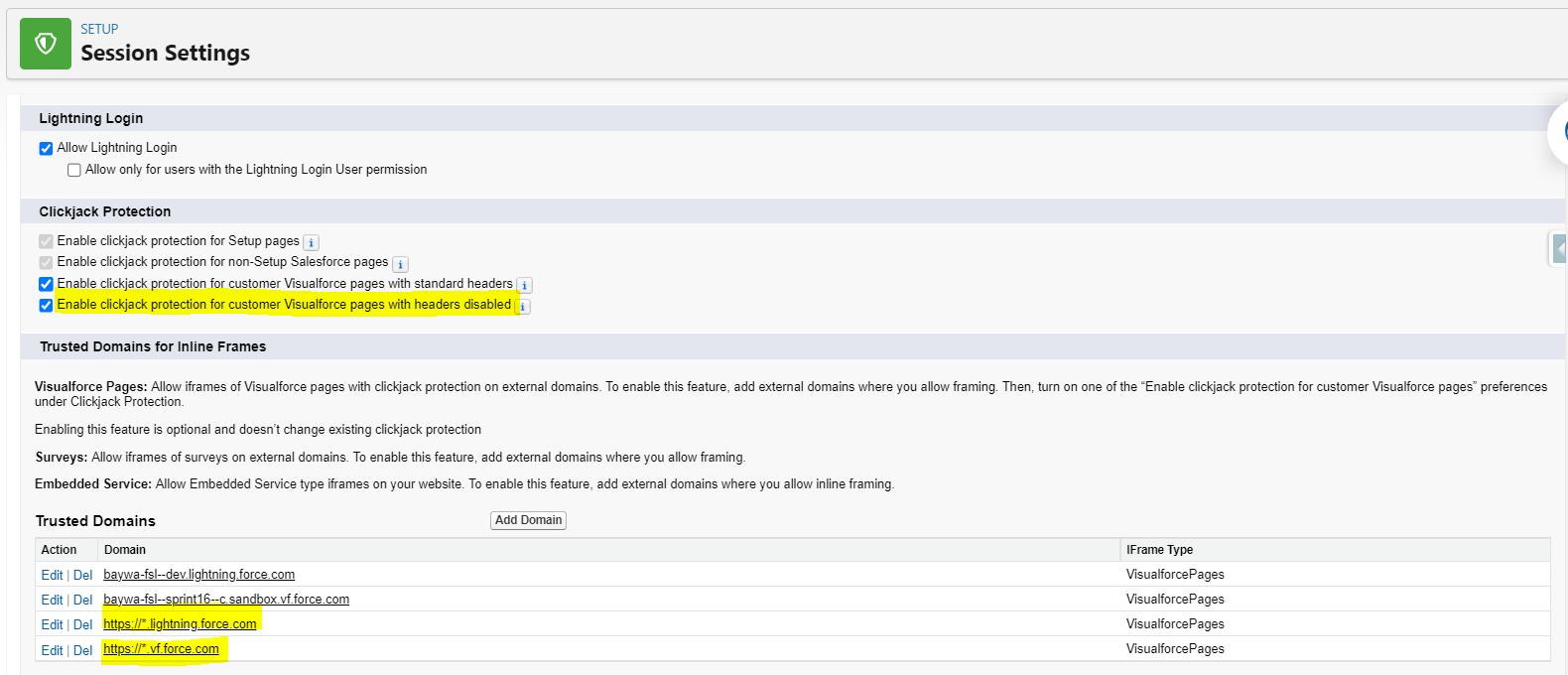
- Domain: https://*.lightning.force.com
- IFrame Type: Visualforce Pages
- Click Save & New.
- Click Add Domain.
- Domain: https://*.vf.force.com
- IFrame Type: Visualforce Pages
- Click Save.
After adding both domains, Field Service Visualforce pages load correctly without blank page or CSP errors, even with clickjack protection enabled. The screenshot below shows an example of a correctly configured Trusted Domains setup.
Дополнительные ресурсы
Номер статьи базы знаний
000394615
Эта статья решила вашу проблему?
Оставьте свой отзыв, чтобы мы могли стать лучше!
