Seleccionar una organización
Salesforce Visual Remote Assistant for Field Service: Images and Videos Not Saved to the Record
Fecha de publicación: May 12, 2026
Descripción
The Salesforce Visual Remote Assistant (VRA) is a tool that allows agents and technicians to remotely access and interact with visual content — such as images and videos — from a remote location during a Field Service session. When a VRA session ends, the images and videos captured during the session are not saved to the record.
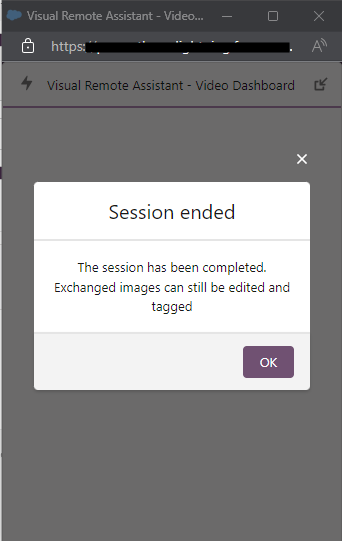
This issue occurs when the agent or user does not click the OK button in the session-end pop-up notification. The OK button triggers the generation of the session summary, which saves all captured visual content to the related record.
Solución
When a Visual Remote Assistant (VRA) session ends, a pop-up notification appears prompting the agent or user to click the OK button. This action generates the session summary, which includes a recap of all visual content — images and videos — accessed or created during the session. The session summary serves as the record of the session and is saved to the related Salesforce record.
Why Images and Videos May Not Be Saved
If the agent or user closes the pop-up without clicking OK, the session summary is not generated. As a result:
- Images and videos captured during the session are not saved to the record.
- The session recording may not be available for future review or documentation.
How to Ensure Session Content Is Saved
To ensure all images and videos from a Visual Remote Assistant session are saved to the record:
- When the session ends, wait for the session-end pop-up notification to appear on screen.
- Click the OK button in the pop-up notification.
- The session summary is generated and all visual content is saved to the related Salesforce record.
Note: If the OK button is not clicked before the pop-up closes, the session content cannot be recovered. Agents and users should be trained to always click OK at the end of every VRA session.
Recursos adicionales
Número del artículo de conocimiento
000395195
¿Resolvió este artículo su problema?
¡Háganos saber cómo podemos mejorar!
