조직 선택
How to create a formula for days elapsed in a quarter
게시 일자: Apr 3, 2026
상세 설명
솔루션
How to create a Row-Level Formula for Days Elapsed in a Quarter:
Use a Row-Level Formula to display the Number of Days Elapsed in a Quarter on a Report.
Here are the instructions for creating a row-level formula to calculate the number of days between the start of the quarter and the close date within the same quarter.
Step1. Login to your Salesforce account
Step 2. In the navigation bar at the top, click on the App Launcher 
Step 3. From the Reports tab, click New Report
Step 4. Select the Opportunities report type for the report, and click Start Report
Step 5. Save the report with a name of your choosing
Step 6. From the Columns section of the Outline pane, click 
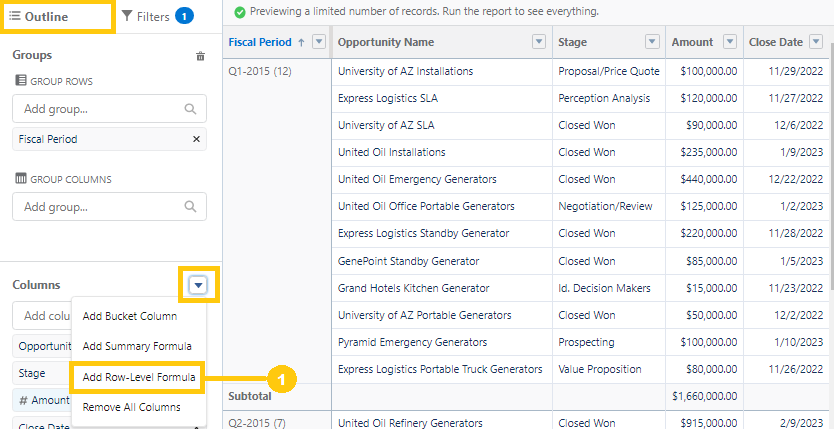
Step 7. From the Edit Row-Level Formula Column window, enter a Column Name (2), choose a Formula Output Type of Number (3), set the number of Decimal Points to 0 (4), and use the Formula below (See Sample Formulas) (5). To test your formula for errors, click Validate. If necessary, resolve any errors. Then, click Apply (6).
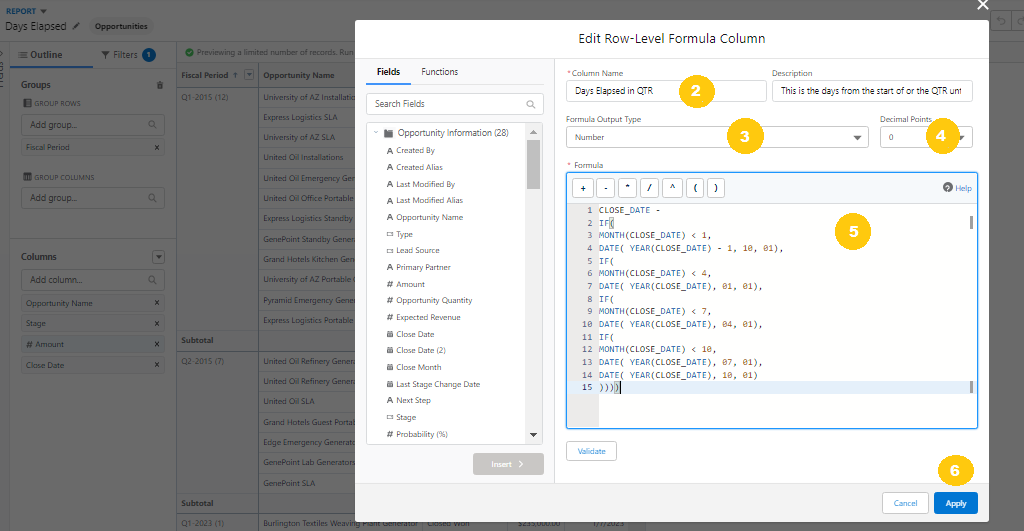
Sample Formulas:
The following formula calculates the number of days between the start of the calendar quarter and the Opportunity Close Date.
Quarters begin on Jan 1, Apr 1, Jul 1, and Oct 1.
CLOSE_DATE -
IF(
MONTH(CLOSE_DATE) < 4,
DATE( YEAR(CLOSE_DATE), 01, 01),
IF(
MONTH(CLOSE_DATE) < 7,
DATE( YEAR(CLOSE_DATE), 04, 01),
IF(
MONTH(CLOSE_DATE) < 10,
DATE( YEAR(CLOSE_DATE), 07, 01),
DATE( YEAR(CLOSE_DATE), 10, 01)
)))
Note: This version does not include the first IF statement like the formulas below because there is no need to check if the month is less than 1, as it would always evaluate to false.
CLOSE_DATE -
IF(
MONTH(CLOSE_DATE) < 2,
DATE( YEAR(CLOSE_DATE) - 1, 11, 01),
IF(
MONTH(CLOSE_DATE) < 5,
DATE( YEAR(CLOSE_DATE), 02, 01),
IF(
MONTH(CLOSE_DATE) < 8,
DATE( YEAR(CLOSE_DATE), 05, 01),
IF(
MONTH(CLOSE_DATE) < 11,
DATE( YEAR(CLOSE_DATE), 08, 01),
DATE( YEAR(CLOSE_DATE), 11, 01)
))))
In this formula the Quarters start on Mar 1st, Apr 1st, Sep 1st, and Dec 1st:
CLOSE_DATE -
IF(
MONTH(CLOSE_DATE) < 3,
DATE( YEAR(CLOSE_DATE) - 1, 12, 01),
IF(
MONTH(CLOSE_DATE) < 6,
DATE( YEAR(CLOSE_DATE), 03, 01),
IF(
MONTH(CLOSE_DATE) < 9,
DATE( YEAR(CLOSE_DATE), 06, 01),
IF(
MONTH(CLOSE_DATE) < 12,
DATE( YEAR(CLOSE_DATE), 09, 01),
DATE( YEAR(CLOSE_DATE), 12, 01)
))))
Step 8. To save and run the report, click Save & Run
You're Done!
추가 자원
See Also:
Build a Report in Lightning Experience
Write a Row-Level Formula
Get the Most Out of Row-Level Formulas: Tips, Limits, and Limitations
Knowledge 기사 번호
000395525
이 기사를 통해 문제를 해결했습니까?
개선을 위한 의견을 보내주세요.
