Select An Org
Salesforce Visual Remote Assistant (VRA) Send Invite Button is Disabled (Greyed Out)
Publish Date: May 12, 2026
Description
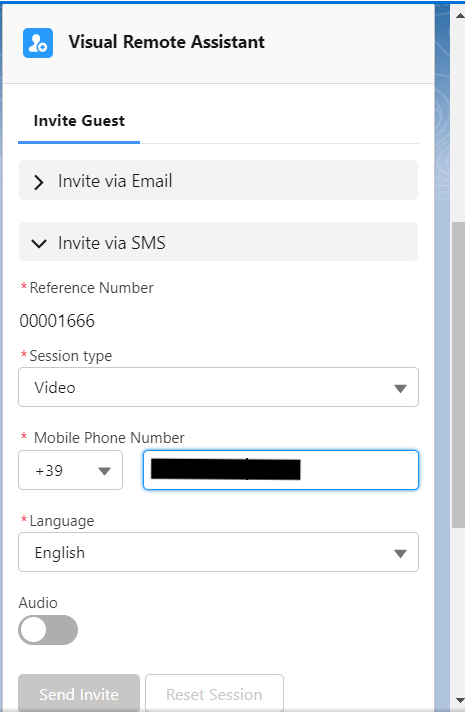
The "Send Invite" button is disabled (greyed out) for users on the Salesforce Visual Remote Assistant (VRA) invite component. VRA (Visual Remote Assistant) is a Salesforce Field Service feature that allows field agents to share a live video session with a remote expert for real-time guidance. When the Send Invite button is unavailable, agents cannot initiate a remote assistance session, blocking the core VRA workflow.
Resolution
To resolve the disabled Send Invite button in Salesforce Visual Remote Assistant (VRA), review the following troubleshooting steps in order. Each step addresses a distinct root cause.
Permission and License Checks
- Ensure the user accessing the VRA invite component is assigned the Remote Expert permission set and the Visual Remote Assistant license.
- Do not use the Login As mechanism. It is currently impossible to send invitations while logged in as another user. Use the user's own credentials for testing.
Browser and Network Checks
- Reproduce the issue from different browsers to confirm it is not a browser-specific problem. Do not use Incognito or Private mode. Guest mode in Chrome is the preferred method for testing.
- Verify that no browser-installed add-ons are blocking or interfering with the session. Using Guest mode in Chrome ensures no extensions and no cached data.
- If connected to a VPN (Virtual Private Network) or corporate firewall, disable them temporarily for testing. This issue is more common on work-issued computers with network restrictions.
- If reproducing from a work computer, also test from a personal computer, which typically has no firewall or VPN. This is an important isolation step.
Identity Provider (IDP) Configuration
- Enabling the Identity Provider (IDP) is a required step in the VRA setup. A certificate is needed for authentication purposes to validate the IDP. See the VRA Admin Manual, page 56, for details.
Third-Party Cookie Settings
- Ensure Third-Party Cookies are set to "allowed" in your browser.
- In Chrome: navigate to chrome://flags/#third-party-storage-partitioning and set the "Third-party Storage Partitioning" dropdown to Disabled. Relaunch the browser.
- In Edge: navigate to edge://flags/#third-party-storage-partitioning and set the "Third-party Storage Partitioning" dropdown to Disabled. Relaunch the browser.
Profile Configuration for VRA Access
If the issue is reproducible for specific users only, those users may have profiles that are misconfigured for VRA. To update profile access:
- Go to Setup.
- Search for Manage Connected Apps in the Quick Find box.
- Click Manage Connected Apps.
- Select Visual Remote Assistant.
- Scroll down to the Profiles section.
- Click Manage Profiles.
- Select and enable the required profiles.
- Click Save.
If the issue persists after all checks above, raise a Salesforce Support case for further investigation.
Additional Resources
Knowledge Article Number
000395645
Did this article solve your issue?
Let us know so we can improve!
