Velg en organisasjon
Salesforce Field Service Mobile App: "An Error Has Occurred. Try Again." When Scanning Pending Product Transfer Request from Inventory Tab — Serialized Product Sharing Settings Set to Private
Publiseringsdato: May 17, 2026
Beskrivelse
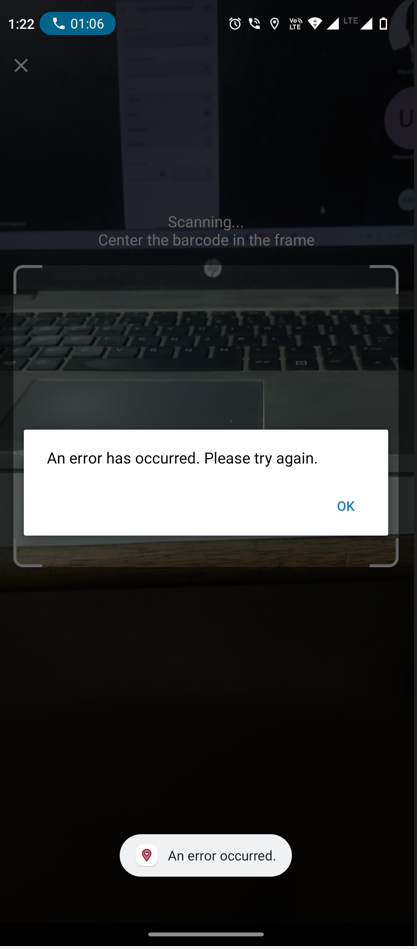
In the Salesforce Field Service (SFS) mobile app, when a user scans a pending Product Transfer request from the Inventory tab to accept a product, the following error appears:
"An error has occurred. Try again."
Løsning
The error occurs because the Salesforce Field Service mobile app cannot access Serialized Product records during the product transfer scan. This is a permissions issue.
Option 1: Update Sharing Settings on the Serialized Product Object (Recommended for Community Users)
- Go to Setup > Sharing Settings.
- Find Serialized Product in the object list.
- Change the Default Internal Access (and Default External Access if applicable) from Private to Public Read/Write.
- Click Save.
After this change, community users can access the Serialized Product records required for the product transfer scan.
Option 2: Grant Explicit Object Permissions via Permission Set (For Internal Users or When Sharing Settings Cannot Be Changed)
- Go to Setup > Permission Sets.
- Open the permission set assigned to the affected user.
- Go to Object Settings > Serialized Product.
- Enable the following permissions: Create, Read, Edit, View All Records, Modify All Records.
- Click Save.
Note: Option 1 (Sharing Settings change) is most effective for community-licensed users. If the error is occurring for internal Salesforce users as well, Option 2 (permission set with explicit object access) is recommended.
Knowledge-artikkelnummer
000395974
Hjalp denne artikkelen med å løse problemet ditt?
La oss få vite det slik at vi kan forbedre!
