Välj en organisation
Engagement - How to Fill Out the Sender Authentication Package (SAP) Application Form
Publiceringsdatum: Nov 16, 2024
Beskrivning
The Sender Authentication Package (SAP) is a Marketing Cloud Engagement (MCE) add-on that provides a custom Private Domain for email authentication, a dedicated sending IP address, and account branding — improving deliverability and sender reputation.
After purchasing an MCE license (or contracting an additional SAP SKU), Salesforce sends an email with the subject: "Sender Authentication Package for Your Salesforce Marketing Cloud Account." This email contains a unique form URL for beginning the SAP application process.
If you do not receive an email with this subject line or a URL containing senderauth.marketingcloud.com, contact Salesforce Support before proceeding.
This article explains how to complete each field in the SAP application form correctly to avoid delays in your SAP setup.
Lösning
The sample of SAP Application Form
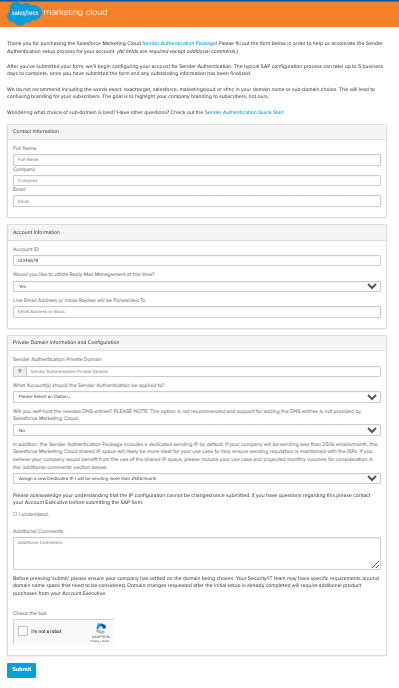
Below are explanations of frequently asked questions during the application process.
Prerequisites
Once the process starts, you will interact with the Salesforce team through a case, and since it will be with the global team, all communication must be in English. Therefore, all content in the form must be filled out in English.
The URL of the application form is different for each account and contract. You cannot use the same URL form in different environments. Use the URL issued for each account or contract.
Full Name / Email Address
Enter the name and email address of the person responsible for this interaction. This person must be a "Salesforce Help & Training (H&T) user." Before applying, ensure that the person logs into MCE with their MCE Login User and can access H&T from the "Salesforce Help & Training" link under the "Setup" menu.
If the email address does not match the one of H&T user, you will need to perform the above steps in a separate case after applying, which will delay the SAP application process.
Account ID
Enter the MID (EnterpriseID/EID) of the "parent business unit (BU)" for the MCE license contract. If you need to apply it to a specific child BU, replace it with the MID of the target child BU.
Would you like to utilize Reply Mail Management at this time?
Indicate whether you want to use the Reply Mail Management (RMM) feature after applying SAP. If you have already decided whether to use it at the time of application, select accordingly. If undecided, select "No" at the time of application. You can enable or configure it from the screen at any time after the SAP application is complete.
Reference: Reply Mail Management for Email Studio
Sender Authentication Private Domain
As a general rule, please prepare a dedicated domain for use in MCE. For example, if the root domain of your company is example.com, you will need to issue and apply for a subdomain for the SAP domain, such as mail.example.com.Once the application of SAP is completed, in principle, please set the email address with the SAP domain (e.g, no-reply@mail.example.com) to the From email address field of the Business Unit.
If you want to specify a From address other than the SAP domain, please consider using the "Private Domain" option separately.
Please note that this content may change depending on the requirements, but at the very least, the existing root domain (the domain used for the official website, etc.) itself is generally not used as the SAP domain.
In any case, please thoroughly confirm with the domain management personnel within your company regarding the domain to be applied for.
What Account(s) should the Sender Authentication be applied to?
Specify the scope of application. The options are:
- This Account only: Apply SAP to a specific account or business unit only.
- This Account's Sub-Accounts Only: Apply SAP to a specific account or business unit and its sub-accounts.
- This Account and Sub-Accounts: Apply SAP to all accounts/business units within the organization. It will also apply to business units created after the setting.
You can also share (copy) the existing SAP settings to new business units via a Support case after the form submitted if necessary.
Will you self-host the needed DNS entries?
Choose whether to delegate DNS management of the SAP domain to Salesforce (Self-host - No) or manage it yourself (Self-host - Yes). Delegation to Salesforce is recommended, but if you need to manage it yourself, coordinate with your company's domain management personnel. Salesforce cannot support issues with Self-host DNS settings.
Even if you wish to delegate, you may need to self-host due to DNS service limitations. Refer to the following document and consult your company's domain management personnel or Salesforce Support if necessary.
Reference: 'Domain is not Delegated' SAP form submission error
In addition, the Sender Authentication Package includes a dedicated sending IP by default...
If many of your email recipients are general consumers, the recipients will be major ISPs. In such cases, regardless of the volume, it is strongly recommended to select "Assign a new Dedicated IP." If a new sending IP address is issued, follow the steps for "IP Warming."
Reference: IP Warming Considerations and Additional Information
If the required sending volume for warming up is low, you may need to select "Use SFMC Shared IP space." If you are unsure whether to choose a dedicated IP address or a shared IP address, please contact your account representative or Salesforce Support.
Additional Notes
After your form submitted, deliverability case will be created automatically. A case owner of our deliverability team may ask you a few questions to complete SAP setup. If you need to ask questions, please contact Salesforce Support.
Please don't forget SSL setup for each sub domains after SAP setup completed. Follow the instructions in the following document and contact Salesforce Support if you have any questions.
Reference: SSL Certificates for Account Branding
Reference: SSL Certificates for Account Branding
Ytterligare resurser
For more detailed explanations related to SAP, please refer to the following documents.
Reference: Sender Authentication Package for Marketing Cloud Engagement Emails
Knowledge-artikelnummer
000396049
Löste denna artikel ditt problem?
Berätta för oss vad vi kan förbättra!
